
React Native商城项目实战14 - 首页中间下部分
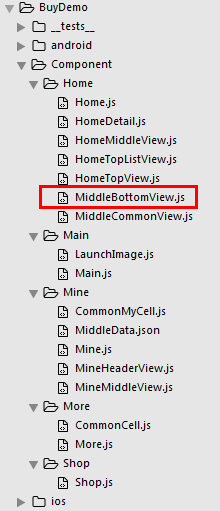
1.MiddleBottomView.js
/**

 * 首页中间下部分

 */

import React, { Component } from 'react';

import {

    AppRegistry,

    StyleSheet,

    Text,

    View,

    Image,

    TouchableOpacity

} from 'react-native';

var Dimensions = require('Dimensions');

var screenW = Dimensions.get('window').width;

// 导入json数据

var JsonData = require('../../LocalData/XMG_Home_D4.json');

// 导入外部组件

var CommonView = require('./MiddleCommonView');

// ES5

var MiddleBottom = React.createClass({

    render() {

        return (

            <View style={styles.container}>

                <View style={styles.topViewStyle}></View>

                <View style={styles.bottomViewStyle}>

                    {this.renderBottomItem()}

                </View>

            </View>

        );

    },

    renderBottomItem(){

        var itemArr = [];

        var dataArr = JsonData.data;

        for (var i=0;i<dataArr.length;i++){

            var data = dataArr[i];

            itemArr.push(

                <CommonView

                    key={i}

                    title={data.maintitle}

                    subTitle={data.deputytitle}

                    rightIcon={this.dealWithImgUrl(data.imageurl)}

                    titleColor={data.typeface_color}

                />

            );

        }

        return itemArr;

    },

    // 处理图片url的方法

    dealWithImgUrl(url){

        if (url.search('w.h') == -1){ // 没有找到,正常返回

            return url;

        }else{

            return url.replace('w.h', '120.90');

        }

    },

});

const styles = StyleSheet.create({

    container: {

        marginTop:10,

    },

    topViewStyle:{},

    bottomViewStyle:{

        flexDirection:'row',

        // 换行

        width:screenW,

        flexWrap:'wrap',

        justifyContent:'center',

        alignItems:'center',

    },

});

// 输出

module.exports = MiddleBottom;
2.用到的json数据
{

    "stid": "720698155324449024",

    "data": [{

        "position": 0,

        "typeface_color": "#ff9900",

        "id": 7486,

        "share": {

            "message": "1元能吃肯德基",

            "url": "http://i.meituan.com/firework/kfchanbao"

        },

        "title": "1元能吃肯德基",

        "module": false,

        "maintitle": "1元肯德基",

        "tplurl": "imeituan://www.meituan.com/web?url=http://i.meituan.com/firework/kfchanbao",

        "type": 1,

        "imageurl": "http://p0.meituan.net/w.h/groupop/9aa35eed64db45aa33f9e74726c59d938450.png",

        "solds": 0,

        "deputytitle": "新用户专享"

    }, {

        "position": 0,

        "typeface_color": "#f6687d",

        "id": 15351,

        "share": {

            "message": "刷新颜值啦!领最高188元红包,更有疯狂立减ing~",

            "url": "http://i.meituan.com/firework/beautyactivity0328"

        },

        "title": "4月开春大促",

        "module": false,

        "maintitle": "领21元红包",

        "tplurl": "imeituan://www.meituan.com/web?url=http://i.meituan.com/firework/beautyactivity0328",

        "type": 1,

        "imageurl": "http://p0.meituan.net/w.h/groupop/b8fb2def2c0063c9acabed6cbf1c65449452.png",

        "solds": 0,

        "deputytitle": "小长假美美哒"

    }, {

        "position": 0,

        "typeface_color": "#6bbd00",

        "id": 15444,

        "share": {

            "message": "",

            "url": "http://i.meituan.com/firework/160115xinyonghu?activity_id=611"

        },

        "title": "外卖0401-0417刘莉君新客",

        "module": false,

        "maintitle": "新用户专享",

        "tplurl": "imeituan://www.meituan.com/web?url=http://i.meituan.com/firework/160115xinyonghu?activity_id=611",

        "type": 1,

        "imageurl": "http://p0.meituan.net/w.h/groupop/e1855577efd5280c905ab7a438b83f3d5000.png",

        "solds": 0,

        "deputytitle": "最高立减25元"

    }, {

        "position": 0,

        "typeface_color": "#06c1ae",

        "id": 15182,

        "share": {

            "message": "",

            "url": "http://mpay.meituan.com/resource/oneyuan/deal-list.html?entry=home#deal-list/"

        },

        "title": "一元抢吧",

        "module": false,

        "maintitle": "一元抢吧",

        "tplurl": "imeituan://www.meituan.com/web?url=http://mpay.meituan.com/resource/oneyuan/deal-list.html?entry=home#deal-list/",

        "type": 1,

        "imageurl": "http://p1.meituan.net/w.h/groupop/286f56222bac7bfd7462af56a64ce4a59032.png",

        "solds": 0,

        "deputytitle": "爆品抢到手软"

    }],

    "server": {

        "time": 1459731016

    },

    "paging": {

        "count": 5

    }

}
3.Home.js 引入 MiddleBottom
/**

 * 首页

 */

import React, { Component } from 'react';

import {

    AppRegistry,

    StyleSheet,

    Text,

    View,

    TouchableOpacity,

    TextInput,

    Image,

    Platform,

    ScrollView

} from 'react-native';

var Dimensions = require('Dimensions');

var screenW = Dimensions.get('window').width;

var screenH = Dimensions.get('window').height;

/*======导入外部组件类======*/

var HomeDetail = require('./HomeDetail');

var TopView = require('./HomeTopView');

var MiddleView = require('./HomeMiddleView');

var MiddleBottom = require('./MiddleBottomView');

// ES5

var Home = React.createClass({

    render() {

        return (

            <View style={styles.container}>

                {/*首页的导航条*/}

                {this.renderNavBar()}

                {/*首页主要内容*/}

                <ScrollView>

                    {/*头部的View*/}

                   <TopView />

                    {/*中间上部分的view*/}

                    <MiddleView />

                    {/*中间下部分内容*/}

                    <MiddleBottom

                        popTopHome={(data)=>{this.pushToDetail(data)}}

                    />

                </ScrollView>

            </View>

        );

    },

    // 首页的导航条

    renderNavBar(){

        return(

            <View style={styles.navBarStyle}>

                <TouchableOpacity onPress={()=>{this.pushToDetail()}} >

                    <Text style={styles.leftTitleStyle}>宁波</Text>

                </TouchableOpacity>

                <TextInput placeholder="输入商家,品类,商圈" style={styles.topInputStyle} />

                <View style={styles.rightNavViewStyle}>

                    <TouchableOpacity onPress={()=>{alert('点击了')}} >

                        <Image source={{uri:'icon_homepage_message'}} style={styles.navRightImgStyle} />

                    </TouchableOpacity>

                    <TouchableOpacity onPress={()=>{alert('点击了')}} >

                        <Image source={{uri:'icon_homepage_scan'}} style={styles.navRightImgStyle} />

                    </TouchableOpacity>

                </View>

            </View>

        )

    },

    // 跳转到首页详细页

    pushToDetail(data){

        this.props.navigator.push({

            component:HomeDetail,   // 要跳转过去的组件

            title:'首页详细页'

        });

    },

});

const styles = StyleSheet.create({

    // 导航栏

    navBarStyle:{

        height:Platform.OS === 'ios' ? 64 : 44,

        backgroundColor:'rgba(255,96,0,1)',

        // 主轴方向

        flexDirection:'row',

        // 侧轴对齐方式 垂直居中

        alignItems:'center',

        // 主轴对齐方式

        justifyContent:'space-around', // 平均分布

    },

    // 导航条左侧文字

    leftTitleStyle:{

        color:'white',

        fontSize:16,

    },

    // 导航栏输入框

    topInputStyle:{

        width:screenW * 0.71,

        height:Platform.OS === 'ios' ? 35 : 30,

        backgroundColor:'white',

        marginTop:Platform.OS === 'ios' ? 18 : 0,

        // 圆角

        borderRadius:18,

        paddingLeft:10,

    },

    // 导航条右侧视图

    rightNavViewStyle:{

        flexDirection:'row',

        height:64,

        // 侧轴对齐方式

        alignItems:'center',

        // backgroundColor:'blue',

    },

    // 导航栏右侧图片

    navRightImgStyle:{

        width:Platform.OS === 'ios' ? 28 : 24,

        height:Platform.OS === 'ios' ? 28 : 24,

    },

    container: {

        flex: 1,

        backgroundColor: '#e8e8e8',

    },

    welcome: {

        fontSize: 20,

        textAlign: 'center',

        margin: 10,

    },

});

// 输出

module.exports = Home;
4.效果图

React Native商城项目实战14 - 首页中间下部分的更多相关文章
- React Native商城项目实战12 - 首页头部内容
1.HomeTopView为首页头部内容,HomeTopListView为HomeTopView子视图. 2.HomeTopView.js /** * 首页头部内容 */ import React, ...
- React Native商城项目实战15 - 首页购物中心
1.公共的标题栏组件TitleCommonCell.js /** * 首页购物中心 */ import React, { Component } from 'react'; import { AppR ...
- React Native商城项目实战13 - 首页中间上部分内容
1.HomeMiddleView.js /** * 首页中间上部分内容 */ import React, { Component } from 'react'; import { AppRegistr ...
- React Native商城项目实战05 - 设置首页的导航条
1.Home.js /** * 首页 */ import React, { Component } from 'react'; import { AppRegistry, StyleSheet, Te ...
- React Native商城项目实战04 - 封装TabNavigator.Item的创建
1.Main.js /** * 主页面 */ import React, { Component } from 'react'; import { StyleSheet, Text, View, Im ...
- React Native商城项目实战02 - 主要框架部分(tabBar)
1.安装插件,cd到项目根目录下执行: $ npm i react-native-tab-navigator --save 2.主框架文件Main.js /** * 主页面 */ import Rea ...
- React Native商城项目实战03 - 包装Navigator
1.在Home目录下新建首页详细页HomeDetail.js /** * 首页详情页 */ import React, { Component } from 'react'; import { App ...
- React Native商城项目实战01 - 初始化设置
1.创建项目 $ react-native init BuyDemo 2.导入图片资源 安卓:把文件夹放到/android/app/src/main/res/目录下,如图: iOS: Xcode打开工 ...
- React Native商城项目实战16 - 购物中心详细页
逻辑分析: 首页(Home)加载的购物中心组件(ShopCenter),传递url数据: ShopCenter里根据url加载购物中心详细页组件(ShopCenterDetail), ShopCent ...
随机推荐
- The order of a Tree
The order of a Tree Problem Description As we know,the shape of a binary search tree is greatly rela ...
- 【洛谷 P1879】【[USACO06NOV]玉米田Corn Fields】
题目: 链接 思路: Q:如何想到是状压DP? A:那是因为(我看了标签)\(1 ≤ M ≤ 12; 1 ≤ N ≤ 12\),\(2 ^ {12}\) 不过才...(Win7计算器使用中)\(409 ...
- Simpsons’ Hidden Talents
Homer: Marge, I just figured out a way to discover some of the talents we weren’t aware we had. Marg ...
- MyBatis逆向工程无效
在Taget目录下修改的东西无法逆向, 在源代码目录就可以
- SpringBoot_04springDataJPA
说明:底层使用Hibernate 一.springDataJPA和mybatisPlus的使用区别 第一步: 把mybatisPlus的依赖.配置删除 包括:实体类的注解.引导类的mapperScan ...
- 微信小程序(19)-- 从底部向上滑出的动画效果
从底部向上滑出的动画效果: 用到了小程序的触摸事件bindtouchmove,以及创建一个annimation对象,完成动画操作之后使用animation这个对象的export()方法导出动画数据. ...
- CSS初识
CSS:层叠样式表,控制网页数据样式显示,使得数据的表现和内容分离 CSS的引入方式 使用元素内嵌样式表:例<a style=”font-size:40px”></a>表示在a ...
- Docker介绍,安装和常用的命令
Docker是Google公司推出的Go语言开发的,基于Linux内核的cgroup,namespace,AUFS类的UnionFS等技术.对进程进行封装格力,属于操作系统层面的虚拟化技术.隔离的进程 ...
- 01JAVA入门
1 Welcome to java public class ch01Welcome { public static void main(String[] args) { System.out.pri ...
- JS让函数只调用一次
1 . 在第一次调用函数时,就将该函数内容腾空,以到达函数仅调用一次 ———————————————————————————————— 2 . 设置布尔值来控制后面的函数调用 window.onlo ...