
React Native商城项目实战16 - 购物中心详细页
逻辑分析:
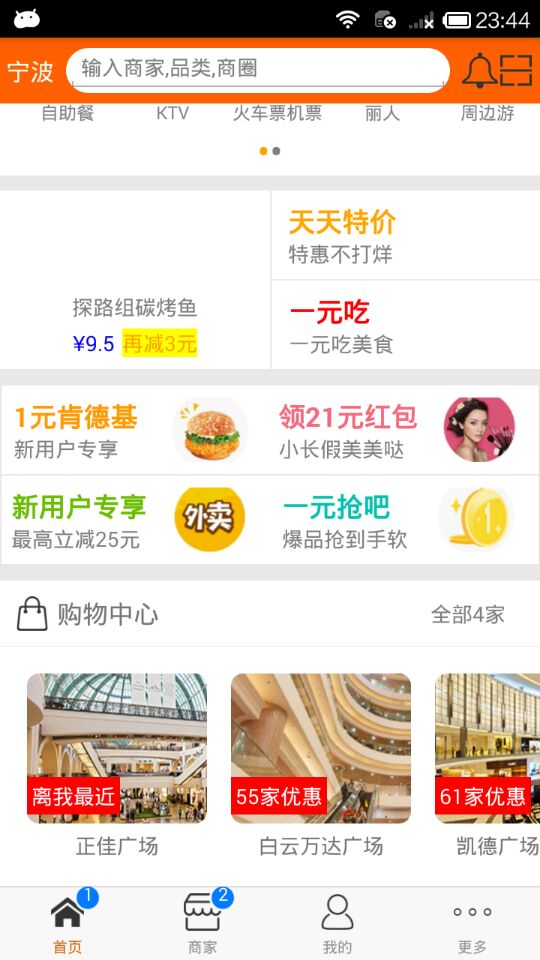
首页(Home)加载的购物中心组件(ShopCenter),传递url数据;
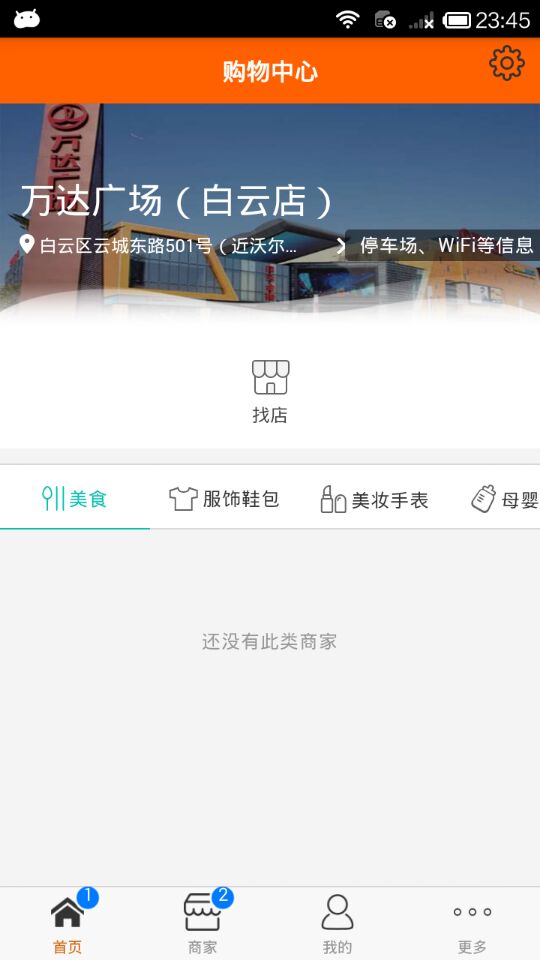
ShopCenter里根据url加载购物中心详细页组件(ShopCenterDetail),
ShopCenterDetail中利用WebView展示。
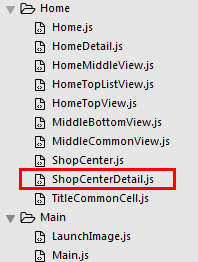
1.Home.js
/**

 * 首页

 */

import React, { Component } from 'react';

import {

    AppRegistry,

    StyleSheet,

    Text,

    View,

    TouchableOpacity,

    TextInput,

    Image,

    Platform,

    ScrollView

} from 'react-native';

var Dimensions = require('Dimensions');

var screenW = Dimensions.get('window').width;

var screenH = Dimensions.get('window').height;

/*======导入外部组件类======*/

var HomeDetail = require('./HomeDetail');

var TopView = require('./HomeTopView');

var MiddleView = require('./HomeMiddleView');

var MiddleBottom = require('./MiddleBottomView');

var ShopCenter = require('./ShopCenter');

var ShopCenterDetail = require('./ShopCenterDetail');

// ES5

var Home = React.createClass({

    render() {

        return (

            <View style={styles.container}>

                {/*首页的导航条*/}

                {this.renderNavBar()}

                {/*首页主要内容*/}

                <ScrollView>

                    {/*头部的View*/}

                   <TopView />

                    {/*中间上部分的view*/}

                    <MiddleView />

                    {/*中间下部分内容*/}

                    <MiddleBottom

                        popTopHome={(data)=>{this.pushToDetail(data)}}

                    />

                    {/*购物中心*/}

                    <ShopCenter

                        popToHomeView={(url)=>this.pushToShopCenterDetail(url)}

                    />

                </ScrollView>

            </View>

        );

    },

    // 首页的导航条

    renderNavBar(){

        return(

            <View style={styles.navBarStyle}>

                <TouchableOpacity onPress={()=>{this.pushToDetail()}} >

                    <Text style={styles.leftTitleStyle}>宁波</Text>

                </TouchableOpacity>

                <TextInput placeholder="输入商家,品类,商圈" style={styles.topInputStyle} />

                <View style={styles.rightNavViewStyle}>

                    <TouchableOpacity onPress={()=>{alert('点击了')}} >

                        <Image source={{uri:'icon_homepage_message'}} style={styles.navRightImgStyle} />

                    </TouchableOpacity>

                    <TouchableOpacity onPress={()=>{alert('点击了')}} >

                        <Image source={{uri:'icon_homepage_scan'}} style={styles.navRightImgStyle} />

                    </TouchableOpacity>

                </View>

            </View>

        )

    },

    // 跳转到首页详细页

    pushToDetail(data){

        this.props.navigator.push({

            component:HomeDetail,   // 要跳转过去的组件

            title:'首页详细页'

        });

    },

    // 跳转到购物中心详细页

    pushToShopCenterDetail(url){

        this.props.navigator.push({

            component:ShopCenterDetail,   // 要跳转过去的组件

            passProps:{'url':this.dealWithImgUrl(url)},  // 传递数据到下一个界面

        });

    },

    // URL处理函数

    dealWithImgUrl(url){

        return url.replace('imeituan://www.meituan.com/web/?url=','');

    },

});

const styles = StyleSheet.create({

    // 导航栏

    navBarStyle:{

        height:Platform.OS === 'ios' ? 64 : 44,

        backgroundColor:'rgba(255,96,0,1)',

        // 主轴方向

        flexDirection:'row',

        // 侧轴对齐方式 垂直居中

        alignItems:'center',

        // 主轴对齐方式

        justifyContent:'space-around', // 平均分布

    },

    // 导航条左侧文字

    leftTitleStyle:{

        color:'white',

        fontSize:16,

    },

    // 导航栏输入框

    topInputStyle:{

        width:screenW * 0.71,

        height:Platform.OS === 'ios' ? 35 : 30,

        backgroundColor:'white',

        marginTop:Platform.OS === 'ios' ? 18 : 0,

        // 圆角

        borderRadius:18,

        paddingLeft:10,

    },

    // 导航条右侧视图

    rightNavViewStyle:{

        flexDirection:'row',

        height:64,

        // 侧轴对齐方式

        alignItems:'center',

        // backgroundColor:'blue',

    },

    // 导航栏右侧图片

    navRightImgStyle:{

        width:Platform.OS === 'ios' ? 28 : 24,

        height:Platform.OS === 'ios' ? 28 : 24,

    },

    container: {

        flex: 1,

        backgroundColor: '#e8e8e8',

    },

    welcome: {

        fontSize: 20,

        textAlign: 'center',

        margin: 10,

    },

});

// 输出

module.exports = Home;
2.ShopCenter.js
/**

 * 首页购物中心

 */

import React, { Component } from 'react';

import {

    AppRegistry,

    StyleSheet,

    Text,

    View,

    ScrollView,

    Image,

    TouchableOpacity

} from 'react-native';

// 导入外部组件类

var TitleView = require('./TitleCommonCell');

// 导入json数据

var Home_D5 = require('../../LocalData/XMG_Home_D5.json');

// ES5

var ShopCenter = React.createClass({

    getDefaultPorps(){

        return{

            popToHomeView:null, // 回调函数

        }

    },

    render() {

        return (

            <View style={styles.container}>

                <TitleView

                    leftIcon="gw"

                    leftTitle="购物中心"

                    rightTitle={Home_D5.tips}

                />

                <ScrollView

                    style={styles.scrollViewStyle}

                    horizontal={true}

                    showsHorizontalScrollIndicator={false}

                >

                    {this.renderAllItem()}

                </ScrollView>

            </View>

        );

    },

    // 返回所有item

    renderAllItem(){

        var itemArr = [];

        var shopData = Home_D5.data;

        for (var i=0;i<shopData.length;i++){

            var data = shopData[i];

            itemArr.push(

                <ShopCenterItem

                    key={i}

                    shopImage={data.img}

                    shopSale={data.showtext.text}

                    shopName={data.name}

                    detailurl={data.detailurl}

                    popToShopCenter={(url)=>this.popTopHome(url)}

                />

            )

        }

        return itemArr;

    },

    // 返回首页

    popTopHome(url){

        if(this.props.popToHomeView != null){

            this.props.popToHomeView(url);

        }

    }

});

// 每一个商场

var ShopCenterItem = React.createClass({

    getDefaultProps(){

        return{

            shopImage:'',

            shopSale:'',

            shopName:'',

            detailurl:'',

            popToShopCenter:null

        }

    },

    render() {

        return (

            <TouchableOpacity activeOpacity={0.8} onPress={()=>this.clickItem(this.props.detailurl)}>

                <View style={styles.itemViewStyle}>

                   <Image source={{uri:this.props.shopImage}} style={styles.imageStyle}/>

                    <Text style={styles.shopSaleStyle}>{this.props.shopSale}</Text>

                    <Text style={styles.shopNameStyle}>{this.props.shopName}</Text>

                </View>

            </TouchableOpacity>

        );

    },

    // 点击事件

    clickItem(url){

        if(this.props.detailurl != null){

            this.props.popToShopCenter(url);

        }

    },

});

const styles = StyleSheet.create({

    container: {

        marginTop:10,

    },

    scrollViewStyle:{

        flexDirection:'row',

        backgroundColor:'white',

        padding:10,

    },

    itemViewStyle:{

        margin:8,

    },

    imageStyle:{

        width:120,

        height:100,

        borderRadius:8,

    },

    shopSaleStyle:{

        // 定位

        position:'absolute',

        left:0,

        bottom:30,

        backgroundColor:'red',

        color:'white',

        padding:3,

    },

    shopNameStyle:{

        textAlign:'center',

        marginTop:5,

    },

});

// 输出

module.exports = ShopCenter;
3.ShopCenterDetail.js
/**

 * 购物中心详情

 */

import React, { Component } from 'react';

import {

    AppRegistry,

    StyleSheet,

    Text,

    View,

    Platform,

    Image,

    TouchableOpacity,

    WebView

} from 'react-native';

// ES5

var ShopCenterDetail = React.createClass({

    getInitialState(){

        return{

            detailUrl: this.props.url

        }

    },

    render() {

        return (

            <View style={styles.container}>

                {this.renderNavBar()}

                <WebView

                    automaticallyAdjustContentInsets={true}

                    source={{uri: this.state.detailUrl}}

                    javaScriptEnabled={true}

                    decelerationRate="normal"

                    startInLoadingState={true}

                />

            </View>

        );

    },

    // 导航条

    renderNavBar(){

        return(

            <View style={styles.navOutViewStyle}>

                <TouchableOpacity activeOpacity={0.8} onPress={()=>{this.props.navigator.pop()}} style={styles.LeftViewStyle}>

                    <Image source={{uri:'icon_camera_back_normal'}} style={styles.navImgStyle} />

                </TouchableOpacity>

                <Text style={{color:'white',fontSize:16,fontWeight:'bold'}}>购物中心</Text>

                <TouchableOpacity  style={styles.rightViewStyle}>

                    <Image source={{uri:'icon_mine_setting'}} style={styles.navImgStyle} />

                </TouchableOpacity>

            </View>

        )

    }

});

const styles = StyleSheet.create({

    container: {

        flex:1,

    },

    // 导航条视图

    navOutViewStyle:{

        height:Platform.OS === 'ios' ? 64 : 44,

        backgroundColor:'rgba(255,96,0,1)',

        // 主轴方向

        flexDirection:'row',

        // 侧轴对齐方式 垂直居中

        alignItems:'center',

        // 主轴方向居中

        justifyContent:'center',

    },

    // 导航条左侧

    LeftViewStyle:{

        position:'absolute',

        left:10,

        bottom:15,

    },

    // 导航栏右侧

    rightViewStyle:{

        // 绝对定位

        position:'absolute',

        right:10,

        bottom:15,

    },

    // 导航条上图片

    navImgStyle:{

        width:Platform.OS === 'ios' ? 28 : 24,

        height:Platform.OS === 'ios' ? 28 : 24,

    },

});

// 输出

module.exports = ShopCenterDetail;
4.效果图
React Native商城项目实战16 - 购物中心详细页的更多相关文章
- React Native商城项目实战15 - 首页购物中心
1.公共的标题栏组件TitleCommonCell.js /** * 首页购物中心 */ import React, { Component } from 'react'; import { AppR ...
- React Native商城项目实战14 - 首页中间下部分
1.MiddleBottomView.js /** * 首页中间下部分 */ import React, { Component } from 'react'; import { AppRegistr ...
- React Native商城项目实战13 - 首页中间上部分内容
1.HomeMiddleView.js /** * 首页中间上部分内容 */ import React, { Component } from 'react'; import { AppRegistr ...
- React Native商城项目实战12 - 首页头部内容
1.HomeTopView为首页头部内容,HomeTopListView为HomeTopView子视图. 2.HomeTopView.js /** * 首页头部内容 */ import React, ...
- React Native商城项目实战05 - 设置首页的导航条
1.Home.js /** * 首页 */ import React, { Component } from 'react'; import { AppRegistry, StyleSheet, Te ...
- React Native商城项目实战03 - 包装Navigator
1.在Home目录下新建首页详细页HomeDetail.js /** * 首页详情页 */ import React, { Component } from 'react'; import { App ...
- React Native商城项目实战04 - 封装TabNavigator.Item的创建
1.Main.js /** * 主页面 */ import React, { Component } from 'react'; import { StyleSheet, Text, View, Im ...
- React Native商城项目实战07 - 设置“More”界面导航条
1.More/More.js /** * 更多 */ import React, { Component } from 'react'; import { AppRegistry, StyleShee ...
- React Native商城项目实战02 - 主要框架部分(tabBar)
1.安装插件,cd到项目根目录下执行: $ npm i react-native-tab-navigator --save 2.主框架文件Main.js /** * 主页面 */ import Rea ...
随机推荐
- ES5中的继承
继承 在面向对象的语言中, 大多语言都支持两种继承方式: 接口继承 和 实现继承, 接口继承 只继承方法签名, 实现继承 才继承实际的方法, ECMAScript 值支持 实现继承, 今天我们来谈谈实 ...
- SQL Server之索引解析(二)
1.堆表 堆表通过IAM连接一起,查询时全表扫描. 1.1 非聚集索引 结构 叶子节点数据结构:行数据结构+Rid(8字节) 中间节点数据结构: (非聚集非唯一索引)行数据结构+Page(4)+2+ ...
- C#中的委托和事件(一)——delegate
前言 来说一说委托(delegate)和事件(event),本篇采取的形式是翻译微软Delegate的docs中的重要部分(不要问我为什么微软的docs有中文还要读英文,因为读中文感觉自己有阅读障碍- ...
- 洛谷 P5661 公交换乘 & [NOIP2019普及组] (模拟)
传送门 解题思路 先把所有的数据读下来. 对于地铁,答案直接加,然后把编号放入一个数组a内. 对于公交车,从前往后枚举a数组,然后找到出现最早的且符合价钱大于等于公交车的价钱,然后把这个数删除(变为0 ...
- Ubuntu 解决wifi无法打开的问题 安装NVIDIA显卡驱动的正确姿势
游戏本型号Y7000 win10 Ubuntu16.04双系统 解决wifi无法打开的问题 解决方法: 1.打开终端输入:rfkill list all 出现如下提示:: 可以看到,优先级 ...
- HNUSTOJ-1521 塔防游戏
1521: 塔防游戏 时间限制: 1 Sec 内存限制: 128 MB提交: 117 解决: 38[提交][状态][讨论版] 题目描述 小明最近迷上了塔防游戏,塔防游戏的规则就是在地图上建炮塔,用 ...
- 通过编写串口助手工具学习MFC过程——(三)Unicode字符集的宽字符和多字节字符转换
通过编写串口助手工具学习MFC过程 因为以前也做过几次MFC的编程,每次都是项目完成时,MFC基本操作清楚了,但是过好长时间不再接触MFC的项目,再次做MFC的项目时,又要从头开始熟悉.这次通过做一个 ...
- java 技术分享
http://www.ccblog.cn/99.htm http://www.ccblog.cn/100.htm http://www.ccblog.cn/101.htm http://www.ccb ...
- 原生js格式化json和格式化xml的方法
在工作中一直看各位前辈的博客解决各种问题,对我的帮助很大,非常感谢! 之前一直比较忙没有写博客,终于过年有了点空闲时间,可以把自己积累的东西分享下,笔记中的部分函数不是自己写的,都是工作中一点点积累的 ...
- num1,随堂笔记(3月10日)
1.计算机发展史(略) 2.我们所使用的计算机包括了计算机硬件.操作系统和应用程序与网络. 3.计算机硬件构成---CPU(运算器和控制器).内存.硬盘.输入设备和输出设备. ①CPU是计算机的主要计 ...