
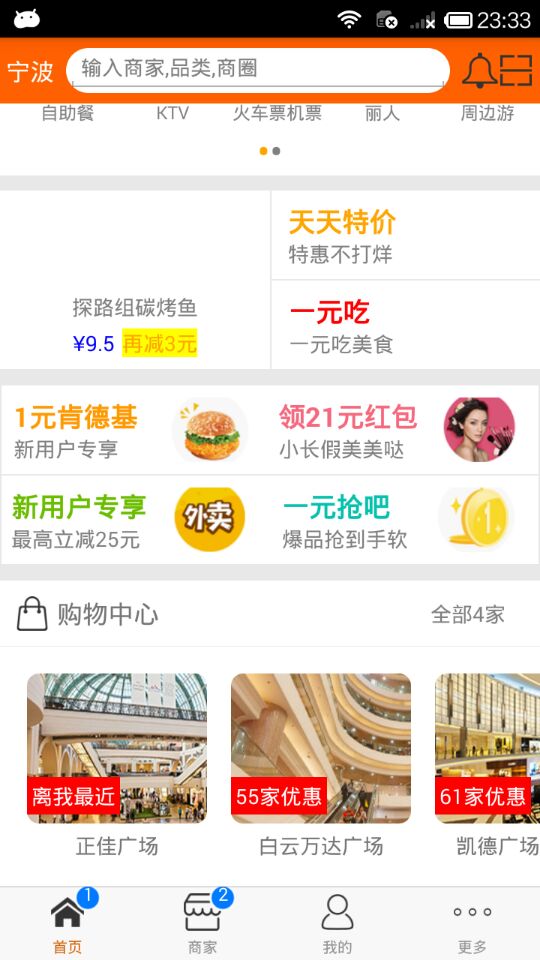
React Native商城项目实战15 - 首页购物中心
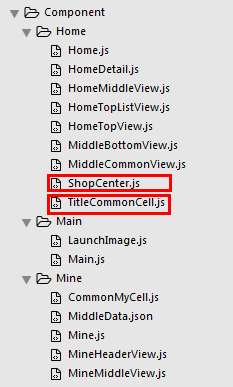
1.公共的标题栏组件TitleCommonCell.js
/**

 * 首页购物中心

 */

import React, { Component } from 'react';

import {

    AppRegistry,

    StyleSheet,

    Text,

    View,

    Image,

    TouchableOpacity

} from 'react-native';

// ES5

var TitleCell = React.createClass({

    getDefaultProps(){

        return{

            leftIcon:'',

            leftTitle:'',

            rightTitle:'',

        }

    },

    render() {

        return (

            <TouchableOpacity activeOpacity={0.8}>

                <View style={styles.container}>

                    <View style={styles.leftViewStyle}>

                        <Image source={{uri:this.props.leftIcon}}  style={{width:23,height:23,marginRight:5}} />

                        <Text style={{fontSize:17}}>{this.props.leftTitle}</Text>

                    </View>

                    <View style={styles.rightViewStyle}>

                        <Text style={{color:'gray'}}>{this.props.rightTitle}</Text>

                        <Image source={{uri:'icon_cell_rightArrow'}} style={{width:8,height:13,marginRight:10,marginLeft:5}} />

                    </View>

                </View>

            </TouchableOpacity>

        );

    }

});

const styles = StyleSheet.create({

    container: {

        backgroundColor: 'white',

        flexDirection:'row',

        height:44,

        justifyContent:'space-between',

        borderBottomColor:'#e8e8e8',

        borderBottomWidth:0.5,

    },

    leftViewStyle:{

        flexDirection:'row',

        alignItems:'center',

        marginLeft:10,

    },

    rightViewStyle:{

        flexDirection:'row',

        alignItems:'center',

    },

});

// 输出

module.exports = TitleCell;
2.ShopCenter.js
/**

 * 首页购物中心

 */

import React, { Component } from 'react';

import {

    AppRegistry,

    StyleSheet,

    Text,

    View,

    ScrollView,

    Image,

    TouchableOpacity

} from 'react-native';

// 导入外部组件类

var TitleView = require('./TitleCommonCell');

// 导入json数据

var Home_D5 = require('../../LocalData/XMG_Home_D5.json');

// ES5

var ShopCenter = React.createClass({

    render() {

        return (

            <View style={styles.container}>

                <TitleView

                    leftIcon="gw"

                    leftTitle="购物中心"

                    rightTitle={Home_D5.tips}

                />

                <ScrollView

                    style={styles.scrollViewStyle}

                    horizontal={true}

                    showsHorizontalScrollIndicator={false}

                >

                    {this.renderAllItem()}

                </ScrollView>

            </View>

        );

    },

    // 返回所有item

    renderAllItem(){

        var itemArr = [];

        var shopData = Home_D5.data;

        for (var i=0;i<shopData.length;i++){

            var data = shopData[i];

            itemArr.push(

                <ShopCenterItem

                    key={i}

                    shopImage={data.img}

                    shopSale={data.showtext.text}

                    shopName={data.name}

                />

            )

        }

        return itemArr;

    },

});

// 每一个商场

var ShopCenterItem = React.createClass({

    getDefaultProps(){

        return{

            shopImage:'',

            shopSale:'',

            shopName:'',

        }

    },

    render() {

        return (

            <TouchableOpacity activeOpacity={0.8}>

                <View style={styles.itemViewStyle}>

                   <Image source={{uri:this.props.shopImage}} style={styles.imageStyle}/>

                    <Text style={styles.shopSaleStyle}>{this.props.shopSale}</Text>

                    <Text style={styles.shopNameStyle}>{this.props.shopName}</Text>

                </View>

            </TouchableOpacity>

        );

    }

});

const styles = StyleSheet.create({

    container: {

        marginTop:10,

    },

    scrollViewStyle:{

        flexDirection:'row',

        backgroundColor:'white',

        padding:10,

    },

    itemViewStyle:{

        margin:8,

    },

    imageStyle:{

        width:120,

        height:100,

        borderRadius:8,

    },

    shopSaleStyle:{

        // 定位

        position:'absolute',

        left:0,

        bottom:30,

        backgroundColor:'red',

        color:'white',

        padding:3,

    },

    shopNameStyle:{

        textAlign:'center',

        marginTop:5,

    },

});

// 输出

module.exports = ShopCenter;
3.Home.js里使用ShopCenter组件
/**

 * 首页

 */

import React, { Component } from 'react';

import {

    AppRegistry,

    StyleSheet,

    Text,

    View,

    TouchableOpacity,

    TextInput,

    Image,

    Platform,

    ScrollView

} from 'react-native';

var Dimensions = require('Dimensions');

var screenW = Dimensions.get('window').width;

var screenH = Dimensions.get('window').height;

/*======导入外部组件类======*/

var HomeDetail = require('./HomeDetail');

var TopView = require('./HomeTopView');

var MiddleView = require('./HomeMiddleView');

var MiddleBottom = require('./MiddleBottomView');

var ShopCenter = require('./ShopCenter');

// ES5

var Home = React.createClass({

    render() {

        return (

            <View style={styles.container}>

                {/*首页的导航条*/}

                {this.renderNavBar()}

                {/*首页主要内容*/}

                <ScrollView>

                    {/*头部的View*/}

                   <TopView />

                    {/*中间上部分的view*/}

                    <MiddleView />

                    {/*中间下部分内容*/}

                    <MiddleBottom

                        popTopHome={(data)=>{this.pushToDetail(data)}}

                    />

                    {/*购物中心*/}

                    <ShopCenter />

                </ScrollView>

            </View>

        );

    },

    // 首页的导航条

    renderNavBar(){

        return(

            <View style={styles.navBarStyle}>

                <TouchableOpacity onPress={()=>{this.pushToDetail()}} >

                    <Text style={styles.leftTitleStyle}>宁波</Text>

                </TouchableOpacity>

                <TextInput placeholder="输入商家,品类,商圈" style={styles.topInputStyle} />

                <View style={styles.rightNavViewStyle}>

                    <TouchableOpacity onPress={()=>{alert('点击了')}} >

                        <Image source={{uri:'icon_homepage_message'}} style={styles.navRightImgStyle} />

                    </TouchableOpacity>

                    <TouchableOpacity onPress={()=>{alert('点击了')}} >

                        <Image source={{uri:'icon_homepage_scan'}} style={styles.navRightImgStyle} />

                    </TouchableOpacity>

                </View>

            </View>

        )

    },

    // 跳转到首页详细页

    pushToDetail(data){

        this.props.navigator.push({

            component:HomeDetail,   // 要跳转过去的组件

            title:'首页详细页'

        });

    },

});

const styles = StyleSheet.create({

    // 导航栏

    navBarStyle:{

        height:Platform.OS === 'ios' ? 64 : 44,

        backgroundColor:'rgba(255,96,0,1)',

        // 主轴方向

        flexDirection:'row',

        // 侧轴对齐方式 垂直居中

        alignItems:'center',

        // 主轴对齐方式

        justifyContent:'space-around', // 平均分布

    },

    // 导航条左侧文字

    leftTitleStyle:{

        color:'white',

        fontSize:16,

    },

    // 导航栏输入框

    topInputStyle:{

        width:screenW * 0.71,

        height:Platform.OS === 'ios' ? 35 : 30,

        backgroundColor:'white',

        marginTop:Platform.OS === 'ios' ? 18 : 0,

        // 圆角

        borderRadius:18,

        paddingLeft:10,

    },

    // 导航条右侧视图

    rightNavViewStyle:{

        flexDirection:'row',

        height:64,

        // 侧轴对齐方式

        alignItems:'center',

        // backgroundColor:'blue',

    },

    // 导航栏右侧图片

    navRightImgStyle:{

        width:Platform.OS === 'ios' ? 28 : 24,

        height:Platform.OS === 'ios' ? 28 : 24,

    },

    container: {

        flex: 1,

        backgroundColor: '#e8e8e8',

    },

    welcome: {

        fontSize: 20,

        textAlign: 'center',

        margin: 10,

    },

});

// 输出

module.exports = Home;
4.用到的json数据
{

  "count": 4,

  "data": [

    {

      "detailurl": "imeituan://www.meituan.com/web/?url=http://i.meituan.com/shoppingmall/smDetail/4374715",

      "promotionIcon": "",

      "name": "正佳广场",

      "img": "http://p0.meituan.net/codeman/b4686ddc7270363868fcff917d3526cd37899.jpg",

      "showtext": {

        "text": "离我最近",

        "count": 84,

        "color": ""

      },

      "longitude": 113.327086,

      "latitude": 23.131909,

      "smid": 4374715,

      "promotionText": "送福利 商品低至1.5折"

    },

    {

      "detailurl": "imeituan://www.meituan.com/web/?url=http://i.meituan.com/shoppingmall/smDetail/50606658",

      "promotionIcon": "",

      "name": "白云万达广场",

      "img": "http://p0.meituan.net/codeman/c217fffcbf9b434844434a0acbdb434827837.jpg",

      "showtext": {

        "text": "55家优惠",

        "count": 55,

        "color": ""

      },

      "longitude": 113.26605,

      "latitude": 23.17151,

      "smid": 50606658,

      "promotionText": "春来花开 满100最高减60"

    },

    {

      "detailurl": "imeituan://www.meituan.com/web/?url=http://i.meituan.com/shoppingmall/smDetail/75813274",

      "promotionIcon": "",

      "name": "凯德广场●云尚",

      "img": "http://p0.meituan.net/codeman/2ad0711b7ffa9433bdc2577e7896082937607.jpg",

      "showtext": {

        "text": "61家优惠",

        "count": 61,

        "color": ""

      },

      "longitude": 113.269668,

      "latitude": 23.1818,

      "smid": 75813274,

      "promotionText": "新春送福利 购物满额有好礼"

    },

    {

      "detailurl": "imeituan://www.meituan.com/web/?url=http://i.meituan.com/shoppingmall/smDetail/41692498",

      "promotionIcon": "",

      "name": "来又来广场",

      "img": "http://p0.meituan.net/codeman/d675f4ad9b7ece9f0593db298beb082d31800.jpg",

      "showtext": {

        "text": "48家优惠",

        "count": 48,

        "color": ""

      },

      "longitude": 113.232008,

      "latitude": 23.397758,

      "smid": 41692498,

      "promotionText": "48家品牌优惠中:瑞可爷爷的店每满30减5,全单9折(买单立享)"

    }

  ],

  "tips": "全部4家",

  "jumpto": "imeituan://www.meituan.com/web/?url=http://i.meituan.com/shoppingmall/smList?sid=@geodist:asc"

}
5.效果图
React Native商城项目实战15 - 首页购物中心的更多相关文章
- React Native商城项目实战14 - 首页中间下部分
1.MiddleBottomView.js /** * 首页中间下部分 */ import React, { Component } from 'react'; import { AppRegistr ...
- React Native商城项目实战13 - 首页中间上部分内容
1.HomeMiddleView.js /** * 首页中间上部分内容 */ import React, { Component } from 'react'; import { AppRegistr ...
- React Native商城项目实战12 - 首页头部内容
1.HomeTopView为首页头部内容,HomeTopListView为HomeTopView子视图. 2.HomeTopView.js /** * 首页头部内容 */ import React, ...
- React Native商城项目实战16 - 购物中心详细页
逻辑分析: 首页(Home)加载的购物中心组件(ShopCenter),传递url数据: ShopCenter里根据url加载购物中心详细页组件(ShopCenterDetail), ShopCent ...
- React Native商城项目实战05 - 设置首页的导航条
1.Home.js /** * 首页 */ import React, { Component } from 'react'; import { AppRegistry, StyleSheet, Te ...
- React Native商城项目实战04 - 封装TabNavigator.Item的创建
1.Main.js /** * 主页面 */ import React, { Component } from 'react'; import { StyleSheet, Text, View, Im ...
- React Native商城项目实战02 - 主要框架部分(tabBar)
1.安装插件,cd到项目根目录下执行: $ npm i react-native-tab-navigator --save 2.主框架文件Main.js /** * 主页面 */ import Rea ...
- React Native商城项目实战07 - 设置“More”界面导航条
1.More/More.js /** * 更多 */ import React, { Component } from 'react'; import { AppRegistry, StyleShee ...
- React Native商城项目实战03 - 包装Navigator
1.在Home目录下新建首页详细页HomeDetail.js /** * 首页详情页 */ import React, { Component } from 'react'; import { App ...
随机推荐
- jquery导航栏高亮(二级菜单点击一级保持高亮)
<script type="text/javascript"> var urlstr = location.href; var urlstatus=false; $(& ...
- linux-memcache安装及memcached memcache扩展
linux memcached安装yum -y install libevent libevent-deve yum list memcached yum -y install memcached m ...
- nginx知识问答
1.请解释一下什么是Nginx? 答:Nginx是一个web服务器和反向代理服务器,用于HTTP.HTTPS.SMTP.POP3和IMAP协议.2.请列举Nginx的一些特性? 答:Nginx服务器的 ...
- CyclicBarrier、CountDownLatch、Callable、FutureTask、thread.join() 、wait()、notify()、Condition
CyclicBarrier使用: import java.util.Random; import java.util.concurrent.BrokenBarrierException; import ...
- Prometheus 2.14.0 新特性
Prometheus 2.14.0 现在(2019.11.11)已经发布,在上个月的 2.13.0 之后又进行了一些修正和改进. 这次最大的新功能是基于 React 的新 UI,与现有 UI 大体相同 ...
- “百度杯”CTF比赛 十一月场--CrackMe01
测试文件:https://static2.ichunqiu.com/icq/resources/fileupload/CTF/BSRC/BSRC-11-3/CrackMe01_97D2BF0DBD2E ...
- json.dumps、json.dump、json.loads、json.load的区别
json 模块提供了一种很简单的方式来编码和解码JSON数据. 其中两个主要的函数是 json.dumps() 和 json.loads() 下面是如何将Python数据结构转换为json impor ...
- 02-Django-views
# views 视图# 1. 视图概述- 视图即视图函数,接收web请求并返回web响应的事物处理函数.- 响应指符合http协议要求的任何内容,包括json,string, html等 # 2 其他 ...
- Elastic Search安装-windows
转载自:https://blog.csdn.net/linkkb/article/details/82805145 其中稍作修改 ElasticSearch介绍 ES是一个基于Lucene的分布式全文 ...
- OC+swift混编
作者:fengsh998 原文地址:http://blog.csdn.net/fengsh998/article/details/34440159 转载请注明出处 如果觉得文章对你有所帮助,请通过留言 ...