
《DSP using MATLAB》Problem 8.39
代码:
%% ------------------------------------------------------------------------

%%            Output Info about this m-file

fprintf('\n***********************************************************\n');

fprintf('        <DSP using MATLAB> Problem 8.39.2 \n\n');

banner();

%% ------------------------------------------------------------------------

% Digital Filter Specifications:   Chebyshev-1 bandstop

ws = [0.35*pi 0.65*pi];             % digital stopband freq in rad

wp = [0.25*pi 0.75*pi];             % digital passband freq in rad

delta1 = 0.05;                      % passband tolerance, absolute specs

delta2 = 0.01;                      % stopband tolerance, absolute specs

Rp = -20 * log10( (1-delta1)/(1+delta1))    % passband ripple in dB

As = -20 * log10( delta2 / (1+delta1))      % stopband attenuation in dB

Ripple = 10 ^ (-Rp/20)           % passband ripple in absolute

Attn = 10 ^ (-As/20)             % stopband attenuation in absolute

% Calculation of Chebyshev-1 filter parameters:

[N, wn] = cheb1ord(wp/pi, ws/pi, Rp, As);

fprintf('\n  ********* Chebyshev-1 Digital Bandstop Filter Order is = %3.0f \n', 2*N)

% Digital Chebyshev-1 bandstop Filter Design:

[bbs, abs] = cheby1(N, Rp, wn, 'stop');

[C, B, A] = dir2cas(bbs, abs)

% Calculation of Frequency Response:

[dbbs, magbs, phabs, grdbs, wwbs] = freqz_m(bbs, abs);

% ---------------------------------------------------------------

%    find Actual Passband Ripple and Min Stopband attenuation

% ---------------------------------------------------------------

delta_w = 2*pi/1000;

Rp_bs = -(min(dbbs(1:1:ceil(wp(1)/delta_w+1))));                           % Actual Passband Ripple

fprintf('\nActual Passband Ripple is %.4f dB.\n', Rp_bs);

As_bs = -round(max(dbbs(ceil(ws(1)/delta_w)+1:1:ceil(ws(2)/delta_w)+1)));   % Min Stopband attenuation

fprintf('\nMin Stopband attenuation is %.4f dB.\n\n', As_bs);

%% -----------------------------------------------------------------

%%                             Plot

%% -----------------------------------------------------------------

figure('NumberTitle', 'off', 'Name', 'Problem 8.39.2 Chebyshev-1 bs by cheby1 function')

set(gcf,'Color','white');

M = 1;                          % Omega max

subplot(2,2,1); plot(wwbs/pi, magbs); axis([0, M, 0, 1.2]); grid on;

xlabel('Digital frequency in \pi units'); ylabel('|H|'); title('Magnitude Response');

set(gca, 'XTickMode', 'manual', 'XTick', [0, 0.25, 0.35, 0.65, 0.75, M]);

set(gca, 'YTickMode', 'manual', 'YTick', [0, 0.01, 0.9048, 1]);

subplot(2,2,2); plot(wwbs/pi, dbbs); axis([0, M, -120, 2]); grid on;

xlabel('Digital frequency in \pi units'); ylabel('Decibels'); title('Magnitude in dB');

set(gca, 'XTickMode', 'manual', 'XTick', [0, 0.25, 0.35, 0.65, 0.75, M]);

set(gca, 'YTickMode', 'manual', 'YTick', [-80, -40, -1, 0]);

set(gca,'YTickLabelMode','manual','YTickLabel',['80'; '40';'1 ';' 0']);

subplot(2,2,3); plot(wwbs/pi, phabs/pi); axis([0, M, -1.1, 1.1]); grid on;

xlabel('Digital frequency in \pi nuits'); ylabel('radians in \pi units'); title('Phase Response');

set(gca, 'XTickMode', 'manual', 'XTick', [0, 0.25, 0.35, 0.65, 0.75, M]);

set(gca, 'YTickMode', 'manual', 'YTick', [-1:0.5:1]);

subplot(2,2,4); plot(wwbs/pi, grdbs); axis([0, M, 0, 50]); grid on;

xlabel('Digital frequency in \pi units'); ylabel('Samples'); title('Group Delay');

set(gca, 'XTickMode', 'manual', 'XTick', [0, 0.25, 0.35, 0.65, 0.75, M]);

set(gca, 'YTickMode', 'manual', 'YTick', [0:20:50]);
运行结果:
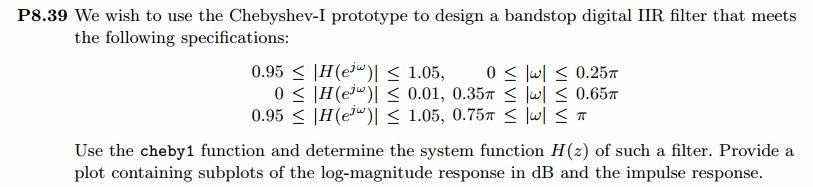
通带、阻带衰减指标,dB单位和绝对值单位,
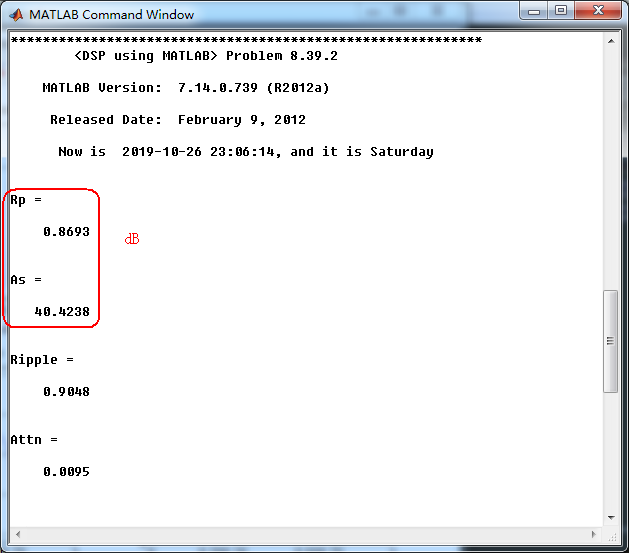
使用cheby1函数(MATLAB工具箱函数)得到Chebyshev-1型数字带阻滤波器,系统函数串联形式的系数
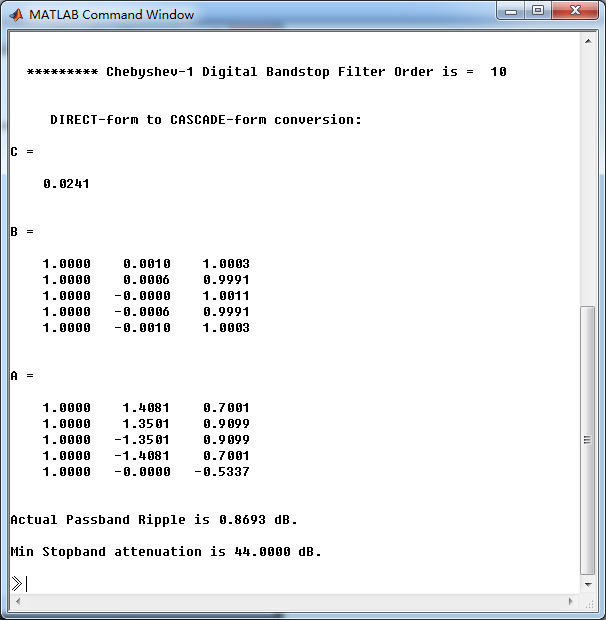
最小阻带衰减为44dB,满足40.4238dB的设计要求。滤波器的幅度谱、相位谱和群延迟响应如下
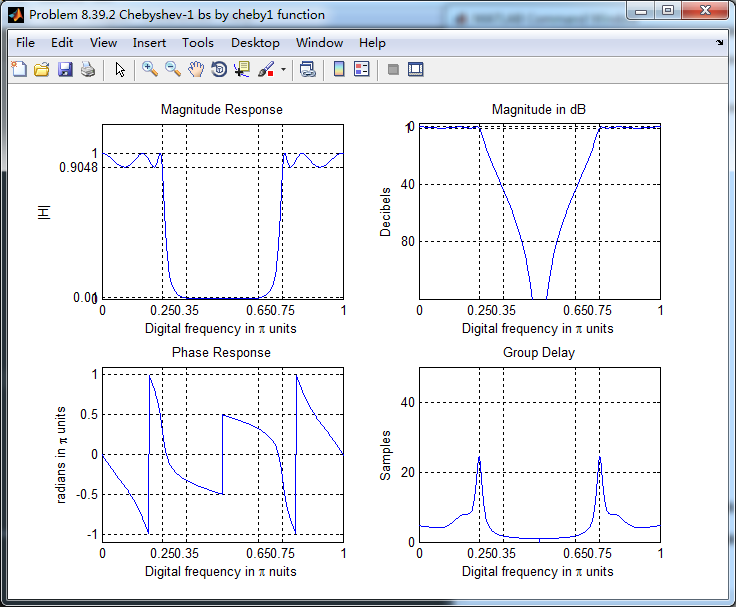
类似的,使用butter、cheby2和ellip函数(都是MATLAB工具箱函数)也可以设计带阻滤波器,这里不放图了。
《DSP using MATLAB》Problem 8.39的更多相关文章
- 《DSP using MATLAB》Problem 5.19
代码: function [X1k, X2k] = real2dft(x1, x2, N) %% --------------------------------------------------- ...
- 《DSP using MATLAB》Problem 8.40
代码: function [wpLP, wsLP, alpha] = bs2lpfre(wpbs, wsbs) % Band-edge frequency conversion from bandst ...
- 《DSP using MATLAB》Problem 7.36
代码: %% ++++++++++++++++++++++++++++++++++++++++++++++++++++++++++++++++++++++++++++++++ %% Output In ...
- 《DSP using MATLAB》Problem 7.28
又是一年五一节,朋友圈都是晒名山大川的,晒脑袋的,我这没钱的待在家里上网转转吧 频率采样法设计带通滤波器,过渡带中有一个样点 代码: %% ++++++++++++++++++++++++++++++ ...
- 《DSP using MATLAB》Problem 7.27
代码: %% ++++++++++++++++++++++++++++++++++++++++++++++++++++++++++++++++++++++++++++++++ %% Output In ...
- 《DSP using MATLAB》Problem 7.26
注意:高通的线性相位FIR滤波器,不能是第2类,所以其长度必须为奇数.这里取M=31,过渡带里采样值抄书上的. 代码: %% +++++++++++++++++++++++++++++++++++++ ...
- 《DSP using MATLAB》Problem 7.25
代码: %% ++++++++++++++++++++++++++++++++++++++++++++++++++++++++++++++++++++++++++++++++ %% Output In ...
- 《DSP using MATLAB》Problem 7.24
又到清明时节,…… 注意:带阻滤波器不能用第2类线性相位滤波器实现,我们采用第1类,长度为基数,选M=61 代码: %% +++++++++++++++++++++++++++++++++++++++ ...
- 《DSP using MATLAB》Problem 7.23
%% ++++++++++++++++++++++++++++++++++++++++++++++++++++++++++++++++++++++++++++++++ %% Output Info a ...
随机推荐
- CTF学习路线指南(附刷题练习网址)
PWN,Reverse:偏重对汇编,逆向的理解: Gypto:偏重对数学,算法的深入学习: Web:偏重对技巧沉淀,快速搜索能力的挑战: Mic:则更为复杂,所有与计算机安全挑战有关的都算在其中 常规 ...
- 【JZOJ6409】困难的图论
description 给定由 n 个点 m 条边组成的无向连通图,保证没有重边和自环. 你需要找出所有边,满足这些边恰好存在于一个简单环中.一个环被称为简单环,当且仅当它包含的所有点都只在这个环中被 ...
- 解析Spring第三天(面向切面AOP)
面向切面:AOP 在不修改源代码的基础上,对方法进行增强.AOP的底层原理就是代理技术(第一种:jdk的动态代理(编写程序必须要有接口).第二种:cglib代理技术(生成类的子类).如果编写的程序有借 ...
- 拦截器一Interceptor
import org.springframework.web.servlet.HandlerInterceptor; 前言 拦截器,在AOP(Aspect-Oriented Programming)中 ...
- 46 python学习笔记
0 引言 之前用python跑过深度学习的代码,用过一段时间的jupiter和tensorflow:最近在Ubuntu下搭建起了VSCode + Anaconda的python开发环境,感觉很好用,尤 ...
- NX二次开发-UFUN获取对象的显示属性(图层,颜色,空白状态,线宽,字体,高亮状态)UF_OBJ_ask_display_properties
NX9+VS2012 #include <uf.h> #include <uf_modl.h> #include <uf_obj.h> UF_initialize( ...
- NX二次开发-NXOPEN导出STEP Step214Creator *step214Creator1;
没有什么可以看的,NXOPEN直接录制一下导出STEP就可以了.录制出来自己挑需要的代码拿过来改一下. NX9+VS2012 #include <NXOpen/Part.hxx> #inc ...
- CodeForces1249B1/B2-Books Exchange-dfs-一般搜索+记忆化搜索
一般搜索 注意:一般定义成void Books Exchange (easy version) CodeForces - 1249B2 The only difference between eas ...
- 2019 IEEEXtreme 13.0 题解记录
比赛时间 2019.10.19 8:00 - 2019.10.20 8:00 比赛网站 https://csacademy.com/ieeextreme13 // 连续24小时做题真的是极限体验 // ...
- Linux下rsync的安装及简单使用
2018-09-25 15:39:04 一.RSYNC安装环境: centos6.5 iptables关闭和selinux为disabled 源码安装:到rsync官网下载rsync源码安装包,上传到 ...