
【转】Setting up SDL Extension Libraries on MinGW
FROM:http://lazyfoo.net/tutorials/SDL/06_extension_libraries_and_loading_other_image_formats/windows/mingw/index.php
Setting up SDL Extension Libraries on MinGW
Last Updated 6/21/14
1)First thing you need to do is download SDL_image headers and binaries. You will find them on the SDL_image website, specifically on this page.
You'll want to download the MinGW development libraries.
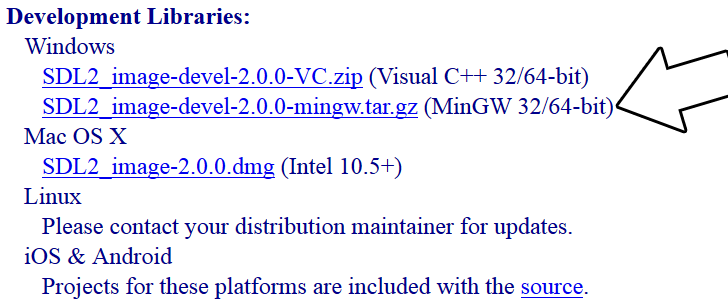
Open the gzip archive and there should be a tar archive. Open up the tar archive and the should be a folder called SDL2_image-2.something.something. In side of that folder there should be a bunch of folders and files, most importantly i686-w64-mingw32 which contains the 32bit library and x86_64-w64-mingw32 which contains the 64bit library.
2)This is important: most compilers still compile 32bit binaries by default to maximize compatibility. We will be using the 32bit binaries for this tutorial set. It doesn't matter if you have a 64bit operating system, since we are compiling 32bit binaries we will be using the 32bit library.
Inside of i686-w64-mingw32 are the include, lib, and bin folders which contain everything we need compile and run SDL applications. Copy the contents of i686-w64-mingw32 to any directory you want. I recommend putting it in a folder that you dedicate to holding all your development libraries for MinGW. For these tutorials I'm putting it in a directory I created C:\mingw_dev_lib
3)Now go download the source for lesson 06. Extract the source somewhere and compile by entering this big old command (This command assumed you have SDL_image extracted at C:\mingw_dev_lib):
g++ 06_extension_libraries_and_loading_other_image_formats.cpp -IC:\mingw_dev_lib\include\SDL2 -LC:\mingw_dev_lib\lib -w -Wl,-subsystem,windows -lmingw32 -lSDL2main -lSDL2 -lSDL2_image -o 06_extension_libraries_and_loading_other_image_formats
If you're using a makefile, you can just change the values of some of the macros:
From Makefile
#OBJS specifies which files to compile as part of the project

OBJS = 06_extension_libraries_and_loading_other_image_formats.cpp

#CC specifies which compiler we're using

CC = g++

#INCLUDE_PATHS specifies the additional include paths we'll need

INCLUDE_PATHS = -IC:\mingw_dev_lib\include\SDL2

#LIBRARY_PATHS specifies the additional library paths we'll need

LIBRARY_PATHS = -LC:\mingw_dev_lib\lib

#COMPILER_FLAGS specifies the additional compilation options we're using

# -w suppresses all warnings

# -Wl,-subsystem,windows gets rid of the console window

COMPILER_FLAGS = -w -Wl,-subsystem,windows

#LINKER_FLAGS specifies the libraries we're linking against

LINKER_FLAGS = -lmingw32 -lSDL2main -lSDL2 -lSDL2_image

#OBJ_NAME specifies the name of our exectuable

OBJ_NAME = 06_extension_libraries_and_loading_other_image_formats

#This is the target that compiles our executable

all : $(OBJS)

	$(CC) $(OBJS) $(INCLUDE_PATHS) $(LIBRARY_PATHS) $(COMPILER_FLAGS) $(LINKER_FLAGS) -o $(OBJ_NAME)
As you can see it was as easy as changing the file name of the source and executable and adding
-lSDL2_image
to the linker. If we were linking SDL_ttf, we'd add
-lSDL2_ttf
and for SDL_mixer we'd put:
-lSDL2_mixer
Now that you have the extension library compiling, it's time to go onto part 2 of the tutorial.
【转】Setting up SDL Extension Libraries on MinGW的更多相关文章
- 【转】Setting up SDL Extension Libraries on Code::Blocks 12.11
FROM: http://lazyfoo.net/tutorials/SDL/06_extension_libraries_and_loading_other_image_formats/window ...
- 【转】Setting up SDL Extension Libraries on Windows
FROM: http://lazyfoo.net/tutorials/SDL/06_extension_libraries_and_loading_other_image_formats/window ...
- 【转】Setting up SDL Extension Libraries on Visual Studio 2010 Ultimate
FROM:http://lazyfoo.net/tutorials/SDL/06_extension_libraries_and_loading_other_image_formats/windows ...
- 【转】Setting up SDL Extension Libraries on Visual Studio 2019 Community
FROM:http://lazyfoo.net/tutorials/SDL/06_extension_libraries_and_loading_other_image_formats/windows ...
- 【转】Extension Libraries and Loading Other Image Formats
FROM: http://lazyfoo.net/tutorials/SDL/06_extension_libraries_and_loading_other_image_formats/index. ...
- 【转】Setting up SDL 2 on MinGW
FROM: http://lazyfoo.net/tutorials/SDL/01_hello_SDL/windows/mingw/index.php Setting up SDL 2 on MinG ...
- 【转】Setting up SDL 2 on Code::Blocks 12.11
FROM: http://lazyfoo.net/tutorials/SDL/01_hello_SDL/windows/codeblocks/index.php Setting up SDL 2 on ...
- 【转】Setting up SDL 2 on Visual Studio 2010 Ultimate
from: Lazy Foo'Productions - Setting up SDL 2 on Visual Studio 2010 Ultimate 1)First thing you need ...
- 【转】Setting up SDL 2 on Visual Studio 2019 Community
FROM: http://lazyfoo.net/tutorials/SDL/01_hello_SDL/windows/msvc2019/index.php Setting up SDL 2 on V ...
随机推荐
- ASP.NET Core 基于声明的访问控制到底是什么鬼?
从ASP.NET 4.x到ASP.NET Core,内置身份验证已从基于角色的访问控制(RBAC)转变为基于声明的访问控制(CBAC). 我们常用的HttpContext.User属性ASP.NET ...
- 在Ubuntu下部署Flask项目
FlaskDemo 命名为test.py # coding=utf-8 from flask import Flask app = Flask(__name__) @app.route("/ ...
- Android小部件Widget开发过程中的坑和总结
@ 目录 概述 官方参考 效果图 AndroidManifest.xml Receiver Service Options res/xml/ widget_desktop_options.xml 常用 ...
- Centos-清屏命令-clear
clear 清理屏幕输出 相关快捷键 ctrl + l
- 故意使用free掉的内存的一个实验( 常量区/栈)
故意使用free掉的内存的一个实验 考虑一下两种声明 struct stuff{ char home[10]; int num; char name[10]; }; struct stuff{ cha ...
- Java知识系统回顾整理01基础03变量05变量命名规则
一.命名规则 变量命名只能使用字母 .数字. $. _ 变量第一个字符 只能使用: 字母. $. _ 变量第一个字符 不能使用数字 注:_ 是下划线,不是-减号或者-- 破折号 int a= 5; i ...
- javaFX 在窗口的标题栏显示当前时间,1秒更新一次时间
例1:在窗口的标题栏显示当前时间,1秒更新一次时间 1 import java.text.DateFormat; 2 import java.text.SimpleDateFormat; 3 impo ...
- IDEA推送docker镜像到私服/利用dockerfile-maven-plugin插件在springboot中上传镜像到远程的docker服务器、远程仓库
利用dockerfile-maven-plugin插件在springboot中上传镜像到远程仓库 这篇文章讲解在开发工具中把打包好的jar编译成docker镜像,上传到远程的docker服务 ...
- linux 路径结构
/bin /boot /data /dev /etc /home /lib /lib64 /lost+found /media /mnt /opt /proc /root /run /sbin /sr ...
- git 查看本地分支和切换本地分支的命令
查看本地分支,和当前所在的分支 git branch -vv git checkout developer 切换到developer分支