
《DSP using MATLAB》Problem 8.41
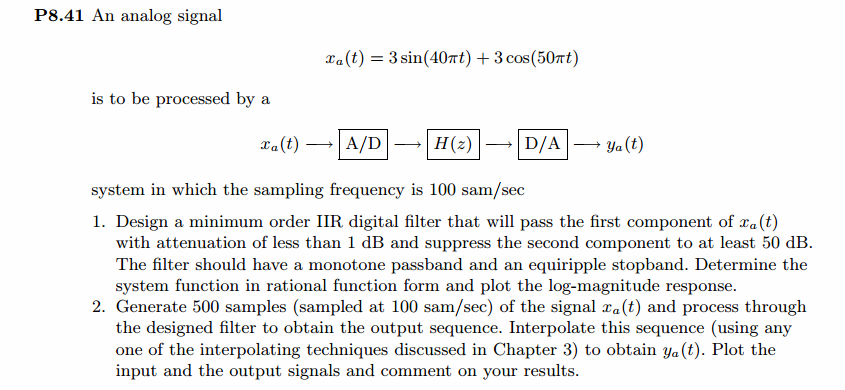
代码:
%% ------------------------------------------------------------------------

%%            Output Info about this m-file

fprintf('\n***********************************************************\n');

fprintf('        <DSP using MATLAB> Problem 8.41.2 \n\n');

banner();

%% ------------------------------------------------------------------------

% Digital lowpass Filter Specifications:

wplp = 0.4*pi;                 % digital passband freq in rad

wslp = 0.5*pi;                 % digital stopband freq in rad

Rp = 1.0;                       % passband ripple in dB

As = 50.0;                        % stopband attenuation in dB

Ripple = 10 ^ (-Rp/20)           % passband ripple in absolute

Attn = 10 ^ (-As/20)             % stopband attenuation in absolute

fprintf('\n*******Digital lowpass, Coefficients of DIRECT-form***********\n');

[blp, alp] = cheb2lpf(wplp, wslp, Rp, As);

[C, B, A] = dir2cas(blp, alp)

% Calculation of Frequency Response:

[dblp, maglp, phalp, grdlp, wwlp] = freqz_m(blp, alp);

% ---------------------------------------------------------------

%    find Actual Passband Ripple and Min Stopband attenuation

% ---------------------------------------------------------------

delta_w = 2*pi/1000;

Rp_lp = -(min(dblp(1:1:ceil(wplp/delta_w)+1)));                            % Actual Passband Ripple

fprintf('\nActual Passband Ripple is %.4f dB.\n', Rp_lp);

As_lp = -round(max(dblp( ceil(wslp/delta_w)+1:1:501 )));                    % Min Stopband attenuation

fprintf('\nMin Stopband attenuation is %.4f dB.\n\n', As_lp);

%% -----------------------------------------------------------------

%%                             Plot

%% -----------------------------------------------------------------

figure('NumberTitle', 'off', 'Name', 'Problem 8.41.1 Chebyshev-2 lowpass by cheb2lpf function')

set(gcf,'Color','white');

M = 2;                          % Omega max

subplot(2,2,1); plot(wwlp/pi, maglp); axis([0, M, 0, 1.2]); grid on;

xlabel('Digital frequency in \pi units'); ylabel('|H|'); title('Lowpass Filter Magnitude Response');

set(gca, 'XTickMode', 'manual', 'XTick', [0, 0.4, 0.5, M]);

set(gca, 'YTickMode', 'manual', 'YTick', [0, 0.8913, 1]);

subplot(2,2,2); plot(wwlp/pi, dblp); axis([0, M, -100, 2]); grid on;

xlabel('Digital frequency in \pi units'); ylabel('Decibels'); title('Lowpass Filter Magnitude in dB');

set(gca, 'XTickMode', 'manual', 'XTick', [0, 0.4, 0.5, M]);

set(gca, 'YTickMode', 'manual', 'YTick', [-80, -60, -50, -1, 0]);

set(gca,'YTickLabelMode','manual','YTickLabel',['80'; '60'; '50';'1 ';' 0']);

subplot(2,2,3); plot(wwlp/pi, phalp/pi); axis([0, M, -1.1, 1.1]); grid on;

xlabel('Digital frequency in \pi nuits'); ylabel('radians in \pi units'); title('Lowpass Filter Phase Response');

set(gca, 'XTickMode', 'manual', 'XTick', [0, 0.4, 0.5, M]);

set(gca, 'YTickMode', 'manual', 'YTick', [-1:1:1]);

subplot(2,2,4); plot(wwlp/pi, grdlp); axis([0, M, 0, 50]); grid on;

xlabel('Digital frequency in \pi units'); ylabel('Samples'); title('Lowpass Filter Group Delay');

set(gca, 'XTickMode', 'manual', 'XTick', [0, 0.4, 0.5, M]);

set(gca, 'YTickMode', 'manual', 'YTick', [0:20:50]);

% ------------------------------------------------------------

%                 PART 2   A/D and Reconstruction

% ------------------------------------------------------------

% Discrete time signal, Samples of analog signal xa(t)

Ts = 0.01;                       % sample intevel, second

Fs = 1/Ts;                       % sample frequency, Hz

n1_start = 0; n1_end = 500;

      n1 = [n1_start:1:n1_end];

     nTs = n1 * Ts;                   % [0, 5]s

xn1 = 3 * sin(40*pi*nTs) + 3 * cos(50*pi*nTs);    % digital signal

figure('NumberTitle', 'off', 'Name', 'Problem 8.41 xn1')

set(gcf,'Color','white');

subplot(2,1,1); stem(n1, xn1);

xlabel('n'); ylabel('x(n)');

title('xn sequence');  grid on;

% ----------------------------

%       DTFT of xn1

% ----------------------------

M = 500;

[X1, w] = dtft1(xn1, n1, M);

magX1  = abs(X1);  angX1  = angle(X1);  realX1  = real(X1);  imagX1  = imag(X1);

%% --------------------------------------------------------------------

%%              START X(w)'s  mag ang real imag

%% --------------------------------------------------------------------

figure('NumberTitle', 'off', 'Name', 'Problem 8.41 X1 DTFT');

set(gcf,'Color','white');

subplot(2,1,1); plot(w/pi,magX1); grid on;  %axis([-1,1,0,1.05]);

title('Magnitude Response');

xlabel('digital frequency in \pi units'); ylabel('Magnitude  |H|');

subplot(2,1,2); plot(w/pi, angX1/pi); grid on;  %axis([-1,1,-1.05,1.05]);

title('Phase Response');

xlabel('digital frequency in \pi units'); ylabel('Radians/\pi');

figure('NumberTitle', 'off', 'Name', 'Problem 8.41 X1 DTFT');

set(gcf,'Color','white');

subplot(2,1,1); plot(w/pi, realX1); grid on;

title('Real Part');

xlabel('digital frequency in \pi units'); ylabel('Real');

subplot(2,1,2); plot(w/pi, imagX1); grid on;

title('Imaginary Part');

xlabel('digital frequency in \pi units'); ylabel('Imaginary');

%% -------------------------------------------------------------------

%%             END X's  mag ang real imag

%% -------------------------------------------------------------------

% -----------------------------------------

%       Reconstruction

%       methods: ZOH FOH spline  sinc

% -----------------------------------------

figure('NumberTitle', 'off', 'Name', 'Problem 8.41.2 Reconstruction xa(t) by ZOH');

set(gcf,'Color','white');

subplot(1,1,1); stairs(nTs*100, xn1); grid on;  %axis([0,1,0,1.5]);

title('Reconstructed Signal from x1(n) using Zero-Order-Hold function');

xlabel('t in msec units.'); ylabel('xa(n)'); hold on;

stem(nTs*100, xn1); gtext('Ts = 0.01 sec'); hold off;

figure('NumberTitle', 'off', 'Name', 'Problem 8.41.2 Reconstruction xa(t) by FOH');

set(gcf,'Color','white');

subplot(1,1,1); plot(nTs*100, xn1); grid on;  %axis([0,1,0,1.5]);

title('Reconstructed Signal from x1(n) using First-Order-Hold');

xlabel('t in msec units.'); ylabel('xa(n)'); hold on;

stem(nTs*100, xn1); gtext('Ts = 0.01 sec'); hold off;

% Reconstruction by spline function

Dt = 0.005; t = 0:Dt:5; xa = spline(nTs, xn1, t);

figure('NumberTitle', 'off', 'Name', sprintf('Problem 8.41.2 Reconstruction xa(t) by spline, Ts = %.4fs', Ts));

set(gcf,'Color','white');

%subplot(2,1,1);

plot(100*t, xa); xlabel('t in ms units'); ylabel('x');

title(sprintf('Reconstructed Signal from x1(n) using spline function')); grid on; hold on;

stem(100*nTs, xn1); gtext('spline');

%% --------------------------------------------------------------------

%%         Analog Signal reconstructed by sinc(x) function

%% --------------------------------------------------------------------

Dt = 0.005; t = 0:Dt:5;

xa = xn1 * sinc(Fs*(ones(length(n1),1)*t - nTs'*ones(1,length(t)))) ;

figure('NumberTitle', 'off', 'Name', 'Problem 8.41.2 Reconstruction by sinc function');

set(gcf,'Color','white');

subplot(1,1,1); plot(t*100, xa, 'r'); grid on;  %axis([0,1,0,1.5]);

title('Reconstructed Signal from x1(n) using sinc function');

xlabel('t in msec units.'); ylabel('xa(n)'); hold on;

stem(nTs*100, xn1, 'b', 'filled'); gtext('Ts=0.01 msec'); hold off;

% --------------------------------------------

%             PART 3:  Filter and D/A

% --------------------------------------------

yn1 = filter(blp, alp, xn1);

% ----------------------------

%       DTFT of yn1

% ----------------------------

M = 500;

[Y1, w] = dtft1(yn1, n1, M);

magY1  = abs(Y1);  angY1  = angle(Y1);  realY1  = real(Y1);  imagY1  = imag(Y1);

%% --------------------------------------------------------------------

%%              START Y1(w)'s  mag ang real imag

%% --------------------------------------------------------------------

figure('NumberTitle', 'off', 'Name', 'Problem 8.41 Y1 DTFT');

set(gcf,'Color','white');

subplot(2,1,1); plot(w/pi,magY1); grid on;  %axis([-1,1,0,1.05]);

title('Magnitude Response');

xlabel('digital frequency in \pi units'); ylabel('Magnitude  |H|');

subplot(2,1,2); plot(w/pi, angY1/pi); grid on;  %axis([-1,1,-1.05,1.05]);

title('Phase Response');

xlabel('digital frequency in \pi units'); ylabel('Radians/\pi');

figure('NumberTitle', 'off', 'Name', 'Problem 8.41 Y1 DTFT');

set(gcf,'Color','white');

subplot(2,1,1); plot(w/pi, realY1); grid on;

title('Real Part');

xlabel('digital frequency in \pi units'); ylabel('Real');

subplot(2,1,2); plot(w/pi, imagY1); grid on;

title('Imaginary Part');

xlabel('digital frequency in \pi units'); ylabel('Imaginary');

%% -------------------------------------------------------------------

%%             END Y1's  mag ang real imag

%% -------------------------------------------------------------------

% -----------------------------------------

%       Reconstruction

%       methods: ZOH FOH spline  sinc

% -----------------------------------------

figure('NumberTitle', 'off', 'Name', 'Problem 8.41.2 Reconstruction ya(t) by ZOH');

set(gcf,'Color','white');

subplot(1,1,1); stairs(nTs*100, yn1); grid on;  %axis([0,1,0,1.5]);

title('Reconstructed Signal from y1(n) using Zero-Order-Hold function');

xlabel('t in msec units.'); ylabel('ya(n)'); hold on;

stem(nTs*100, yn1); gtext('Ts = 0.01 sec'); hold off;

figure('NumberTitle', 'off', 'Name', 'Problem 8.41.2 Reconstruction ya(t) by FOH');

set(gcf,'Color','white');

subplot(1,1,1); plot(nTs*100, yn1); grid on;  %axis([0,1,0,1.5]);

title('Reconstructed Signal from y1(n) using First-Order-Hold');

xlabel('t in msec units.'); ylabel('ya(n)'); hold on;

stem(nTs*100, yn1); gtext('Ts = 0.01 sec'); hold off;

% Reconstruction by spline function

Dt = 0.005; t = 0:Dt:5; ya = spline(nTs, yn1, t);

figure('NumberTitle', 'off', 'Name', sprintf('Problem 8.41.2 Reconstruction ya(t) by spline, Ts = %.4fs', Ts));

set(gcf,'Color','white');

%subplot(2,1,1);

plot(100*t, ya); xlabel('t in ms units'); ylabel('ya');

title(sprintf('Reconstructed Signal from y1(n) using spline function')); grid on; hold on;

stem(100*nTs, yn1); gtext('spline');

%% --------------------------------------------------------------------

%%         Analog Signal reconstructed by sinc(x) function

%% --------------------------------------------------------------------

Dt = 0.005; t = 0:Dt:5;

ya = yn1 * sinc(Fs*(ones(length(n1),1)*t - nTs'*ones(1,length(t)))) ;

figure('NumberTitle', 'off', 'Name', 'Problem 8.41.2 Reconstruction by sinc function');

set(gcf,'Color','white');

subplot(1,1,1); plot(t*100, ya, 'r'); grid on;  %axis([0,1,0,1.5]);

title('Reconstructed Signal from y1(n) using sinc function');

xlabel('t in msec units.'); ylabel('ya(n)'); hold on;

stem(nTs*100, yn1, 'b', 'filled'); gtext('Ts=0.01 msec'); hold off;
运行结果:
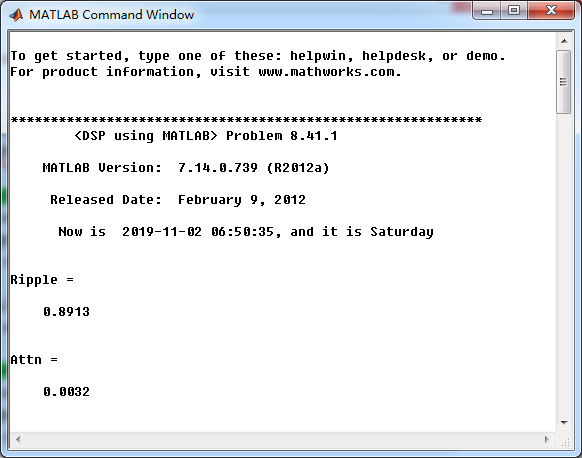
通带、阻带指标,绝对值单位
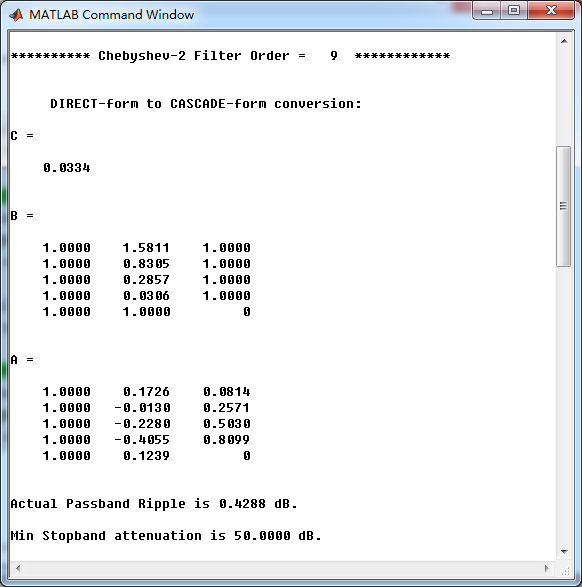
采用cheb2lpf函数,设计的Chebyshev-2型数字低通,系统函数串联形式系数
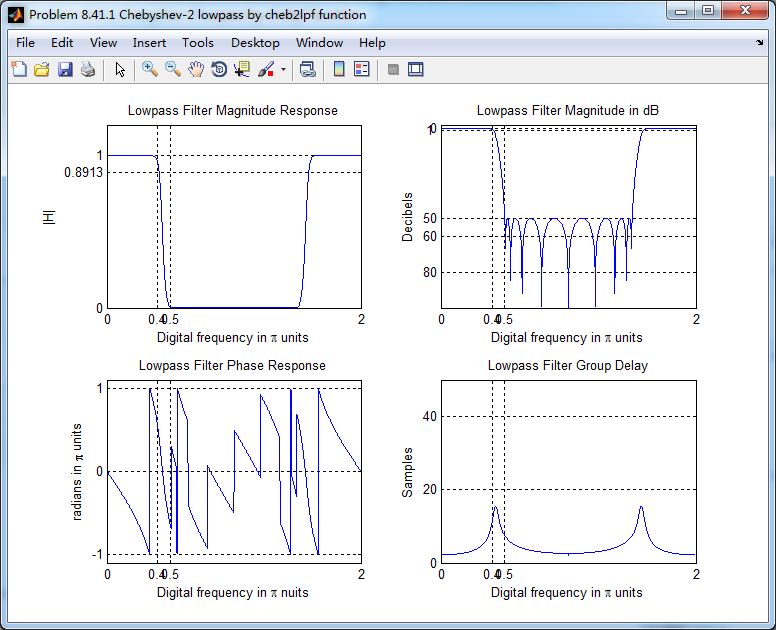
低通,幅度谱、相位谱和群延迟响应
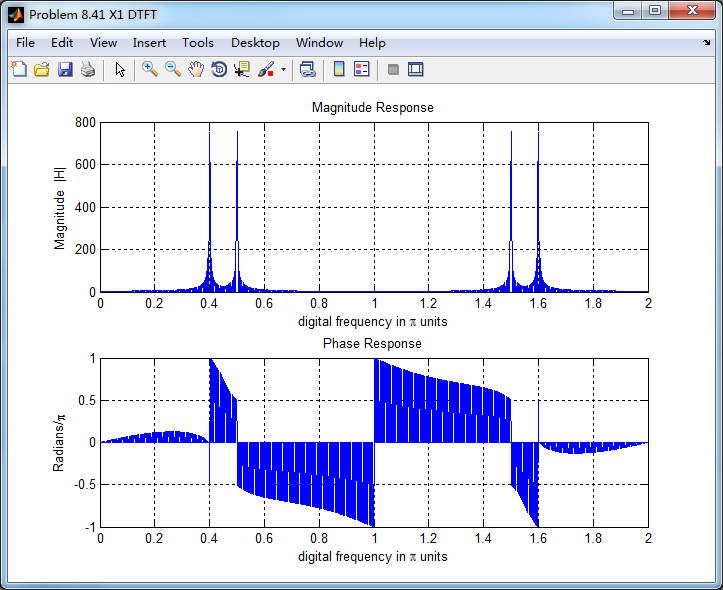
采样信号的谱(DTFT变换),可看出,有两个数字频率分量,0.4π和0.5π
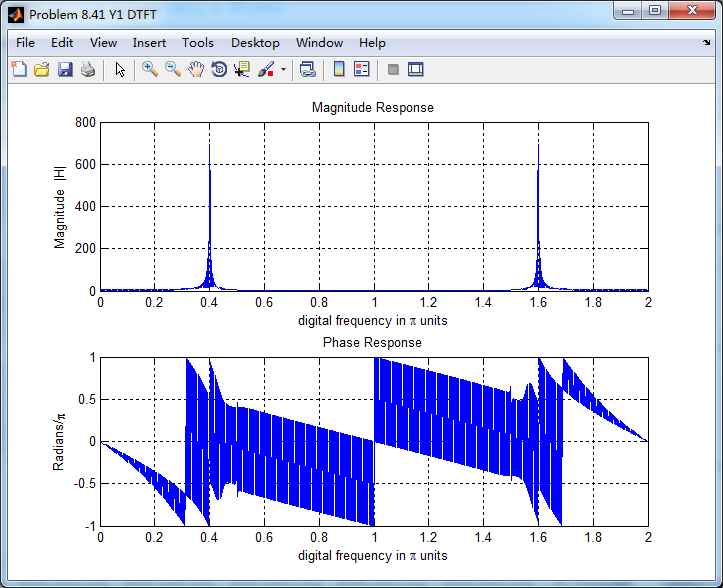
将采样信号通过设计的Chebyshev-2数字低通,得到输出y(n),其频谱如下,可看出,滤除了0.5π分量,仅保留0.4π分量
对离散信号y(n)采用sinc(插值函数)重建连续信号,如下图

《DSP using MATLAB》Problem 8.41的更多相关文章
- 《DSP using MATLAB》Problem 8.45
代码: %% ------------------------------------------------------------------------ %% Output Info about ...
- 《DSP using MATLAB》Problem 8.44
代码: %% ------------------------------------------------------------------------ %% Output Info about ...
- 《DSP using MATLAB》Problem 7.36
代码: %% ++++++++++++++++++++++++++++++++++++++++++++++++++++++++++++++++++++++++++++++++ %% Output In ...
- 《DSP using MATLAB》Problem 7.27
代码: %% ++++++++++++++++++++++++++++++++++++++++++++++++++++++++++++++++++++++++++++++++ %% Output In ...
- 《DSP using MATLAB》Problem 7.26
注意:高通的线性相位FIR滤波器,不能是第2类,所以其长度必须为奇数.这里取M=31,过渡带里采样值抄书上的. 代码: %% +++++++++++++++++++++++++++++++++++++ ...
- 《DSP using MATLAB》Problem 7.25
代码: %% ++++++++++++++++++++++++++++++++++++++++++++++++++++++++++++++++++++++++++++++++ %% Output In ...
- 《DSP using MATLAB》Problem 7.24
又到清明时节,…… 注意:带阻滤波器不能用第2类线性相位滤波器实现,我们采用第1类,长度为基数,选M=61 代码: %% +++++++++++++++++++++++++++++++++++++++ ...
- 《DSP using MATLAB》Problem 7.23
%% ++++++++++++++++++++++++++++++++++++++++++++++++++++++++++++++++++++++++++++++++ %% Output Info a ...
- 《DSP using MATLAB》Problem 7.16
使用一种固定窗函数法设计带通滤波器. 代码: %% ++++++++++++++++++++++++++++++++++++++++++++++++++++++++++++++++++++++++++ ...
随机推荐
- NX二次开发-UFUN由工程图视图tag获取图纸页tag UF_DRAW_ask_drawing_of_view
#include <uf.h> #include <uf_draw.h> #include <uf_drf.h> #include <uf_obj.h> ...
- NX二次开发-C++的vector用法
#include <algorithm> //vector排序去重 sort( BoxNum.begin(), BoxNum.end()); BoxNum.erase(unique(Box ...
- csp-s模拟测试96
csp-s模拟测试96 $T1$一眼慢速乘,$T2$稍证一手最优性尝试用神奇数据结构优化,无果,弃.$T3$暴力+信仰. 100 03:16:38 95 03:16:56 35 03:17:10 23 ...
- sql中desc的妙用
很多情况下对表内部结构不熟悉,想看下我创建的表里面又多少表明,又想他按照首字母的规律排列, 这时候就要用desc +表名了. desc t_bike_info; hive> desc t_bik ...
- Beaglebone Black的引脚分配
转自:http://blog.csdn.net/daxueba/article/details/50998000 Beaglebone Black的引脚分配 绝大多数的微型开发平台都提供了一些称为GP ...
- JAVA发展历史!
前言 自1946年2月14日世界上首款计算机问世,第一代计算机语言“机器语言”便诞生了,它使用的是最原始的穿孔卡片,这种卡片上使用的语言只有专家才能理解,与人类语言差别极大.这种语言本质上是计算机能识 ...
- Area in Triangle /// oj10229
题目大意: 给出三角形的三个顶点 再给一条绳(绳长不超过三角形周长) 求绳子在三角形中能围出的最大面积 题解链接 http://blog.sina.com.cn/s/blog_6a46cc3f0100 ...
- spring MVC <mvc:annotation-driven>
研究SpringMvc 3.2的<mvc:annotation-driven>默认干了什么 如果不配置其他参数,大致相当于以下的配置文件(参考自org.springframework.we ...
- iOS组件化开发-CocoaPods简介
CocoaPods简介 任何一门开发语言到达一定阶段就会出现第三方的类库管理工具,比如Java的Maven.WEB的Webpack等.在iOS中类库的管理工具-CocoaPods. 利用CocoaPo ...
- centos7.3更换ssh默认登陆端口
说明:本方法目前通用于7.1-7.3 vim /etc/ssh/sshd_config 找到Port 22下面添加一行:Port 12345保存退出. systemctl restart sshd.s ...