
《DSP using MATLAB》Problem 8.45


代码:
%% ------------------------------------------------------------------------

%%            Output Info about this m-file

fprintf('\n***********************************************************\n');

fprintf('        <DSP using MATLAB> Problem 8.45.4 \n\n');

banner();

%% ------------------------------------------------------------------------

%%

%%          Chebyshev-1 bandpass and lowpass, parallel form,

%%          by toolbox function in MATLAB,

%%

%% ------------------------------------------------------------------------

%--------------------------------------------------------

%           PART1 bandpass

% Digital Filter Specifications:   Chebyshev-1 bandpass

% -------------------------------------------------------

wsbp = [0.40*pi 0.90*pi];             % digital stopband freq in rad

wpbp = [0.60*pi 0.80*pi];             % digital passband freq in rad

delta1 = 0.05;

delta2 = 0.01;

Ripple = 0.5-delta1;                     % passband ripple in absolute

Attn = delta2;                           % stopband attenuation in absolute

  Rp = -20*log10(Ripple/0.5);             % passband ripple in dB

  As = -20*log10(Attn/0.5);               % stopband attenuation in dB

% Calculation of Chebyshev-1 filter parameters:

[N, wn] = cheb1ord(wpbp/pi, wsbp/pi, Rp, As);

fprintf('\n  ********* Chebyshev-1 Digital Bandpass Filter Order is = %3.0f \n', 2*N)

% Digital Chebyshev-1 Bandpass Filter Design:

[bbp, abp] = cheby1(N, Rp, wn);

[C, B, A] = dir2cas(0.5*bbp, abp)

% Calculation of Frequency Response:

[dbbp, magbp, phabp, grdbp, wwbp] = freqz_m(0.5*bbp, abp);

% -----------------------------------------------------

%    PART2  lowpass

% Digital Highpass Filter Specifications:

% -----------------------------------------------------

wslp = 0.40*pi;             % digital stopband freq in rad

wplp = 0.30*pi;             % digital passband freq in rad

delta1 = 0.10;

delta2 = 0.01;

Ripple = 1.0-delta1;                     % passband ripple in absolute

Attn = delta2;                           % stopband attenuation in absolute

  Rp = -20*log10(Ripple/1.0);             % passband ripple in dB

  As = -20*log10(Attn/1.0);               % stopband attenuation in dB

% Calculation of Chebyshev-1 filter parameters:

[N, wn] = cheb1ord(wplp/pi, wslp/pi, Rp, As);

fprintf('\n  ********* Chebyshev-1 Digital Lowpass Filter Order is = %3.0f \n', N)

% Digital Chebyshev-1 lowpass Filter Design:

[blp, alp] = cheby1(N, Rp, wn);

[C, B, A] = dir2cas(blp, alp)

% Calculation of Frequency Response:

[dblp, maglp, phalp, grdlp, wwlp] = freqz_m(blp, alp);

% ---------------------------------------------

%      PART3   parallel form of bp and lp

% ---------------------------------------------

abp;

bbp;

alp;

blp;

fprintf('\n  ********* Chebyshev-1 Digital Lowpass parrell with Bandpass Filter *******\n');

fprintf('\n  ********* Coefficients of Direct-Form: *******\n');

a = conv(2*abp, alp)

b = conv(bbp, alp) + conv(blp, 2*abp)

[C, B, A] = dir2cas(b, a)

% Calculation of Frequency Response:

[db, mag, pha, grd, ww] = freqz_m(b, a);

%% -----------------------------------------------------------------

%%                             Plot

%% -----------------------------------------------------------------

figure('NumberTitle', 'off', 'Name', 'Problem 8.45.4 combination of Chebyshev-1 bp and lp, by cheby1 function in MATLAB')

set(gcf,'Color','white');

M = 1;                          % Omega max

subplot(2,2,1); plot(ww/pi, mag); axis([0, M, 0, 1.2]); grid on;

xlabel('Digital frequency in \pi units'); ylabel('|H|'); title('Magnitude Response');

set(gca, 'XTickMode', 'manual', 'XTick', [0, wplp/pi, wsbp(1)/pi, wpbp/pi, wsbp(2)/pi, M]);

set(gca, 'YTickMode', 'manual', 'YTick', [0, 0.01, 0.45, 0.5, 0.9, 1]);

subplot(2,2,2); plot(ww/pi, db); axis([0, M, -100, 2]); grid on;

xlabel('Digital frequency in \pi units'); ylabel('Decibels'); title('Magnitude in dB');

set(gca, 'XTickMode', 'manual', 'XTick', [0, wplp/pi, wsbp(1)/pi, wpbp/pi, wsbp(2)/pi, M]);

set(gca, 'YTickMode', 'manual', 'YTick', [-76, -46, -41, -1, 0]);

set(gca,'YTickLabelMode','manual','YTickLabel',['76'; '46'; '41';'1 ';' 0']);

subplot(2,2,3); plot(ww/pi, pha/pi); axis([0, M, -1.1, 1.1]); grid on;

xlabel('Digital frequency in \pi nuits'); ylabel('radians in \pi units'); title('Phase Response');

set(gca, 'XTickMode', 'manual', 'XTick', [0, wplp/pi, wsbp(1)/pi, wpbp/pi, wsbp(2)/pi, M]);

set(gca, 'YTickMode', 'manual', 'YTick', [-1:0.5:1]);

subplot(2,2,4); plot(ww/pi, grd); axis([0, M, 0, 80]); grid on;

xlabel('Digital frequency in \pi units'); ylabel('Samples'); title('Group Delay');

set(gca, 'XTickMode', 'manual', 'XTick', [0, wplp/pi, wsbp(1)/pi, wpbp/pi, wsbp(2)/pi, M]);

set(gca, 'YTickMode', 'manual', 'YTick', [0:20:80]);

figure('NumberTitle', 'off', 'Name', 'Problem 8.45.4 combination of Chebyshev-1 bp and lp, by cheby1')

set(gcf,'Color','white');

M = 1;                          % Omega max

%subplot(2,2,1);

plot(ww/pi, mag); axis([0, M, 0, 1.2]); grid on;

xlabel('Digital frequency in \pi units'); ylabel('|H|'); title('Magnitude Response');

set(gca, 'XTickMode', 'manual', 'XTick', [0, wplp/pi, wsbp(1)/pi, wpbp/pi, wsbp(2)/pi, M]);

set(gca, 'YTickMode', 'manual', 'YTick', [0, 0.01, 0.45, 0.5, 0.9, 1]);

figure('NumberTitle', 'off', 'Name', 'Problem 8.45.4 Pole-Zero Plot')

set(gcf,'Color','white');

zplane(b, a);

title(sprintf('Pole-Zero Plot'));

%pzplotz(b,a);
运行结果:
看题目设计要求,是Chebyshev-1型低通和带通的组合。
我们先设计带通,系统函数串联形式的系数如下:

其次,Chebyshev-1型数字低通,阶数为7,系统函数串联形式的系数如下:

再次,低通和带通进行组合,等效滤波器的系统函数,直接形式和串联形式,系数分别如下:


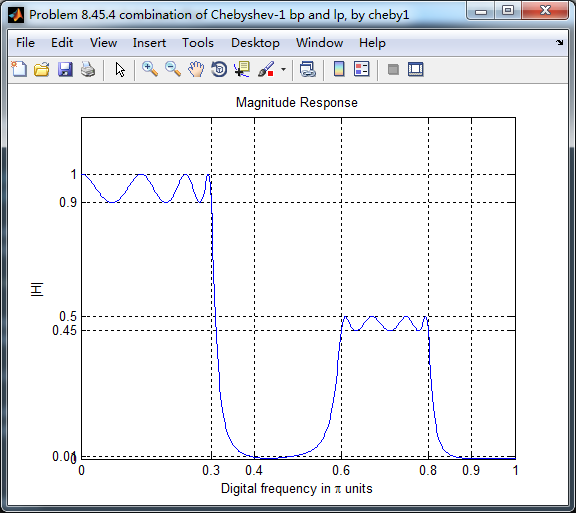
等效滤波器,幅度谱如下,频带边界频率和指标画出直线,
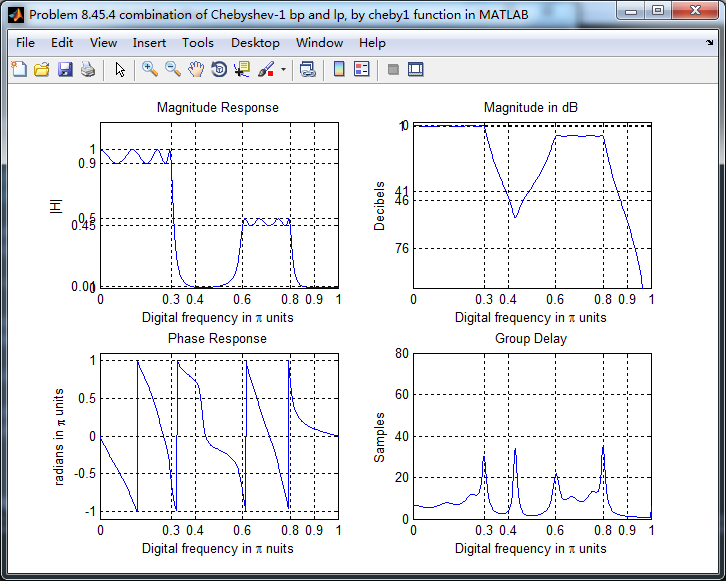
幅度谱、相位谱和群延迟响应
零极点图

《DSP using MATLAB》Problem 8.45的更多相关文章
- 《DSP using MATLAB》Problem 7.27
代码: %% ++++++++++++++++++++++++++++++++++++++++++++++++++++++++++++++++++++++++++++++++ %% Output In ...
- 《DSP using MATLAB》Problem 7.26
注意:高通的线性相位FIR滤波器,不能是第2类,所以其长度必须为奇数.这里取M=31,过渡带里采样值抄书上的. 代码: %% +++++++++++++++++++++++++++++++++++++ ...
- 《DSP using MATLAB》Problem 7.25
代码: %% ++++++++++++++++++++++++++++++++++++++++++++++++++++++++++++++++++++++++++++++++ %% Output In ...
- 《DSP using MATLAB》Problem 7.24
又到清明时节,…… 注意:带阻滤波器不能用第2类线性相位滤波器实现,我们采用第1类,长度为基数,选M=61 代码: %% +++++++++++++++++++++++++++++++++++++++ ...
- 《DSP using MATLAB》Problem 7.23
%% ++++++++++++++++++++++++++++++++++++++++++++++++++++++++++++++++++++++++++++++++ %% Output Info a ...
- 《DSP using MATLAB》Problem 7.15
用Kaiser窗方法设计一个台阶状滤波器. 代码: %% +++++++++++++++++++++++++++++++++++++++++++++++++++++++++++++++++++++++ ...
- 《DSP using MATLAB》Problem 7.14
代码: %% ++++++++++++++++++++++++++++++++++++++++++++++++++++++++++++++++++++++++++++++++ %% Output In ...
- 《DSP using MATLAB》Problem 7.13
代码: %% ++++++++++++++++++++++++++++++++++++++++++++++++++++++++++++++++++++++++++++++++ %% Output In ...
- 《DSP using MATLAB》Problem 7.12
阻带衰减50dB,我们选Hamming窗 代码: %% ++++++++++++++++++++++++++++++++++++++++++++++++++++++++++++++++++++++++ ...
随机推荐
- (15)centos7 系统服务
centos7 服务启动脚本在 /usr/lib/systemd目录下 1.服务基本操作指令 systemclt [command] [unit] #其中command包括: #start 立即启动 ...
- PHP面试 PHP基础知识 八(会话控制)
---恢复内容开始--- PHP会话控制技术 首先了解一下为什么要使用会话控制技术? 本身web 与服务器的交互是通过HTTP协议来实现的,而HTTP协议又是无状态协议.就是说明HTTP协议没有一个內 ...
- RabbitMQ使用(一)
1. 安装与使用 1. 激活 RabbitMQ's Management Plugin (前面跟绝对路径) "D:\娱乐\rabbitmq_server-3.6.5\sbin\rabbitm ...
- CentOS 搭建dns服务器 解析任意域名
DNS服务器IP地址:192.168.1.219 服务器版本:centos6.6一:软件安装 [root@localhost ~]# yum -y install bind* 二:修改主配置文件 [r ...
- Gradle任务
Gradle构建脚本描述一个或多个项目.每个项目都由不同的任务组成.任务是构建执行的一项工作.任务可以是编译一些类,将类文件存储到单独的目标文件夹中,创建JAR,生成Javadoc或将一些归档发布到存 ...
- MySql 主从复制及深入了解
分享一个不错的mysql文章 https://segmentfault.com/a/1190000008942618
- vs2013 命名空间“Microsoft.Office”中不存在类型或命名空间名称“Interop”。是否缺少程序集引用?
参考博文: 解决办法:添加引用/com/Microsoft Office 11.0 Object Library 然后在程序中 C#代码 using Microsoft.Office.Interop. ...
- oracle密码过期,改为原来的密码
我们都知道Oracle 数据库的用户的密码默认是有有效期限制的,特别是在Cloud上面的DB,有些用户是Cloud自动创建的,我们不知道原来的密码是什么,但是如果密码过期了,如果修改成新的密码,会影响 ...
- unlocked - 非锁定的标准输入输出函数
SYNOPSIS 总览 #include <stdio.h> int getc_unlocked(FILE *stream); int getchar_unlocked(void); in ...
- ubuntu QT安装以及配置交叉编译环境
我的环境:ubuntu14.04 64位 1.下载Qt: 上网搜索 qt-opensource-linux-x64-5.3.0.run下载有好多百度云盘 要么在官网下载追新版本http://down ...