
《DSP using MATLAB》Problem 2.6
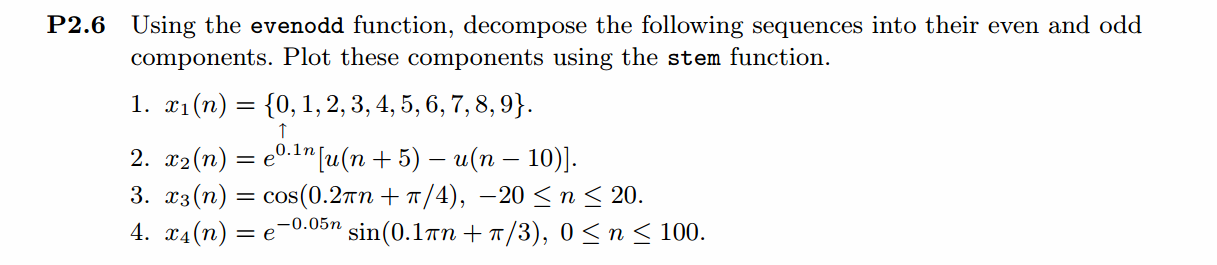
1、代码
%% ------------------------------------------------------------------------

%%            Output Info about this m-file

fprintf('\n***********************************************************\n');

fprintf('        <DSP using MATLAB> Problem 2.6.1 \n\n');

[v, d] = version;

fprintf('    MATLAB Version: %20s\n\n', v);

fprintf('     Released Date: %17s\n\n', d);

time_stamp = datestr(now, 31);

[wkd1, wkd2] = weekday(today, 'long');

fprintf('      Today is %7s, and Now is %20s   \n\n', wkd2, time_stamp);

%% ------------------------------------------------------------------------

n = [0:9];

%x = stepseq(0,0,10) - stepseq(10,0,10);

x = [0, 1, 2, 3, 4, 5, 6, 7, 8, 9];

[xe,xo,m] = evenodd(x,n);

figure('NumberTitle', 'off', 'Name', 'Problem 2.6')

set(gcf,'Color',[1,1,1])                  % 改变坐标外围背景颜色

stem(n,x); title('x sequence ');

xlabel('n'); ylabel('x(n)') ;

% axis([-10,10,0,1.2])

grid on

figure('NumberTitle', 'off', 'Name', 'Problem 2.6')

set(gcf,'Color',[1,1,1])

stem(m,xe); title('Even Part');

xlabel('n'); ylabel('xe(n)');

%axis([-10,10,0,1.2])

grid on

figure('NumberTitle', 'off', 'Name', 'Problem 2.6')

set(gcf,'Color','white')

stem(m,xo); title('Odd Part');

xlabel('n'); ylabel('xo(n)');

%axis([-10,10,-0.6,0.6])

grid on
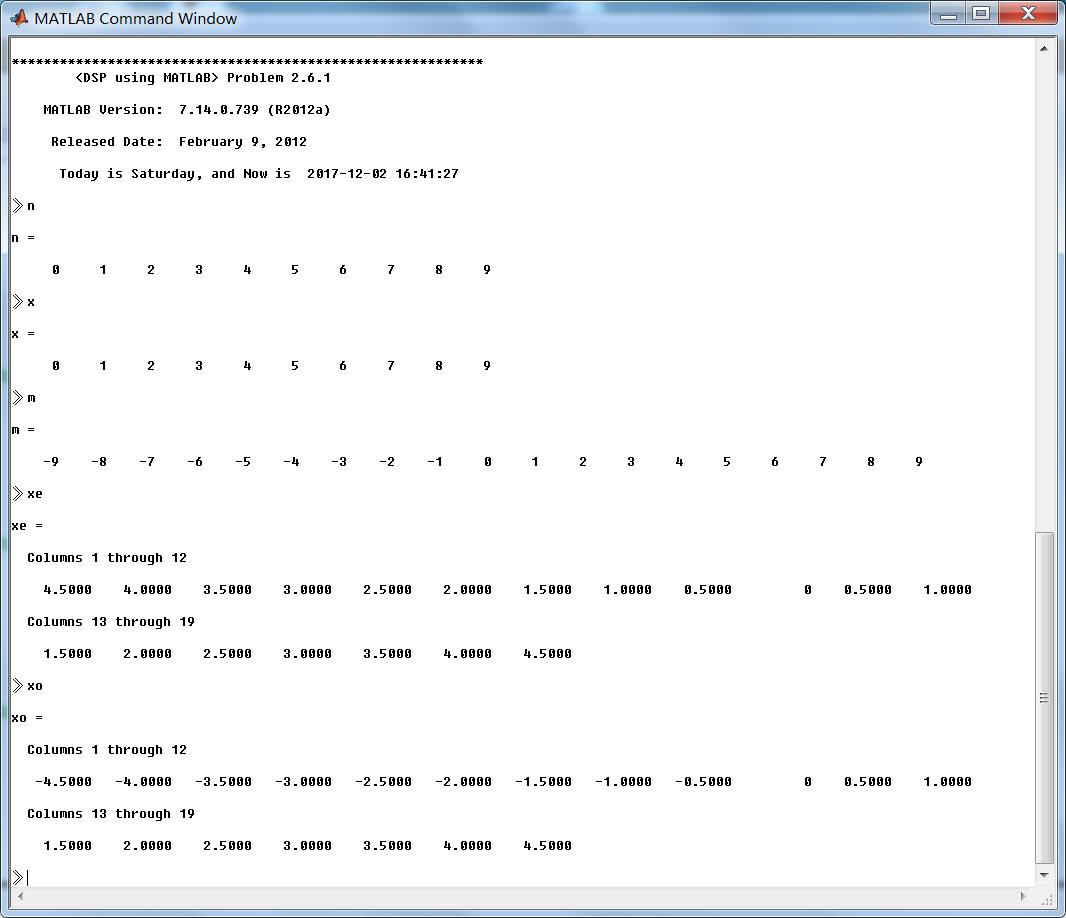
运行结果:


2、代码
%% ------------------------------------------------------------------------

%%            Output Info about this m-file

fprintf('\n***********************************************************\n');

fprintf('        <DSP using MATLAB> Problem 2.6.2 \n\n');

[v, d] = version;

fprintf('    MATLAB Version: %20s\n\n', v);

fprintf('     Released Date: %17s\n\n', d);

time_stamp = datestr(now, 31);

[wkd1, wkd2] = weekday(today, 'long');

fprintf('      Today is %7s, and Now is %20s   \n\n', wkd2, time_stamp);

%% ------------------------------------------------------------------------

n = [-5:10];

x = exp(0.1 * n) .* (stepseq(-5,-5,10) - stepseq(10,-5,10));

[xe,xo,m] = evenodd(x,n);

figure('NumberTitle', 'off', 'Name', 'Problem 2.6')

set(gcf,'Color',[1,1,1])                  % 改变坐标外围背景颜色

stem(n,x); title('x sequence ');

xlabel('n'); ylabel('x(n)') ;

% axis([-10,10,0,1.2])

grid on

figure('NumberTitle', 'off', 'Name', 'Problem 2.6')

set(gcf,'Color',[1,1,1])

stem(m,xe); title('Even Part');

xlabel('n'); ylabel('xe(n)');

%axis([-10,10,0,1.2])

grid on

figure('NumberTitle', 'off', 'Name', 'Problem 2.6')

set(gcf,'Color','white')

stem(m,xo); title('Odd Part');

xlabel('n'); ylabel('xo(n)');

%axis([-10,10,-0.6,0.6])

grid on
运行结果:


3、代码
%% ------------------------------------------------------------------------

%%            Output Info about this m-file

fprintf('\n***********************************************************\n');

fprintf('        <DSP using MATLAB> Problem 2.6.3 \n\n');

[v, d] = version;

fprintf('    MATLAB Version: %20s\n\n', v);

fprintf('     Released Date: %17s\n\n', d);

time_stamp = datestr(now, 31);

[wkd1, wkd2] = weekday(today, 'long');

fprintf('      Today is %7s, and Now is %20s   \n\n', wkd2, time_stamp);

%% ------------------------------------------------------------------------

n = [-20:20];

x = cos(0.2 * pi * n + pi/4);

[xe,xo,m] = evenodd(x,n);

figure('NumberTitle', 'off', 'Name', 'Problem 2.6')

set(gcf,'Color',[1,1,1])                  % 改变坐标外围背景颜色

stem(n,x); title('x sequence ');

xlabel('n'); ylabel('x(n)') ;

% axis([-10,10,0,1.2])

grid on

figure('NumberTitle', 'off', 'Name', 'Problem 2.6')

set(gcf,'Color',[1,1,1])

stem(m,xe); title('Even Part');

xlabel('n'); ylabel('xe(n)');

%axis([-10,10,0,1.2])

grid on

figure('NumberTitle', 'off', 'Name', 'Problem 2.6')

set(gcf,'Color','white')

stem(m,xo); title('Odd Part');

xlabel('n'); ylabel('xo(n)');

%axis([-10,10,-0.6,0.6])

grid on
运行结果:


4、代码
%% ------------------------------------------------------------------------

%%            Output Info about this m-file

fprintf('\n***********************************************************\n');

fprintf('        <DSP using MATLAB> Problem 2.6.4 \n\n');

[v, d] = version;

fprintf('    MATLAB Version: %20s\n\n', v);

fprintf('     Released Date: %17s\n\n', d);

time_stamp = datestr(now, 31);

[wkd1, wkd2] = weekday(today, 'long');

fprintf('      Today is %7s, and Now is %20s   \n\n', wkd2, time_stamp);

%% ------------------------------------------------------------------------

n = [0:100];

x = exp(-0.05 * n) .* sin(0.1 * pi * n + pi/3);

[xe,xo,m] = evenodd(x,n);

figure('NumberTitle', 'off', 'Name', 'Problem 2.6')

set(gcf,'Color',[1,1,1])                  % 改变坐标外围背景颜色

stem(n,x); title('x sequence ');

xlabel('n'); ylabel('x(n)') ;

% axis([-10,10,0,1.2])

grid on

figure('NumberTitle', 'off', 'Name', 'Problem 2.6')

set(gcf,'Color',[1,1,1])

stem(m,xe); title('Even Part');

xlabel('n'); ylabel('xe(n)');

%axis([-10,10,0,1.2])

grid on

figure('NumberTitle', 'off', 'Name', 'Problem 2.6')

set(gcf,'Color','white')

stem(m,xo); title('Odd Part');

xlabel('n'); ylabel('xo(n)');

%axis([-10,10,-0.6,0.6])

grid on
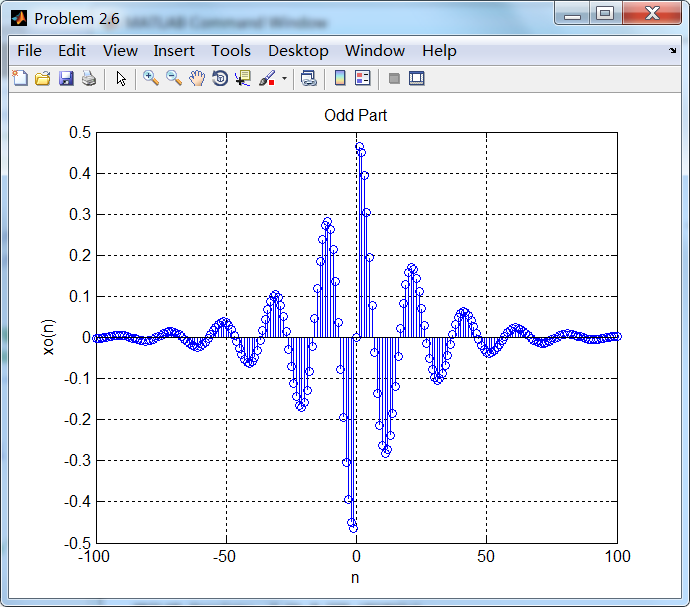
运行结果:


《DSP using MATLAB》Problem 2.6的更多相关文章
- 《DSP using MATLAB》Problem 7.27
代码: %% ++++++++++++++++++++++++++++++++++++++++++++++++++++++++++++++++++++++++++++++++ %% Output In ...
- 《DSP using MATLAB》Problem 7.26
注意:高通的线性相位FIR滤波器,不能是第2类,所以其长度必须为奇数.这里取M=31,过渡带里采样值抄书上的. 代码: %% +++++++++++++++++++++++++++++++++++++ ...
- 《DSP using MATLAB》Problem 7.25
代码: %% ++++++++++++++++++++++++++++++++++++++++++++++++++++++++++++++++++++++++++++++++ %% Output In ...
- 《DSP using MATLAB》Problem 7.24
又到清明时节,…… 注意:带阻滤波器不能用第2类线性相位滤波器实现,我们采用第1类,长度为基数,选M=61 代码: %% +++++++++++++++++++++++++++++++++++++++ ...
- 《DSP using MATLAB》Problem 7.23
%% ++++++++++++++++++++++++++++++++++++++++++++++++++++++++++++++++++++++++++++++++ %% Output Info a ...
- 《DSP using MATLAB》Problem 7.16
使用一种固定窗函数法设计带通滤波器. 代码: %% ++++++++++++++++++++++++++++++++++++++++++++++++++++++++++++++++++++++++++ ...
- 《DSP using MATLAB》Problem 7.15
用Kaiser窗方法设计一个台阶状滤波器. 代码: %% +++++++++++++++++++++++++++++++++++++++++++++++++++++++++++++++++++++++ ...
- 《DSP using MATLAB》Problem 7.14
代码: %% ++++++++++++++++++++++++++++++++++++++++++++++++++++++++++++++++++++++++++++++++ %% Output In ...
- 《DSP using MATLAB》Problem 7.13
代码: %% ++++++++++++++++++++++++++++++++++++++++++++++++++++++++++++++++++++++++++++++++ %% Output In ...
- 《DSP using MATLAB》Problem 7.12
阻带衰减50dB,我们选Hamming窗 代码: %% ++++++++++++++++++++++++++++++++++++++++++++++++++++++++++++++++++++++++ ...
随机推荐
- Spring—切点表达式
摘要: Spring中的AspectJ切点表达式函数 切点表达式函数就像我们的GPS导航软件.通过切点表达式函数,再配合通配符和逻辑运算符的灵活运用,我们能很好定位到我们需要织入增强的连接点上.经过上 ...
- Android中解析XML格式数据的方法
XML介绍:Extensible Markup Language,即可扩展标记语言 一.概述 Android中解析XML格式数据大致有三种方法: SAX DOM PULL 二.详解 2.1 SAX S ...
- java第七天
p38~p41: 1.可以通过import 一个自定义类库(或者网上下的)在java中使用c风格的输入输出方式. 2.忘记优先顺序时应该用括号明确规定计算顺序. 3.java的操作符不同于c++,几乎 ...
- SQL学习笔记五之MySQL索引原理与慢查询优化
阅读目录 一 介绍 二 索引的原理 三 索引的数据结构 四 聚集索引与辅助索引 五 MySQL索引管理 六 测试索引 七 正确使用索引 八 联合索引与覆盖索引 九 查询优化神器-explain 十 慢 ...
- 对OpenCV中seamlessClone的初步实验
seamlessClone是OpenCV中新出现的函数,应该说如果能够基于较为准确的图像分割,能够得到很好的结果. 原始的前景,背景 三种flag下的融合结果 //注意头文件中添加 #inclu ...
- Java静态内存与动态内存分配的解析
1. 静态内存 静态内存是指在程序开始运行时由编译器分配的内存,它的分配是在程序开始编译时完成的,不占用CPU资源. 程序中的各种变量,在编译时系统已经为其分配了所需的内存空间,当该变量在作用域内使用 ...
- LeetCode——Rotate Image
1. Question You are given an n x n 2D matrix representing an image. Rotate the image by 90 degrees ( ...
- 利用ES6中的Array.find/ Array.findIndex来判断数组中已存在某个对象
前端开发过程中,我们会经常遇到这样的情景:比如选中某个指标obj,将其加入到数组checkedArr中({id: 1234, name: 'zzz', ...}),但是在将其选中之前要校验该指标是否已 ...
- 嵌入式Linux应用程序开发环境搭建记录
2016年2月 参考资料: OK210软件手册(Linux版).pdf Ubuntu下Qt4.7.1编译环境配置说明.pdf 我阅读了以下内容: OK210软件手册(Linux版).pdf 第七章 O ...
- P4factory ReadMe Quickstart 安装p4factory
操作系统: Ubuntu 14.04 前言 在之前,我直接从P4.org给的GitHub网址上下载了p4factory,但是在根据ReadMe的内容进行QuickStart的时候,发生了shell脚本 ...