
《DSP using MATLAB》Problem 3.7
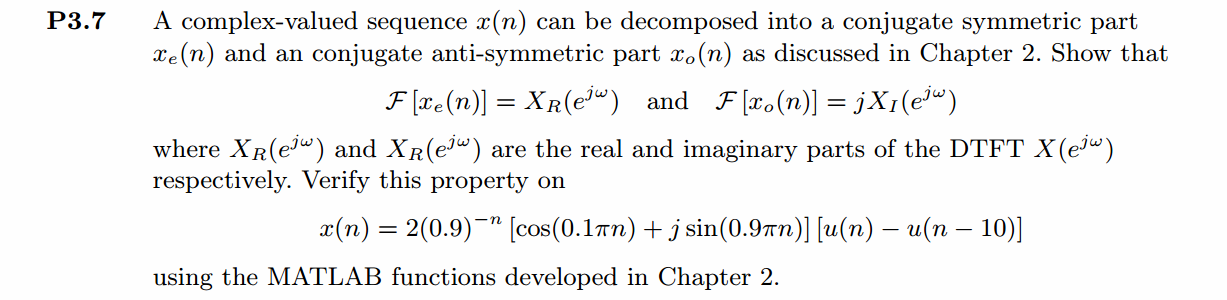
一个复数序列可以分解为共轭偶对称和共轭奇对称部分。
代码:
%% ------------------------------------------------------------------------

%%            Output Info about this m-file

fprintf('\n***********************************************************\n');

fprintf('        <DSP using MATLAB> Problem 3.7 \n\n');

banner();

%% ------------------------------------------------------------------------

n_start = -10; n_end = 20;

n = [n_start:n_end];

x = 2 * (0.9 .^(-n)) .* (cos(0.1*pi*n) + j*sin(0.9*pi*n)) .* (stepseq(0, n_start, n_end)-stepseq(10, n_start, n_end));

[xe,xo,m] = evenodd_cv(x,n);

figure('NumberTitle', 'off', 'Name', 'Problem 3.7 x(n)')

set(gcf,'Color',[1,1,1])                  % 改变坐标外围背景颜色

subplot(2,1,1); stem(n, real(x)); title('x sequence Real Part');

xlabel('n'); ylabel('Real[x(n)]') ;

% axis([-10,10,0,1.2])

grid on

subplot(2,1,2); stem(n, imag(x)); title('x sequence Imag Part');

xlabel('n'); ylabel('Imag[x(n)]');

grid on;

figure('NumberTitle', 'off', 'Name', 'Problem 3.7 xe(m)')

set(gcf,'Color',[1,1,1])

subplot(2,1,1); stem(m, real(xe)); title('Real Part of Even Sequence');

xlabel('m'); ylabel('Real[xe(m)]');

%axis([-10,10,0,1.2])

grid on

subplot(2,1,2); stem(m, imag(xe)); title('Imag Part of Even Sequence');

xlabel('m'); ylabel('Imag[xe(m)]');

%axis([-10,10,0,1.2])

grid on

figure('NumberTitle', 'off', 'Name', 'Problem 3.7 xo(m)')

set(gcf,'Color','white')

subplot(2,1,1); stem(m, real(xo)); title('Real Part of Odd Sequence');

xlabel('m'); ylabel('Real[xo(m)]');

%axis([-10,10,0,1.2])

grid on

subplot(2,1,2); stem(m, imag(xo)); title('Imag Part of Odd Sequence');

xlabel('m'); ylabel('Imag[xo(m)]');

%axis([-10,10,0,1.2])

grid on

% ----------------------------------------------

%           DTFT of x(n)

% ----------------------------------------------

MM = 500;

k = [-MM:MM];        % [-pi, pi]

%k = [0:M];        % [0, pi]

w = (pi/MM) * k;

[X] = dtft(x, n, w);

magX = abs(X); angX = angle(X); realX = real(X); imagX = imag(X);

figure('NumberTitle', 'off', 'Name', 'Problem 3.7 DTFT of x(n)');

set(gcf,'Color','white');

subplot(2,1,1); plot(w/pi, magX); grid on;

title('Magnitude Part');

xlabel('frequency in \pi units'); ylabel('Magnitude');

subplot(2,1,2); plot(w/pi, angX); grid on;

title('Angle Part');

xlabel('frequency in \pi units'); ylabel('Radians');

figure('NumberTitle', 'off', 'Name', 'Problem 3.7 Real and Imag of X(jw)');

set(gcf,'Color','white');

subplot('2,1,1'); plot(w/pi, realX); grid on;

title('Real Part');

xlabel('frequency in \pi units'); ylabel('Real');

subplot('2,1,2'); plot(w/pi, imagX); grid on;

title('Imaginary Part');

xlabel('frequency in \pi units'); ylabel('Imaginary');

% ---------------------------------------------------

%                   DTFT of xe(m)

% ---------------------------------------------------

MM = 500;

k = [-MM:MM];        % [-pi, pi]

%k = [0:M];        % [0, pi]

w = (pi/MM) * k;

[XE] = dtft(xe, m, w);

magXE = abs(XE); angXE = angle(XE); realXE = real(XE); imagXE = imag(XE);

figure('NumberTitle', 'off', 'Name', 'Problem 3.7 DTFT of xe(m)');

set(gcf,'Color','white');

subplot(2,1,1); plot(w/pi, magXE); grid on;

title('Magnitude Part');

xlabel('frequency in \pi units'); ylabel('Magnitude');

subplot(2,1,2); plot(w/pi, angXE); grid on;

title('Angle Part');

xlabel('frequency in \pi units'); ylabel('Radians');

figure('NumberTitle', 'off', 'Name', 'Problem 3.7 Real and Imag of XE(jw)');

set(gcf,'Color','white');

subplot('2,1,1'); plot(w/pi, realXE); grid on;

title('Real Part');

xlabel('frequency in \pi units'); ylabel('Real');

subplot('2,1,2'); plot(w/pi, imagXE); grid on;

title('Imaginary Part');

xlabel('frequency in \pi units'); ylabel('Imaginary');

% ---------------------------------------------------

%                   DTFT of xo(m)

% ---------------------------------------------------

MM = 500;

k = [-MM:MM];        % [-pi, pi]

%k = [0:M];        % [0, pi]

w = (pi/MM) * k;

[XO] = dtft(xo, m, w);

magXO = abs(XO); angXO = angle(XO); realXO = real(XO); imagXO = imag(XO);

figure('NumberTitle', 'off', 'Name', 'Problem 3.7 DTFT of xo(m)');

set(gcf,'Color','white');

subplot(2,1,1); plot(w/pi, magXO); grid on;

title('Magnitude Part');

xlabel('frequency in \pi units'); ylabel('Magnitude');

subplot(2,1,2); plot(w/pi, angXO); grid on;

title('Angle Part');

xlabel('frequency in \pi units'); ylabel('Radians');

figure('NumberTitle', 'off', 'Name', 'Problem 3.7 Real and Imag of XO(jw)');

set(gcf,'Color','white');

subplot('2,1,1'); plot(w/pi, realXO); grid on;

title('Real Part');

xlabel('frequency in \pi units'); ylabel('Real');

subplot('2,1,2'); plot(w/pi, imagXO); grid on;

title('Imaginary Part');

xlabel('frequency in \pi units'); ylabel('Imaginary');

% ------------------------------------------

%             Verify

% ------------------------------------------

figure('NumberTitle', 'off', 'Name', 'Problem 3.7 RealX and RealXE');

set(gcf,'Color','white');

subplot('2,1,1'); plot(w/pi, realX); grid on;

title('Real Part of X(jw)');

xlabel('frequency in \pi units'); ylabel('Real');

subplot('2,1,2'); plot(w/pi, realXE); grid on;

title('Real Part of XE(jw)');

xlabel('frequency in \pi units'); ylabel('Real');

figure('NumberTitle', 'off', 'Name', 'Problem 3.7 ImagX and ImagXO');

set(gcf,'Color','white');

subplot('2,1,1'); plot(w/pi, imagX); grid on;

title('Imaginary Part of X(jw)');

xlabel('frequency in \pi units'); ylabel('Imaginary');

subplot('2,1,2'); plot(w/pi, imagXO); grid on;

title('Imaginary Part of XO(jw)');

xlabel('frequency in \pi units'); ylabel('Imaginary');
运行结果:
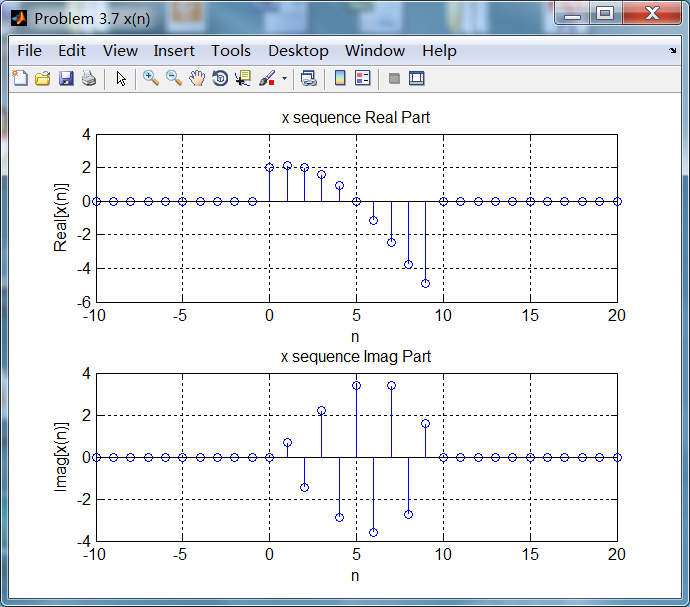
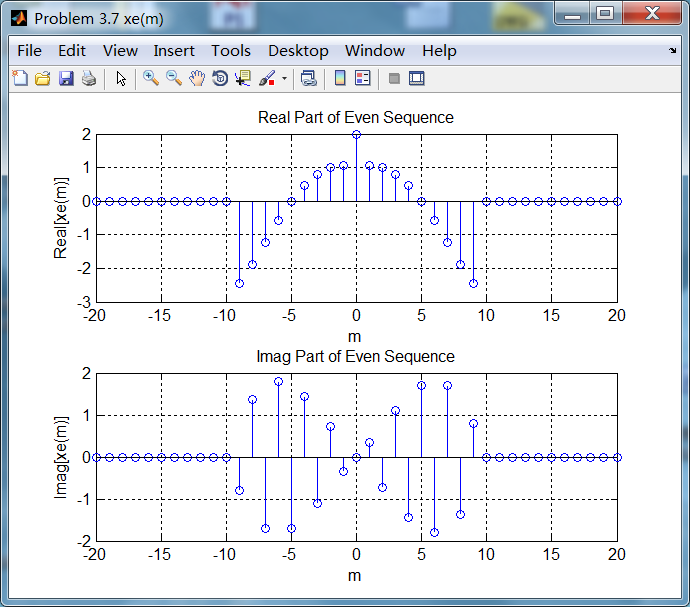
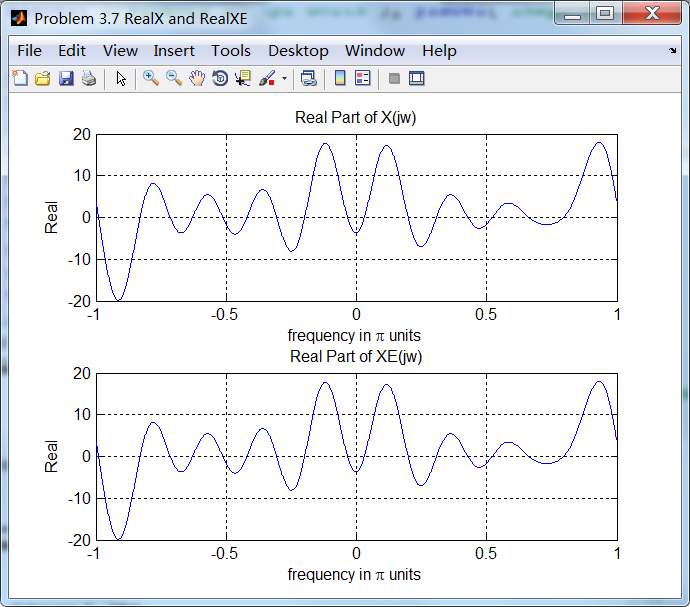
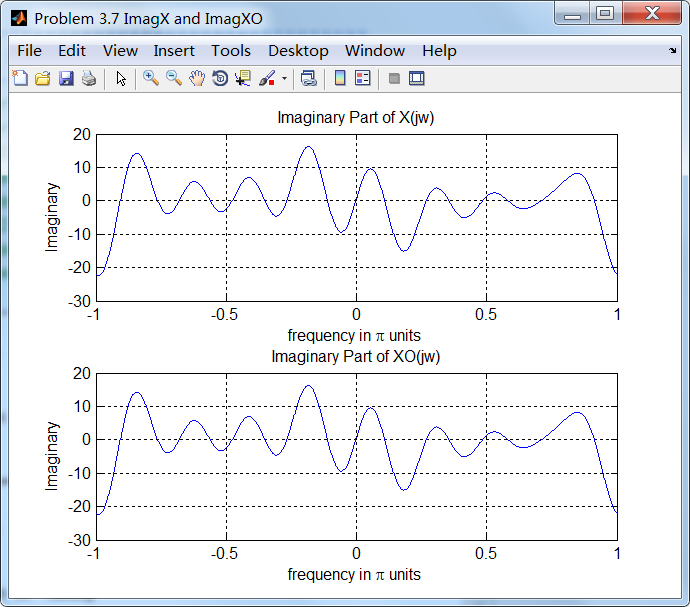
1、原始序列,及其共轭奇偶分解(都是复数序列);

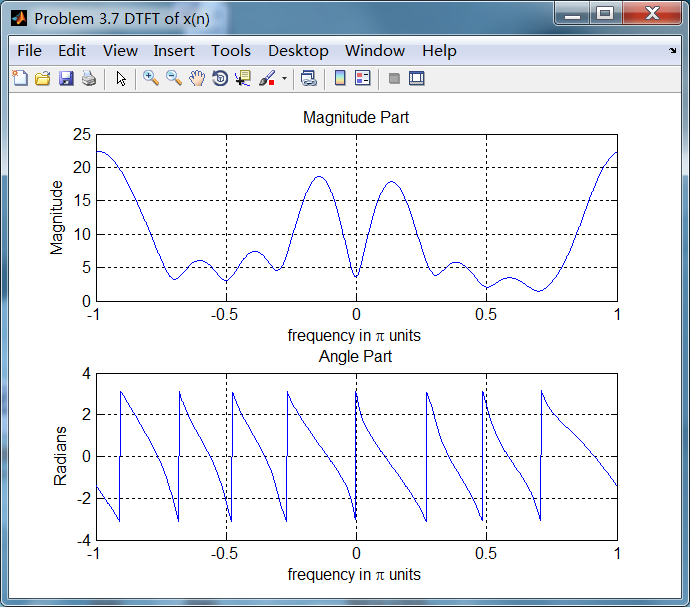
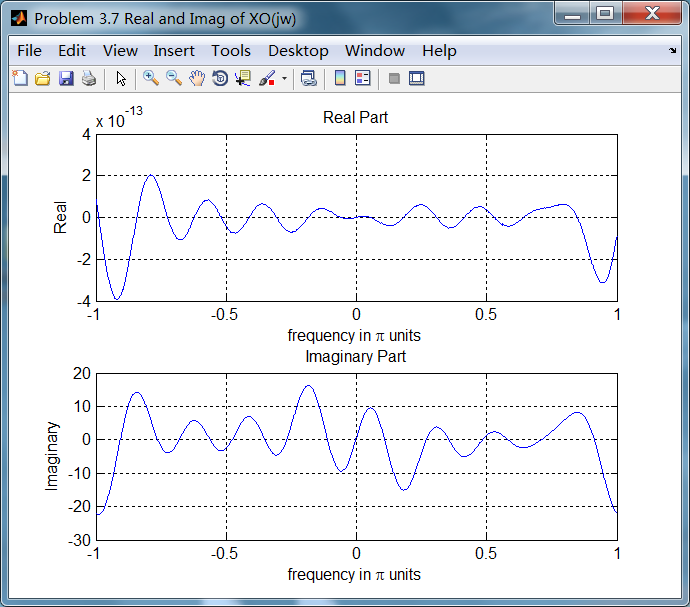
2、原始序列的DTFT,幅度谱和相位谱,实部和虚部;
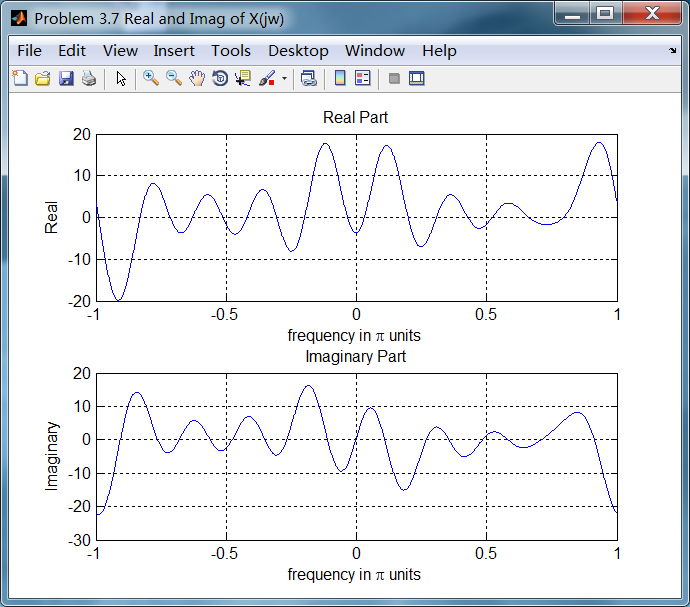
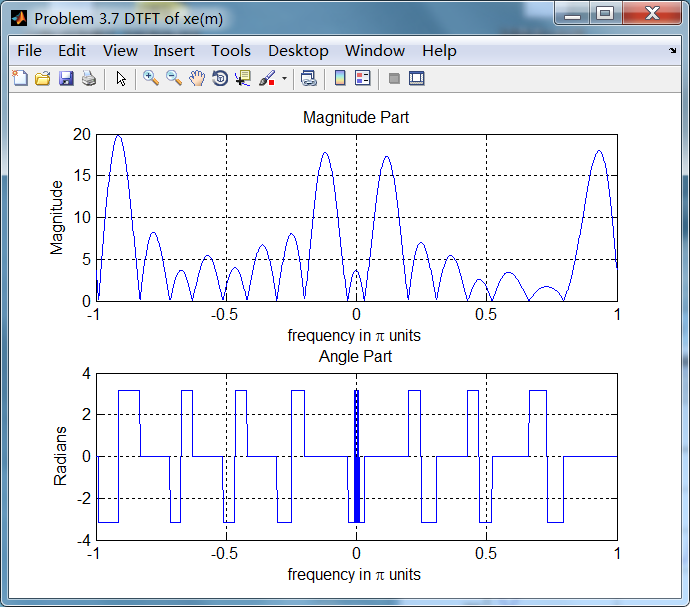
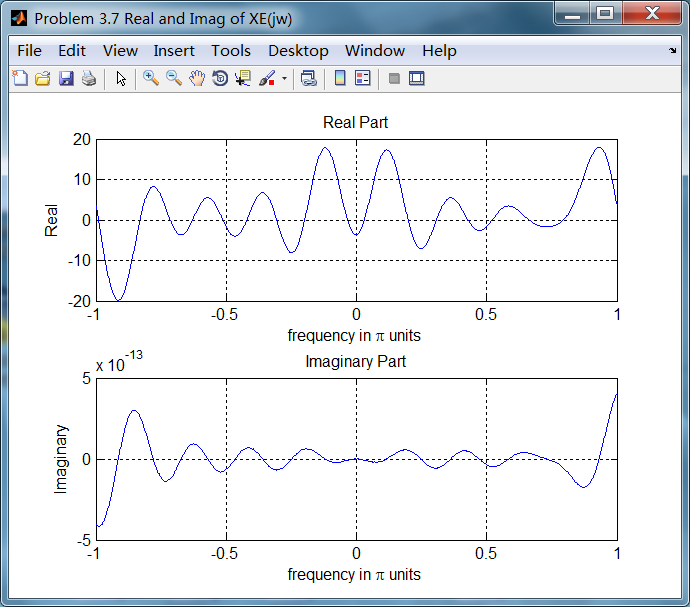
3、共轭偶(奇)对称序列的DTFT
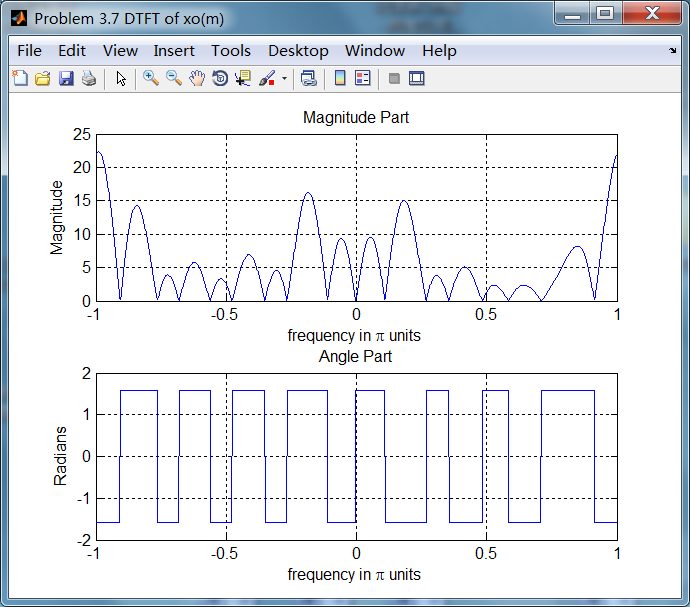
4、共轭奇对称序列的DTFT
5、结论
原始序列谱的实部和共轭偶对称序列的谱相同;
原始序列谱的虚部和共轭奇对称序列的谱相同;
《DSP using MATLAB》Problem 3.7的更多相关文章
- 《DSP using MATLAB》Problem 7.27
代码: %% ++++++++++++++++++++++++++++++++++++++++++++++++++++++++++++++++++++++++++++++++ %% Output In ...
- 《DSP using MATLAB》Problem 7.26
注意:高通的线性相位FIR滤波器,不能是第2类,所以其长度必须为奇数.这里取M=31,过渡带里采样值抄书上的. 代码: %% +++++++++++++++++++++++++++++++++++++ ...
- 《DSP using MATLAB》Problem 7.25
代码: %% ++++++++++++++++++++++++++++++++++++++++++++++++++++++++++++++++++++++++++++++++ %% Output In ...
- 《DSP using MATLAB》Problem 7.24
又到清明时节,…… 注意:带阻滤波器不能用第2类线性相位滤波器实现,我们采用第1类,长度为基数,选M=61 代码: %% +++++++++++++++++++++++++++++++++++++++ ...
- 《DSP using MATLAB》Problem 7.23
%% ++++++++++++++++++++++++++++++++++++++++++++++++++++++++++++++++++++++++++++++++ %% Output Info a ...
- 《DSP using MATLAB》Problem 7.16
使用一种固定窗函数法设计带通滤波器. 代码: %% ++++++++++++++++++++++++++++++++++++++++++++++++++++++++++++++++++++++++++ ...
- 《DSP using MATLAB》Problem 7.15
用Kaiser窗方法设计一个台阶状滤波器. 代码: %% +++++++++++++++++++++++++++++++++++++++++++++++++++++++++++++++++++++++ ...
- 《DSP using MATLAB》Problem 7.14
代码: %% ++++++++++++++++++++++++++++++++++++++++++++++++++++++++++++++++++++++++++++++++ %% Output In ...
- 《DSP using MATLAB》Problem 7.13
代码: %% ++++++++++++++++++++++++++++++++++++++++++++++++++++++++++++++++++++++++++++++++ %% Output In ...
- 《DSP using MATLAB》Problem 7.12
阻带衰减50dB,我们选Hamming窗 代码: %% ++++++++++++++++++++++++++++++++++++++++++++++++++++++++++++++++++++++++ ...
随机推荐
- [ORA-28001: the password has expired]的处理
http://irikintwtr.com/wordpress/?p=420 alter profile default limit password_life_time unlimited; alt ...
- Confluence 6 完成你的任务
很好,宇航员们,你已经令人钦佩的展示了你自己的.我们确定你新招募的员工已经对你了解的 Confluence 知识感到赞叹. 在这个指南中,我们已经完成了: 在主面板中对 Confluence 的功能进 ...
- Android设置全局Context
新建一个java继承Application类 import android.app.Application; import android.content.Context; /** * 编写自定义Ap ...
- 『科学计算』图像检测微型demo
这里是课上老师给出的一个示例程序,演示图像检测的过程,本来以为是传统的滑窗检测,但实际上引入了selectivesearch来选择候选窗,所以看思路应该是RCNN的范畴,蛮有意思的,由于老师的注释写的 ...
- Sunday算法[原创]
一.应用: 同样的,sunday算法也是在一个字符串中查找另一个字符串出现的首地址,是Daniel M.Sunday于1990年提出的,从销量上讲,Sunday>BM>KMP,是这类问题的 ...
- UVA-1322 Minimizing Maximizer (DP+线段树优化)
题目大意:给一个长度为n的区间,m条线段序列,找出这个序列的一个最短子序列,使得区间完全被覆盖. 题目分析:这道题不难想,定义状态dp(i)表示用前 i 条线段覆盖区间1~第 i 线段的右端点需要的最 ...
- mysql 查询某一主键在那些表中中被设置为外键了
use information_schema; show tables; select * from KEY_COLUMN_USAGE where COLUMN_NAME='areaid';
- Eclipse SVN 合并分支/主干
可以从主干合并到分支,也可以从分支合并到主干,根据需要可以选择合适的选项,如下图:
- kill qz _e epi,eu,ex,exo out3
1● epi 在~上,在~周围,在~后面 2● eu 好,优秀 3● ex 出,出去 4● exo 在外面 的,外部的
- 小程序animation动画效果综合应用案例(交流QQ群:604788754)
如果案例有问题,可到QQ群找到今日相关压缩文件下载测试. WXML: <view class="cebian"> <view animation="{{ ...