
《DSP using MATLAB》Problem 3.3
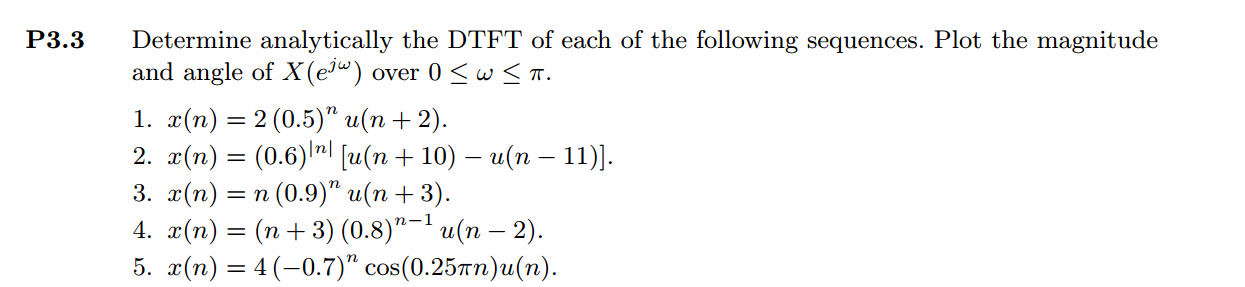
按照题目的意思需要利用DTFT的性质,得到序列的DTFT结果(公式表示),本人数学功底太差,就不写了,直接用
书中的方法计算并画图。
代码:
%% ------------------------------------------------------------------------

%%            Output Info about this m-file

fprintf('\n***********************************************************\n');

fprintf('        <DSP using MATLAB> Problem 3.3 \n\n');

banner();

%% ------------------------------------------------------------------------

% ----------------------------------

%            x1(n)

% ----------------------------------

n1_start = -3; n1_end = 13;

n1 = [n1_start : n1_end];

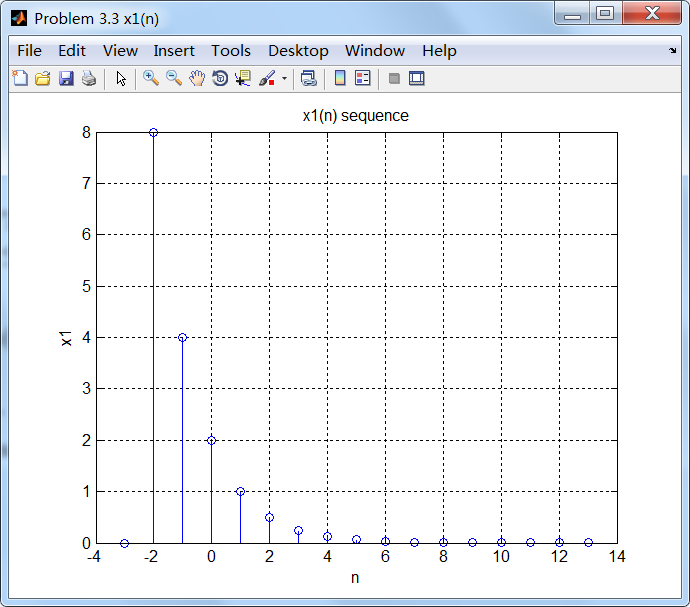
x1 = (2 * 0.5.^ (n1)) .* stepseq(-2, n1_start, n1_end);

figure('NumberTitle', 'off', 'Name', 'Problem 3.3 x1(n)');

set(gcf,'Color','white');

stem(n1, x1);

xlabel('n'); ylabel('x1');

title('x1(n) sequence'); grid on;

M = 500;

k = [-M:M];        % [-pi, pi]

%k = [0:M];        % [0, pi]

w = (pi/M) * k;

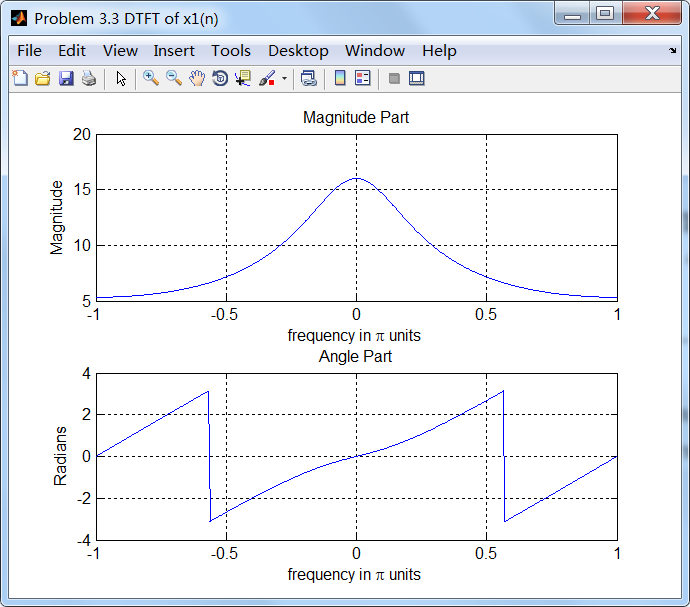
[X1] = dtft(x1, n1, w);

magX1 = abs(X1); angX1 = angle(X1); realX1 = real(X1); imagX1 = imag(X1);

figure('NumberTitle', 'off', 'Name', 'Problem 3.3 DTFT of x1(n)');;

set(gcf,'Color','white');

subplot(2,1,1); plot(w/pi, magX1); grid on;

title('Magnitude Part');

xlabel('frequency in \pi units'); ylabel('Magnitude');

subplot(2,1,2); plot(w/pi, angX1); grid on;

title('Angle Part');

xlabel('frequency in \pi units'); ylabel('Radians');

X1_chk = 8*exp(j*2*w) + 4*exp(j*w) + 2 ./ (1-0.5*exp(-j*w));

magX1_chk = abs(X1_chk); angX1_chk = angle(X1_chk); realX1_chk = real(X1_chk); imagX1_chk = imag(X1_chk);

figure('NumberTitle', 'off', 'Name', 'Problem 3.3 X1(w) by formular');;

set(gcf,'Color','white');

subplot(2,1,1); plot(w/pi, magX1_chk); grid on;

title('Magnitude Part');

xlabel('frequency in \pi units'); ylabel('Magnitude');

subplot(2,1,2); plot(w/pi, angX1_chk); grid on;

title('Angle Part');

xlabel('frequency in \pi units'); ylabel('Radians');

% -------------------------------------

%            x2(n)

% -------------------------------------

n2_start = -9; n2_end = 15;

n2 = [n2_start : n2_end];

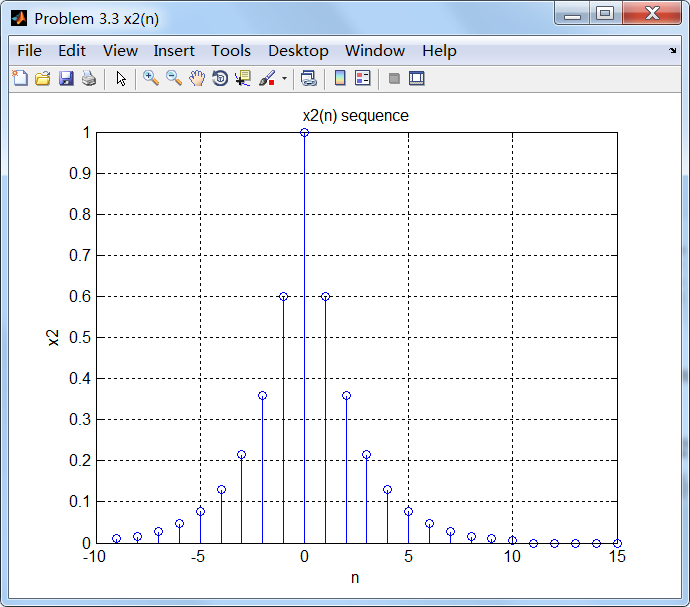
x2 = (0.6 .^ (abs(n2))) .* (stepseq(-10, n2_start, n2_end) - stepseq(11, n2_start, n2_end));

figure('NumberTitle', 'off', 'Name', 'Problem 3.3 x2(n)');

set(gcf,'Color','white');

stem(n2, x2);

xlabel('n'); ylabel('x2');

title('x2(n) sequence'); grid on;

M = 500;

k = [-M:M];        % [-pi, pi]

%k = [0:M];        % [0, pi]

w = (pi/M) * k;

[X2] = dtft(x2, n2, w);

magX2 = abs(X2); angX2 = angle(X2); realX2 = real(X2); imagX2 = imag(X2);

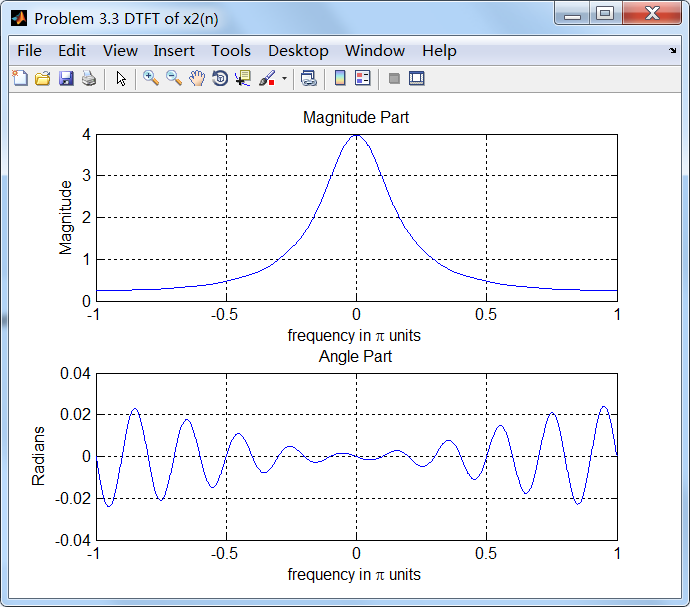
figure('NumberTitle', 'off', 'Name', 'Problem 3.3 DTFT of x2(n)');;

set(gcf,'Color','white');

subplot(2,1,1); plot(w/pi, magX2); grid on;

title('Magnitude Part');

xlabel('frequency in \pi units'); ylabel('Magnitude');

subplot(2,1,2); plot(w/pi, angX2); grid on;

title('Angle Part');

xlabel('frequency in \pi units'); ylabel('Radians');

% -------------------------------------

%            x3(n)

% -------------------------------------

n3_start = -3; n3_end = 10;

n3 = [n3_start : n3_end];

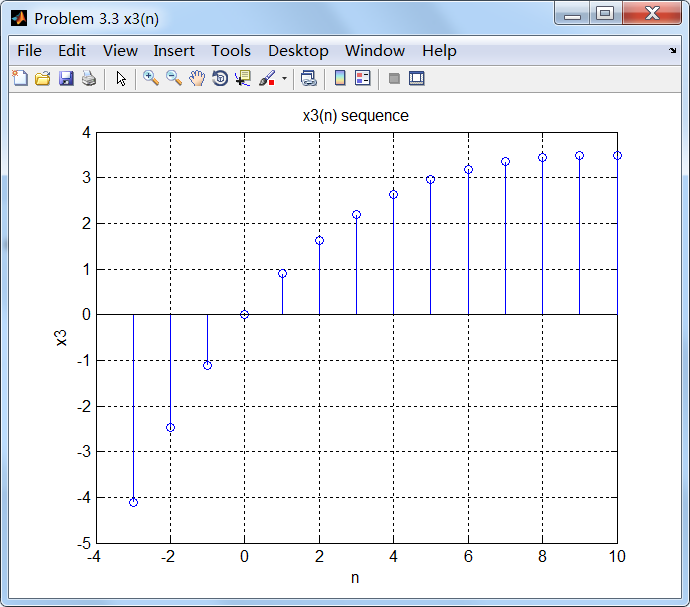
x3 = ( n3 .* (0.9 .^ (n3))) .* stepseq(-3, n3_start, n3_end);

figure('NumberTitle', 'off', 'Name', 'Problem 3.3 x3(n)');

set(gcf,'Color','white');

stem(n3, x3);

xlabel('n'); ylabel('x3');

title('x3(n) sequence'); grid on;

M = 500;

k = [-M:M];        % [-pi, pi]

%k = [0:M];        % [0, pi]

w = (pi/M) * k;

[X3] = dtft(x3, n3, w);

magX3 = abs(X3); angX3 = angle(X3); realX3= real(X3); imagX3 = imag(X3);

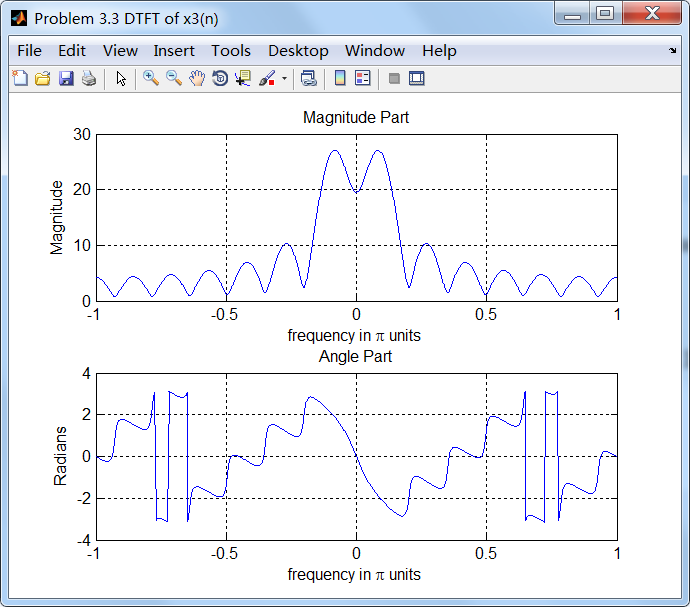
figure('NumberTitle', 'off', 'Name', 'Problem 3.3 DTFT of x3(n)');;

set(gcf,'Color','white');

subplot(2,1,1); plot(w/pi, magX3); grid on;

title('Magnitude Part');

xlabel('frequency in \pi units'); ylabel('Magnitude');

subplot(2,1,2); plot(w/pi, angX3); grid on;

title('Angle Part');

xlabel('frequency in \pi units'); ylabel('Radians');

% -------------------------------------

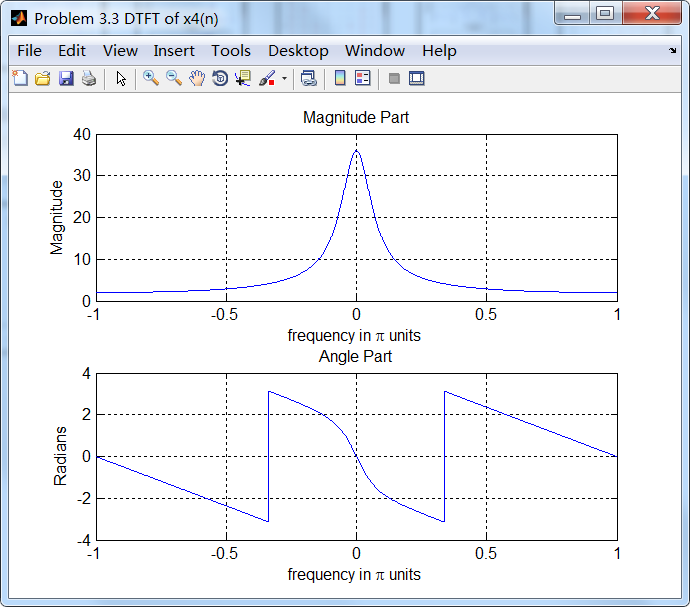
%            x4(n)

% -------------------------------------

n4_start = 0; n4_end = 50;

n4 = [n4_start : n4_end];

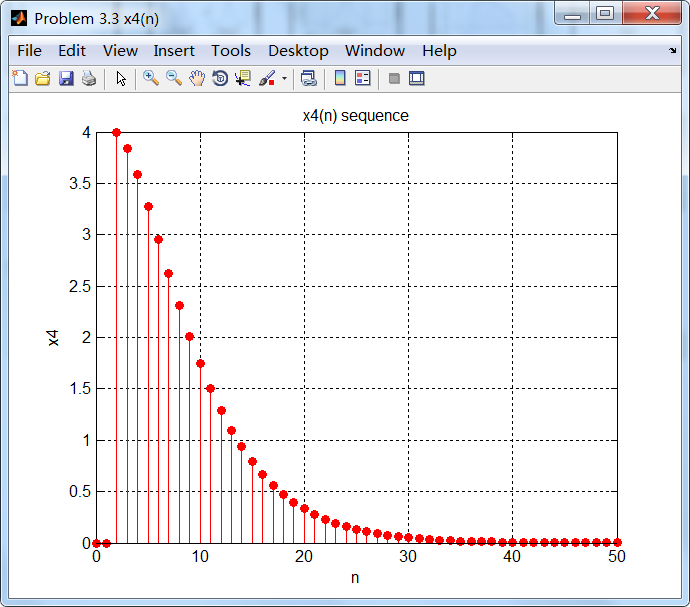
x4 = (n4 + 3) .* (0.8 .^ (n4-1)) .* stepseq(2, n4_start, n4_end);

figure('NumberTitle', 'off', 'Name', 'Problem 3.3 x4(n)');

set(gcf,'Color','white');

stem(n4, x4, 'r', 'filled');

xlabel('n'); ylabel('x4');

title('x4(n) sequence'); grid on;

M = 500;

k = [-M:M];        % [-pi, pi]

%k = [0:M];        % [0, pi]

w = (pi/M) * k;

[X4] = dtft(x4, n4, w);

magX4 = abs(X4); angX4 = angle(X4); realX4= real(X4); imagX4 = imag(X4);

figure('NumberTitle', 'off', 'Name', 'Problem 3.3 DTFT of x4(n)');;

set(gcf,'Color','white');

subplot(2,1,1); plot(w/pi, magX4); grid on;

title('Magnitude Part');

xlabel('frequency in \pi units'); ylabel('Magnitude');

subplot(2,1,2); plot(w/pi, angX4); grid on;

title('Angle Part');

xlabel('frequency in \pi units'); ylabel('Radians');

% -------------------------------------

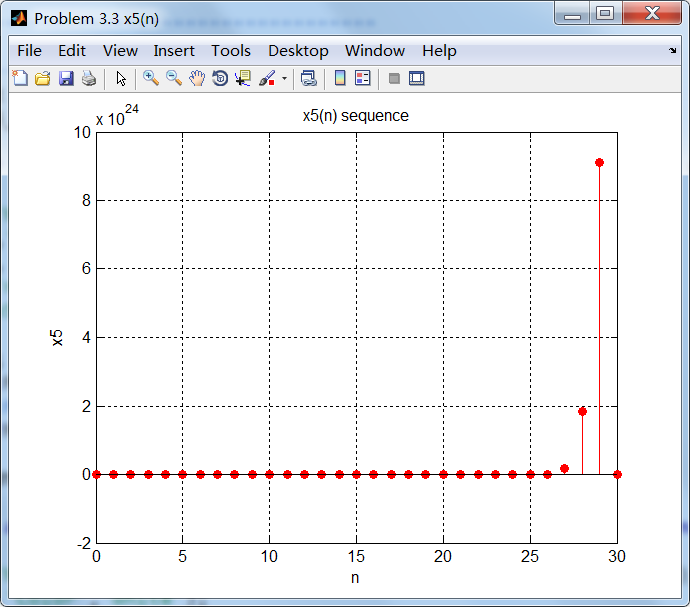
%            x5(n)

% -------------------------------------

n5_start = 0; n5_end = 30;

n5 = [n5_start : n5_end];

x5 = 4 * (-7 .^ (n5)) .* cos(0.25*pi*n5) .* stepseq(0, n5_start, n5_end);

figure('NumberTitle', 'off', 'Name', 'Problem 3.3 x5(n)');

set(gcf,'Color','white');

stem(n5, x5, 'r', 'filled');

xlabel('n'); ylabel('x5');

title('x5(n) sequence'); grid on;

M = 500;

k = [-M:M];        % [-pi, pi]

%k = [0:M];        % [0, pi]

w = (pi/M) * k;

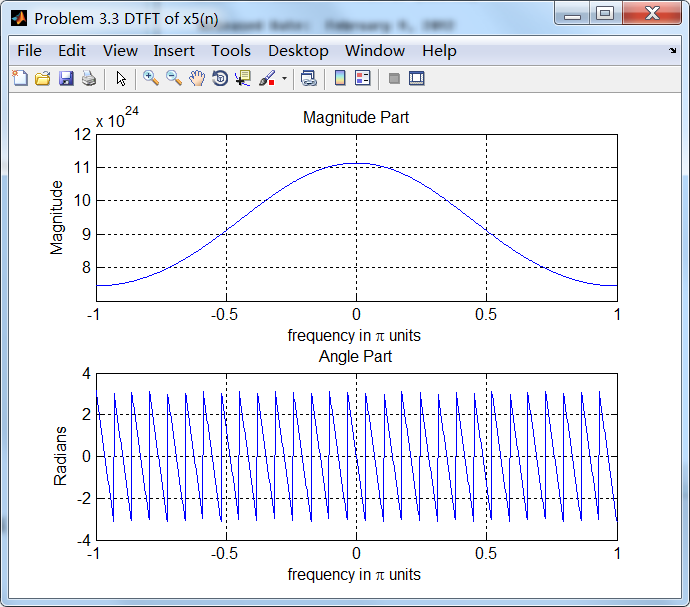
[X5] = dtft(x5, n5, w);

magX5 = abs(X5); angX5 = angle(X5); realX5= real(X5); imagX5 = imag(X5);

figure('NumberTitle', 'off', 'Name', 'Problem 3.3 DTFT of x5(n)');

set(gcf,'Color','white');

subplot(2,1,1); plot(w/pi, magX5); grid on;

title('Magnitude Part');

xlabel('frequency in \pi units'); ylabel('Magnitude');

subplot(2,1,2); plot(w/pi, angX5); grid on;

title('Angle Part');

xlabel('frequency in \pi units'); ylabel('Radians');
运行结果:
1、原始序列及其DTFT
2、
3、
4、
5、
《DSP using MATLAB》Problem 3.3的更多相关文章
- 《DSP using MATLAB》Problem 7.27
代码: %% ++++++++++++++++++++++++++++++++++++++++++++++++++++++++++++++++++++++++++++++++ %% Output In ...
- 《DSP using MATLAB》Problem 7.26
注意:高通的线性相位FIR滤波器,不能是第2类,所以其长度必须为奇数.这里取M=31,过渡带里采样值抄书上的. 代码: %% +++++++++++++++++++++++++++++++++++++ ...
- 《DSP using MATLAB》Problem 7.25
代码: %% ++++++++++++++++++++++++++++++++++++++++++++++++++++++++++++++++++++++++++++++++ %% Output In ...
- 《DSP using MATLAB》Problem 7.24
又到清明时节,…… 注意:带阻滤波器不能用第2类线性相位滤波器实现,我们采用第1类,长度为基数,选M=61 代码: %% +++++++++++++++++++++++++++++++++++++++ ...
- 《DSP using MATLAB》Problem 7.23
%% ++++++++++++++++++++++++++++++++++++++++++++++++++++++++++++++++++++++++++++++++ %% Output Info a ...
- 《DSP using MATLAB》Problem 7.16
使用一种固定窗函数法设计带通滤波器. 代码: %% ++++++++++++++++++++++++++++++++++++++++++++++++++++++++++++++++++++++++++ ...
- 《DSP using MATLAB》Problem 7.15
用Kaiser窗方法设计一个台阶状滤波器. 代码: %% +++++++++++++++++++++++++++++++++++++++++++++++++++++++++++++++++++++++ ...
- 《DSP using MATLAB》Problem 7.14
代码: %% ++++++++++++++++++++++++++++++++++++++++++++++++++++++++++++++++++++++++++++++++ %% Output In ...
- 《DSP using MATLAB》Problem 7.13
代码: %% ++++++++++++++++++++++++++++++++++++++++++++++++++++++++++++++++++++++++++++++++ %% Output In ...
- 《DSP using MATLAB》Problem 7.12
阻带衰减50dB,我们选Hamming窗 代码: %% ++++++++++++++++++++++++++++++++++++++++++++++++++++++++++++++++++++++++ ...
随机推荐
- 安装完C++builder6.0启动的时候总是出现无法将'C:\Program Files\Borland\CBuilder6\Bin\bcb.$$$'重命名为bcb.dro
:兼容性问题 运行前右键属性“兼容性”-尝试不同的兼容性.比如“windows 8”
- 20155239 2016-2017-2 《Java程序设计》第7周学习总结
教材学习内容总结 1.了解Lambda语言 "Lambda 表达式"(lambda expression)是一个匿名函数,Lambda表达式基于数学中的λ演算得名,直接对应于其中的 ...
- Python笔记 #06# NumPy Basis & Subsetting NumPy Arrays
原始的 Python list 虽然很好用,但是不具备能够“整体”进行数学运算的性质,并且速度也不够快(按照视频上的说法),而 Numpy.array 恰好可以弥补这些缺陷. 初步应用就是“整体数学运 ...
- php时间戳函数mktime()
在项目开发中,偶尔会遇到跨周期.跨月的的时间操作.PHP为我们提供了一个很方便的函数->mktime,可以很简单的获取制定日期的时间戳了. mktime(hour,minute,second,m ...
- 搭建linux上的Eclipse+PHP编程环境
最近打算学PHP,于是查阅资料搭建了ubuntu(14.04.3)上的PHP IDE环境 一.准备工作(可略) 主要是推荐科大的源和配置源的方法,因为后于步骤使用到了apt,科大的源非常快,并且有个针 ...
- K-Means 算法(Java)
kMeans算法原理见我的上一篇文章.这里介绍K-Means的Java实现方法,参考了Python的实现方法. 一.数据点的实现 package com.meachine.learning.kmean ...
- Git-分支管理【转】
本文转载自:http://www.liaoxuefeng.com/wiki/0013739516305929606dd18361248578c67b8067c8c017b000 分支管理 分支就是科幻 ...
- 开源工具-Json 解析器 Jackson 的使用
Json已经成为当前服务器与 WEB 应用之间数据传输的公认标准.Java 中常见的 Json 类库有 Gson.JSON-lib 和 Jackson 等.相比于其他的解析工具,Jackson 简单易 ...
- 【同步时间】Linux设置时间同步
所有节点都要确保已安装ntpd(在步骤4已安装) 1.首先选择一台服务器作为时间服务器. 假设选定为node1.sunny.cn服务器为时间服务器. 2.ntp服务器的配置 修改ntp.conf文件: ...
- 癌症免疫细胞治疗知识:CAR-T与TCR-T的区别在哪里?--转载
肿瘤免疫治疗,实际上分为两大类.一种把肿瘤的特征“告诉”免疫细胞,让它们去定位,并造成杀伤:另一种是解除肿瘤对免疫的耐受/屏蔽作用,让免疫细胞重新认识肿瘤细胞,对肿瘤产生攻击(一般来说,肿瘤细胞会巧妙 ...