
《DSP using MATLAB》Problem 8.9
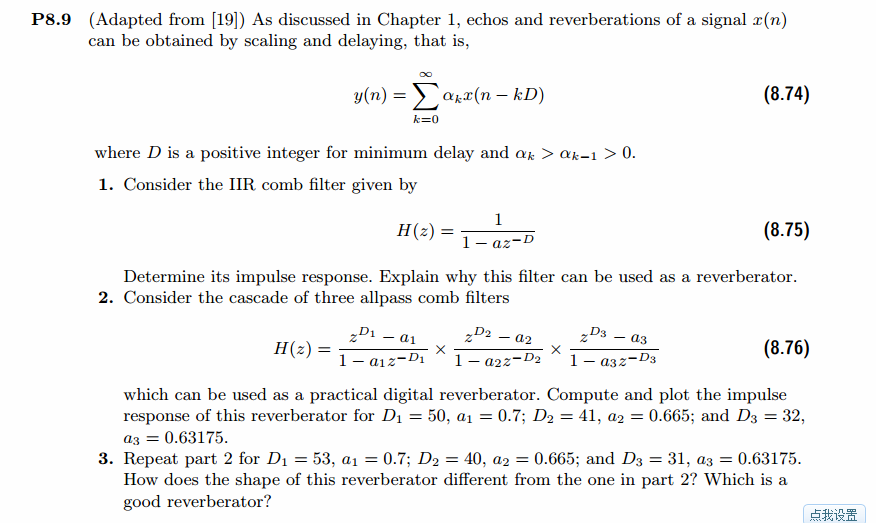
代码:
%% ------------------------------------------------------------------------

%%            Output Info about this m-file

fprintf('\n***********************************************************\n');

fprintf('        <DSP using MATLAB> Problem 8.9 \n\n');

banner();

%% ------------------------------------------------------------------------

a0 = -0.9;

% digital iir lowpass filter

b = [1 ];

a = [1 a0];

figure('NumberTitle', 'off', 'Name', 'Problem 8.9 Pole-Zero Plot')

set(gcf,'Color','white');

zplane(b,a);

title(sprintf('Pole-Zero Plot'));

%pzplotz(b,a);

% corresponding system function  Direct form

K = 1;                                                                     % gain parameter

b = K*b;                                                                    % denominator

a = a;                                                                      % numerator

[db, mag, pha, grd, w] = freqz_m(b, a);

% ---------------------------------------------------------------------

%  Choose the gain parameter of the filter, maximum gain is equal to 1

% ---------------------------------------------------------------------

gain1=max(mag)                    % with poles

K = 1/gain1

[db, mag, pha, grd, w] = freqz_m(K*b, a);

figure('NumberTitle', 'off', 'Name', 'Problem 8.9 IIR lowpass filter')

set(gcf,'Color','white');

subplot(2,2,1); plot(w/pi, db); grid on; axis([0 2 -60 10]);

set(gca,'YTickMode','manual','YTick',[-60,-30,0])

set(gca,'YTickLabelMode','manual','YTickLabel',['60';'30';' 0']);

set(gca,'XTickMode','manual','XTick',[0,0.25,0.5,1,1.5,1.75,2]);

xlabel('frequency in \pi units'); ylabel('Decibels'); title('Magnitude Response in dB');

subplot(2,2,3); plot(w/pi, mag); grid on; %axis([0 1 -100 10]);

xlabel('frequency in \pi units'); ylabel('Absolute'); title('Magnitude Response in absolute');

set(gca,'XTickMode','manual','XTick',[0,0.25,0.5,1,1.5,1.75,2]);

set(gca,'YTickMode','manual','YTick',[0,1.0]);

subplot(2,2,2); plot(w/pi, pha); grid on; %axis([0 1 -100 10]);

xlabel('frequency in \pi units'); ylabel('Rad'); title('Phase Response in Radians');

subplot(2,2,4); plot(w/pi, grd*pi/180);  grid on; %axis([0 1 -100 10]);

xlabel('frequency in \pi units'); ylabel('Rad'); title('Group Delay');

set(gca,'XTickMode','manual','XTick',[0,0.25,0.5,1,1.5,1.75,2]);

%set(gca,'YTickMode','manual','YTick',[0,1.0]);

% Impulse Response

fprintf('\n----------------------------------');

fprintf('\nPartial fraction expansion method: \n');

[R, p, c] = residuez(K*b,a)

MR = (abs(R))'              % Residue  Magnitude

AR = (angle(R))'/pi         % Residue  angles in pi units

Mp = (abs(p))'              % pole  Magnitude

Ap = (angle(p))'/pi         % pole  angles in pi units

[delta, n] = impseq(0,0,50);

h_chk = filter(K*b,a,delta);      % check sequences

% ------------------------------------------------------------------------------------------------

%                                gain parameter K

% ------------------------------------------------------------------------------------------------

h =  ( 0.9.^n ) .* (0.1000) + 0 * delta;

% ------------------------------------------------------------------------------------------------

figure('NumberTitle', 'off', 'Name', 'Problem 8.9 IIR lp filter, h(n) by filter and Inv-Z ')

set(gcf,'Color','white');

subplot(2,1,1); stem(n, h_chk); grid on; %axis([0 2 -60 10]);

xlabel('n'); ylabel('h\_chk'); title('Impulse Response sequences by filter');

subplot(2,1,2); stem(n, h); grid on; %axis([0 1 -100 10]);

xlabel('n'); ylabel('h'); title('Impulse Response sequences by Inv-Z');

[db, mag, pha, grd, w] = freqz_m(h, [1]);

figure('NumberTitle', 'off', 'Name', 'Problem 8.9 IIR filter, h(n) by Inv-Z ')

set(gcf,'Color','white');

subplot(2,2,1); plot(w/pi, db); grid on; axis([0 2 -60 10]);

set(gca,'YTickMode','manual','YTick',[-60,-30,0])

set(gca,'YTickLabelMode','manual','YTickLabel',['60';'30';' 0']);

set(gca,'XTickMode','manual','XTick',[0,0.25,1,1.75,2]);

xlabel('frequency in \pi units'); ylabel('Decibels'); title('Magnitude Response in dB');

subplot(2,2,3); plot(w/pi, mag); grid on; %axis([0 1 -100 10]);

xlabel('frequency in \pi units'); ylabel('Absolute'); title('Magnitude Response in absolute');

set(gca,'XTickMode','manual','XTick',[0,0.25,1,1.75,2]);

set(gca,'YTickMode','manual','YTick',[0,1.0]);

subplot(2,2,2); plot(w/pi, pha); grid on; %axis([0 1 -100 10]);

xlabel('frequency in \pi units'); ylabel('Rad'); title('Phase Response in Radians');

subplot(2,2,4); plot(w/pi, grd*pi/180);  grid on; %axis([0 1 -100 10]);

xlabel('frequency in \pi units'); ylabel('Rad'); title('Group Delay');

set(gca,'XTickMode','manual','XTick',[0,0.25,1,1.75,2]);

%set(gca,'YTickMode','manual','YTick',[0,1.0]);

% --------------------------------------------------

%               digital IIR comb filter

%           system function  Direct form

% --------------------------------------------------

D = 4;

b = K*[1];

a = [1  zeros(1,D-1)  a0];

figure('NumberTitle', 'off', 'Name', 'Problem 8.9 Pole-Zero Plot')

set(gcf,'Color','white');

zplane(b,a);

title(sprintf('Pole-Zero Plot'));

[db, mag, pha, grd, w] = freqz_m(b, a);

figure('NumberTitle', 'off', 'Name', 'Problem 8.9 IIR comb filter')

set(gcf,'Color','white');

subplot(2,2,1); plot(w/pi, db); grid on; axis([0 2 -60 10]);

set(gca,'YTickMode','manual','YTick',[-60,-30,0])

set(gca,'YTickLabelMode','manual','YTickLabel',['60';'30';' 0']);

set(gca,'XTickMode','manual','XTick',[0,0.25,0.5,1,1.5,1.75,2]);

xlabel('frequency in \pi units'); ylabel('Decibels'); title('Magnitude Response in dB');

subplot(2,2,3); plot(w/pi, mag); grid on; %axis([0 1 -100 10]);

xlabel('frequency in \pi units'); ylabel('Absolute'); title('Magnitude Response in absolute');

set(gca,'XTickMode','manual','XTick',[0,0.25,0.5,1,1.5,1.75,2]);

set(gca,'YTickMode','manual','YTick',[0,1.0]);

subplot(2,2,2); plot(w/pi, pha); grid on; %axis([0 1 -100 10]);

xlabel('frequency in \pi units'); ylabel('Rad'); title('Phase Response in Radians');

subplot(2,2,4); plot(w/pi, grd*pi/180);  grid on; %axis([0 1 -100 10]);

xlabel('frequency in \pi units'); ylabel('Rad'); title('Group Delay');

set(gca,'XTickMode','manual','XTick',[0,0.25,0.5,1,1.5,1.75,2]);

%set(gca,'YTickMode','manual','YTick',[0,1.0]);

% Impulse Response

fprintf('\n----------------------------------');

fprintf('\nPartial fraction expansion method: \n');

[R, p, c] = residuez(b,a)

MR = (abs(R))'              % Residue  Magnitude

AR = (angle(R))'/pi         % Residue  angles in pi units

Mp = (abs(p))'              % pole  Magnitude

Ap = (angle(p))'/pi         % pole  angles in pi units

[delta, n] = impseq(0,0,200);

h_chk = filter(b,a,delta);      % check sequences

% ------------------------------------------------------------------------------------------------

%                                gain parameter K

% ------------------------------------------------------------------------------------------------

h =  0.0250 * ( ( 0.9740.^n ) .* ( 2*cos(pi*n/2) + (-1).^n + 1) ) + 0.0*delta;

% ------------------------------------------------------------------------------------------------

figure('NumberTitle', 'off', 'Name', 'Problem 8.9 Comb filter, h(n) by filter and Inv-Z ')

set(gcf,'Color','white');

subplot(2,1,1); stem(n, h_chk); grid on; %axis([0 2 -60 10]);

xlabel('n'); ylabel('h\_chk'); title('Impulse Response sequences by filter');

subplot(2,1,2); stem(n, h); grid on; %axis([0 1 -100 10]);

xlabel('n'); ylabel('h'); title('Impulse Response sequences by Inv-Z');

[db, mag, pha, grd, w] = freqz_m(h, [1]);

figure('NumberTitle', 'off', 'Name', 'Problem 8.9 Comb filter, h(n) by Inv-Z ')

set(gcf,'Color','white');

subplot(2,2,1); plot(w/pi, db); grid on; axis([0 2 -60 10]);

set(gca,'YTickMode','manual','YTick',[-60,-30,0])

set(gca,'YTickLabelMode','manual','YTickLabel',['60';'30';' 0']);

set(gca,'XTickMode','manual','XTick',[0,0.25,1,1.75,2]);

xlabel('frequency in \pi units'); ylabel('Decibels'); title('Magnitude Response in dB');

subplot(2,2,3); plot(w/pi, mag); grid on; %axis([0 1 -100 10]);

xlabel('frequency in \pi units'); ylabel('Absolute'); title('Magnitude Response in absolute');

set(gca,'XTickMode','manual','XTick',[0,0.25,1,1.75,2]);

set(gca,'YTickMode','manual','YTick',[0,1.0]);

subplot(2,2,2); plot(w/pi, pha); grid on; %axis([0 1 -100 10]);

xlabel('frequency in \pi units'); ylabel('Rad'); title('Phase Response in Radians');

subplot(2,2,4); plot(w/pi, grd*pi/180);  grid on; %axis([0 1 -100 10]);

xlabel('frequency in \pi units'); ylabel('Rad'); title('Group Delay');

set(gca,'XTickMode','manual','XTick',[0,0.25,1,1.75,2]);

%set(gca,'YTickMode','manual','YTick',[0,1.0]);
运行结果:
D=1,单个滤波器

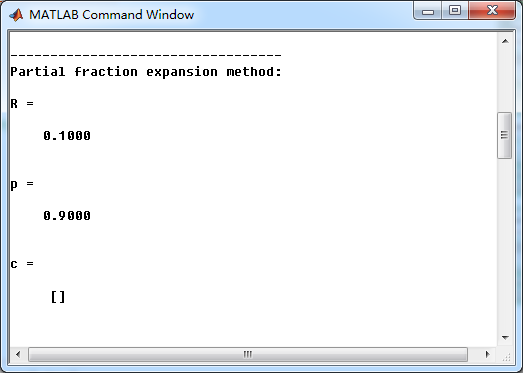
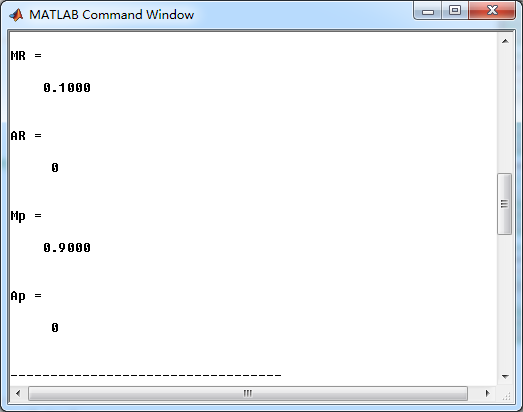
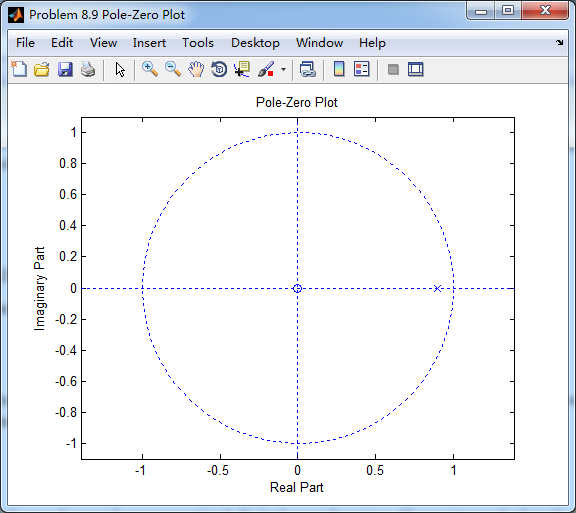
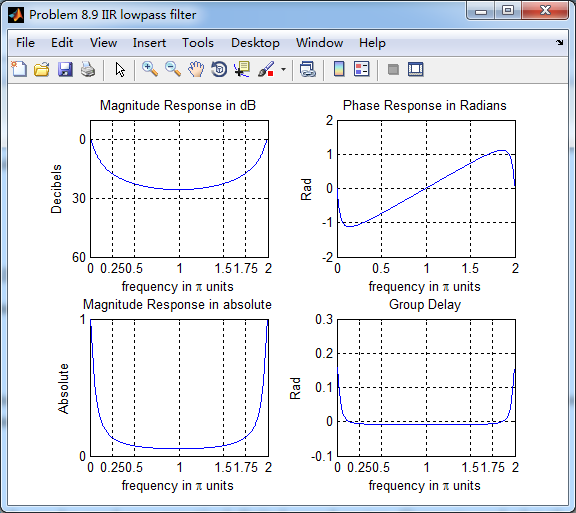
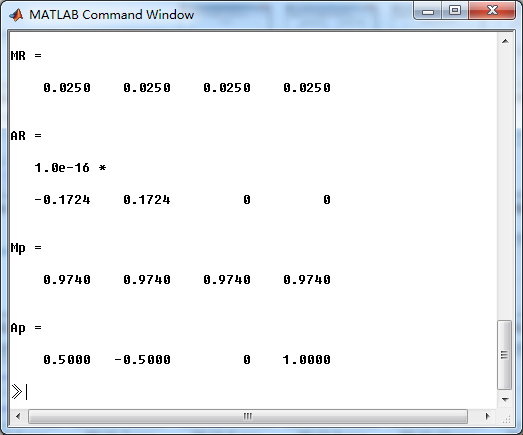
这里取D=4,单个重复4次,系统函数部分分式展开,



第2、3小题不会。
《DSP using MATLAB》Problem 8.9的更多相关文章
- 《DSP using MATLAB》Problem 7.27
代码: %% ++++++++++++++++++++++++++++++++++++++++++++++++++++++++++++++++++++++++++++++++ %% Output In ...
- 《DSP using MATLAB》Problem 7.26
注意:高通的线性相位FIR滤波器,不能是第2类,所以其长度必须为奇数.这里取M=31,过渡带里采样值抄书上的. 代码: %% +++++++++++++++++++++++++++++++++++++ ...
- 《DSP using MATLAB》Problem 7.25
代码: %% ++++++++++++++++++++++++++++++++++++++++++++++++++++++++++++++++++++++++++++++++ %% Output In ...
- 《DSP using MATLAB》Problem 7.24
又到清明时节,…… 注意:带阻滤波器不能用第2类线性相位滤波器实现,我们采用第1类,长度为基数,选M=61 代码: %% +++++++++++++++++++++++++++++++++++++++ ...
- 《DSP using MATLAB》Problem 7.23
%% ++++++++++++++++++++++++++++++++++++++++++++++++++++++++++++++++++++++++++++++++ %% Output Info a ...
- 《DSP using MATLAB》Problem 7.16
使用一种固定窗函数法设计带通滤波器. 代码: %% ++++++++++++++++++++++++++++++++++++++++++++++++++++++++++++++++++++++++++ ...
- 《DSP using MATLAB》Problem 7.15
用Kaiser窗方法设计一个台阶状滤波器. 代码: %% +++++++++++++++++++++++++++++++++++++++++++++++++++++++++++++++++++++++ ...
- 《DSP using MATLAB》Problem 7.14
代码: %% ++++++++++++++++++++++++++++++++++++++++++++++++++++++++++++++++++++++++++++++++ %% Output In ...
- 《DSP using MATLAB》Problem 7.13
代码: %% ++++++++++++++++++++++++++++++++++++++++++++++++++++++++++++++++++++++++++++++++ %% Output In ...
- 《DSP using MATLAB》Problem 7.12
阻带衰减50dB,我们选Hamming窗 代码: %% ++++++++++++++++++++++++++++++++++++++++++++++++++++++++++++++++++++++++ ...
随机推荐
- Linux网络配置 RPM命令 samba服务 Linux目录结构
第一种方法: (1)用root身份登录,运行setup命令进入到 text mode setup utiliy对网络进行配置,这里可以进行ip,子网掩码,默认网关,dns的设置.(2)这时网卡的配置没 ...
- struts2类型转换2
如何自定义类型转换器 ? 1). 为什么需要自定义的类型转换器 ? 因为 Struts 不能自动完成 字符串 到 引用类型 的 转换. 2). 如何定义类型转换器: I. 开发类型转换器的类: 扩展 ...
- 笔记23 搭建Spring MVC
搭建一个最简单的SpringMVC示例 1.配置DispatcherServlet DispatcherServlet是Spring MVC的核心.在这里请求会第一次 接触到框架,它要负责将请求路由到 ...
- 通讯录查询(Profile Lookup)——freeCodeCamp
- [JZOJ1901] 【2010集训队出题】光棱坦克
题目 题目大意 给你个平面上的一堆点,问序列\({p_i}\)的个数. 满足\(y_{p_{i-1}}>y_{p_i}\)并且\(x_{p_i}\)在\(x_{p_i-1}\)和\(x_{p_i ...
- Json数据交换一Jackson
依赖 <dependency> <groupId>com.fasterxml.jackson.core</groupId> <artifactId>ja ...
- Linux的命令提示符 修改
Linux的命令提示符可按个人喜好随意更改,修改PS1的值即可: 在Ubuntu下若只是个别用户下修改~/.profile文件就好,所有用户统一则修改/etc/profile: 加入: export ...
- H5页面在手机上查看 使用手机浏览自己的web项目
参考:http://www.browsersync.cn/#install 首先全局安装BrowserSync : npm install -g browser-sync 其次在项目文件夹下运行: b ...
- VMware Workstation 10 配置Ubuntu环境
分享到 一键分享 QQ空间 新浪微博 百度云收藏 人人网 腾讯微博 百度相册 开心网 腾讯朋友 百度贴吧 豆瓣网 搜狐微博 百度新首页 QQ好友 和讯微博 更多... 百度分享 VMware Work ...
- webservice、httpClient、dubbo的区别
在开发中,对于同一个war包中的对象方法我们可以直接调用,但是很多情况下需要在不同项目或者不同服务器进行相互调用 webservice webservice技术可以实现不同服务器项目直接的调用和交换数 ...