
《DSP using MATLAB》Problem 8.7

代码:
%% ------------------------------------------------------------------------

%%            Output Info about this m-file

fprintf('\n***********************************************************\n');

fprintf('        <DSP using MATLAB> Problem 8.7 \n\n');

banner();

%% ------------------------------------------------------------------------

% digital iir lowpass filter

b = [1 1];

a = [1 -0.9];

figure('NumberTitle', 'off', 'Name', 'Problem 8.7 Pole-Zero Plot')

set(gcf,'Color','white');

zplane(b,a);

title(sprintf('Pole-Zero Plot'));

%pzplotz(b,a);

% corresponding system function  Direct form

K = 1;                                                                     % gain parameter

b = K*b;                                                                    % denominator

a = a;                                                                      % numerator

[db, mag, pha, grd, w] = freqz_m(b, a);

% ---------------------------------------------------------------------

%  Choose the gain parameter of the filter, maximum gain is equal to 1

% ---------------------------------------------------------------------

gain1=max(mag)                    % with poles

K = 1/gain1

[db, mag, pha, grd, w] = freqz_m(K*b, a);

figure('NumberTitle', 'off', 'Name', 'Problem 8.7 IIR lowpass filter')

set(gcf,'Color','white');

subplot(2,2,1); plot(w/pi, db); grid on; axis([0 2 -60 10]);

set(gca,'YTickMode','manual','YTick',[-60,-30,0])

set(gca,'YTickLabelMode','manual','YTickLabel',['60';'30';' 0']);

set(gca,'XTickMode','manual','XTick',[0,0.25,0.5,1,1.5,1.75,2]);

xlabel('frequency in \pi units'); ylabel('Decibels'); title('Magnitude Response in dB');

subplot(2,2,3); plot(w/pi, mag); grid on; %axis([0 1 -100 10]);

xlabel('frequency in \pi units'); ylabel('Absolute'); title('Magnitude Response in absolute');

set(gca,'XTickMode','manual','XTick',[0,0.25,0.5,1,1.5,1.75,2]);

set(gca,'YTickMode','manual','YTick',[0,1.0]);

subplot(2,2,2); plot(w/pi, pha); grid on; %axis([0 1 -100 10]);

xlabel('frequency in \pi units'); ylabel('Rad'); title('Phase Response in Radians');

subplot(2,2,4); plot(w/pi, grd*pi/180);  grid on; %axis([0 1 -100 10]);

xlabel('frequency in \pi units'); ylabel('Rad'); title('Group Delay');

set(gca,'XTickMode','manual','XTick',[0,0.25,0.5,1,1.5,1.75,2]);

%set(gca,'YTickMode','manual','YTick',[0,1.0]);

% Impulse Response

fprintf('\n----------------------------------');

fprintf('\nPartial fraction expansion method: \n');

[R, p, c] = residuez(b,a)

MR = (abs(R))'              % Residue  Magnitude

AR = (angle(R))'/pi         % Residue  angles in pi units

Mp = (abs(p))'              % pole  Magnitude

Ap = (angle(p))'/pi         % pole  angles in pi units

[delta, n] = impseq(0,0,50);

h_chk = filter(b,a,delta);      % check sequences

% ------------------------------------------------------------------------------------------------

%                                gain parameter K=0.05

% ------------------------------------------------------------------------------------------------

h =  ( 0.9.^n ) .* 0.1056 - 0.0556 * delta;

% ------------------------------------------------------------------------------------------------

figure('NumberTitle', 'off', 'Name', 'Problem 8.7 IIR lp filter, h(n) by filter and Inv-Z ')

set(gcf,'Color','white');

subplot(2,1,1); stem(n, h_chk); grid on; %axis([0 2 -60 10]);

xlabel('n'); ylabel('h\_chk'); title('Impulse Response sequences by filter');

subplot(2,1,2); stem(n, h); grid on; %axis([0 1 -100 10]);

xlabel('n'); ylabel('h'); title('Impulse Response sequences by Inv-Z');

[db, mag, pha, grd, w] = freqz_m(h, [1]);

figure('NumberTitle', 'off', 'Name', 'Problem 8.7 IIR filter, h(n) by Inv-Z ')

set(gcf,'Color','white');

subplot(2,2,1); plot(w/pi, db); grid on; axis([0 2 -60 10]);

set(gca,'YTickMode','manual','YTick',[-60,-30,0])

set(gca,'YTickLabelMode','manual','YTickLabel',['60';'30';' 0']);

set(gca,'XTickMode','manual','XTick',[0,0.25,1,1.75,2]);

xlabel('frequency in \pi units'); ylabel('Decibels'); title('Magnitude Response in dB');

subplot(2,2,3); plot(w/pi, mag); grid on; %axis([0 1 -100 10]);

xlabel('frequency in \pi units'); ylabel('Absolute'); title('Magnitude Response in absolute');

set(gca,'XTickMode','manual','XTick',[0,0.25,1,1.75,2]);

set(gca,'YTickMode','manual','YTick',[0,1.0]);

subplot(2,2,2); plot(w/pi, pha); grid on; %axis([0 1 -100 10]);

xlabel('frequency in \pi units'); ylabel('Rad'); title('Phase Response in Radians');

subplot(2,2,4); plot(w/pi, grd*pi/180);  grid on; %axis([0 1 -100 10]);

xlabel('frequency in \pi units'); ylabel('Rad'); title('Group Delay');

set(gca,'XTickMode','manual','XTick',[0,0.25,1,1.75,2]);

%set(gca,'YTickMode','manual','YTick',[0,1.0]);

% --------------------------------------------------

%               digital IIR comb filter

% --------------------------------------------------

b = K*[1  0  0  0  0  0  1];

a = [1  0  0  0  0  0  -0.9];

figure('NumberTitle', 'off', 'Name', 'Problem 8.7 Pole-Zero Plot')

set(gcf,'Color','white');

zplane(b,a);

title(sprintf('Pole-Zero Plot'));

[db, mag, pha, grd, w] = freqz_m(b, a);

figure('NumberTitle', 'off', 'Name', 'Problem 8.7 IIR comb filter')

set(gcf,'Color','white');

subplot(2,2,1); plot(w/pi, db); grid on; axis([0 2 -60 10]);

set(gca,'YTickMode','manual','YTick',[-60,-30,0])

set(gca,'YTickLabelMode','manual','YTickLabel',['60';'30';' 0']);

set(gca,'XTickMode','manual','XTick',[0,0.25,0.5,1,1.5,1.75,2]);

xlabel('frequency in \pi units'); ylabel('Decibels'); title('Magnitude Response in dB');

subplot(2,2,3); plot(w/pi, mag); grid on; %axis([0 1 -100 10]);

xlabel('frequency in \pi units'); ylabel('Absolute'); title('Magnitude Response in absolute');

set(gca,'XTickMode','manual','XTick',[0,0.25,0.5,1,1.5,1.75,2]);

set(gca,'YTickMode','manual','YTick',[0,1.0]);

subplot(2,2,2); plot(w/pi, pha); grid on; %axis([0 1 -100 10]);

xlabel('frequency in \pi units'); ylabel('Rad'); title('Phase Response in Radians');

subplot(2,2,4); plot(w/pi, grd*pi/180);  grid on; %axis([0 1 -100 10]);

xlabel('frequency in \pi units'); ylabel('Rad'); title('Group Delay');

set(gca,'XTickMode','manual','XTick',[0,0.25,0.5,1,1.5,1.75,2]);

%set(gca,'YTickMode','manual','YTick',[0,1.0]);

% Impulse Response

fprintf('\n----------------------------------');

fprintf('\nPartial fraction expansion method: \n');

[R, p, c] = residuez(b,a)

MR = (abs(R))'              % Residue  Magnitude

AR = (angle(R))'/pi         % Residue  angles in pi units

Mp = (abs(p))'              % pole  Magnitude

Ap = (angle(p))'/pi         % pole  angles in pi units

[delta, n] = impseq(0,0,300);

h_chk = filter(b,a,delta);      % check sequences

% ------------------------------------------------------------------------------------------------

%                                gain parameter K=0.05

% ------------------------------------------------------------------------------------------------

%h =  0.0211 * (( 0.9791.^n ) .* (2*cos(0.4*pi*n) + 2*cos(0.8*pi*n) + 1)) - 0.0556*delta;  %L=5;

h =  0.0176 * ( ( 0.9826.^n ) .* ( 2*cos(2*pi*n/3) + 2*cos(pi*n/3) + (-1).^n + 1) ) - 0.0556*delta;  %L=6;

% ------------------------------------------------------------------------------------------------

figure('NumberTitle', 'off', 'Name', 'Problem 8.7 Comb filter, h(n) by filter and Inv-Z ')

set(gcf,'Color','white');

subplot(2,1,1); stem(n, h_chk); grid on; %axis([0 2 -60 10]);

xlabel('n'); ylabel('h\_chk'); title('Impulse Response sequences by filter');

subplot(2,1,2); stem(n, h); grid on; %axis([0 1 -100 10]);

xlabel('n'); ylabel('h'); title('Impulse Response sequences by Inv-Z');

[db, mag, pha, grd, w] = freqz_m(h, [1]);

figure('NumberTitle', 'off', 'Name', 'Problem 8.7 Comb filter, h(n) by Inv-Z ')

set(gcf,'Color','white');

subplot(2,2,1); plot(w/pi, db); grid on; axis([0 2 -60 10]);

set(gca,'YTickMode','manual','YTick',[-60,-30,0])

set(gca,'YTickLabelMode','manual','YTickLabel',['60';'30';' 0']);

set(gca,'XTickMode','manual','XTick',[0,0.25,1,1.75,2]);

xlabel('frequency in \pi units'); ylabel('Decibels'); title('Magnitude Response in dB');

subplot(2,2,3); plot(w/pi, mag); grid on; %axis([0 1 -100 10]);

xlabel('frequency in \pi units'); ylabel('Absolute'); title('Magnitude Response in absolute');

set(gca,'XTickMode','manual','XTick',[0,0.25,1,1.75,2]);

set(gca,'YTickMode','manual','YTick',[0,1.0]);

subplot(2,2,2); plot(w/pi, pha); grid on; %axis([0 1 -100 10]);

xlabel('frequency in \pi units'); ylabel('Rad'); title('Phase Response in Radians');

subplot(2,2,4); plot(w/pi, grd*pi/180);  grid on; %axis([0 1 -100 10]);

xlabel('frequency in \pi units'); ylabel('Rad'); title('Group Delay');

set(gca,'XTickMode','manual','XTick',[0,0.25,1,1.75,2]);

%set(gca,'YTickMode','manual','YTick',[0,1.0]);
运行结果:
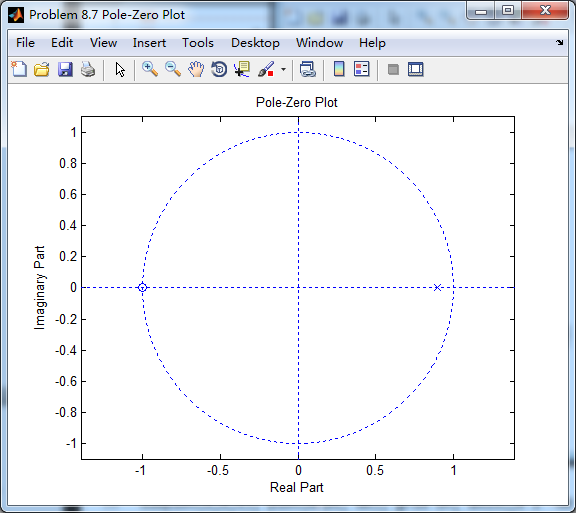
先计算单个IIR低通,

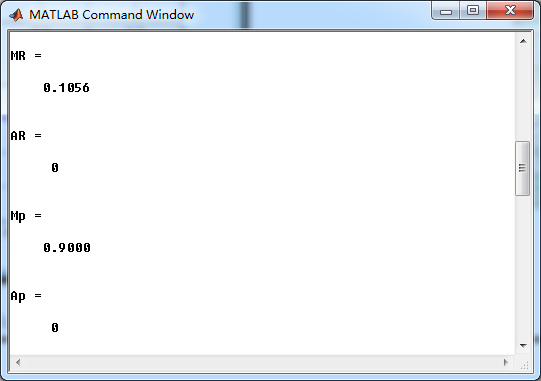
零极点

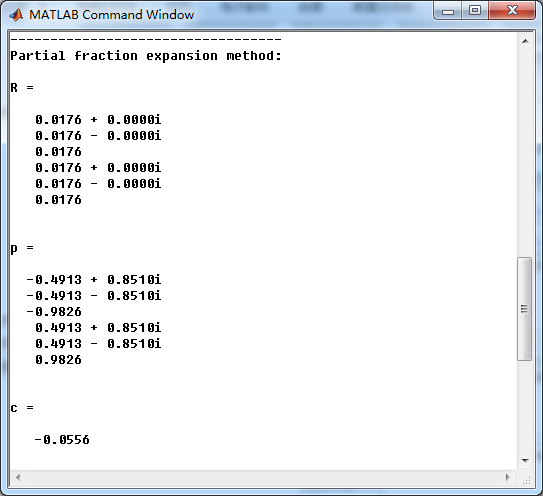
L=6阶梳状低通,系统函数部分分式展开如下
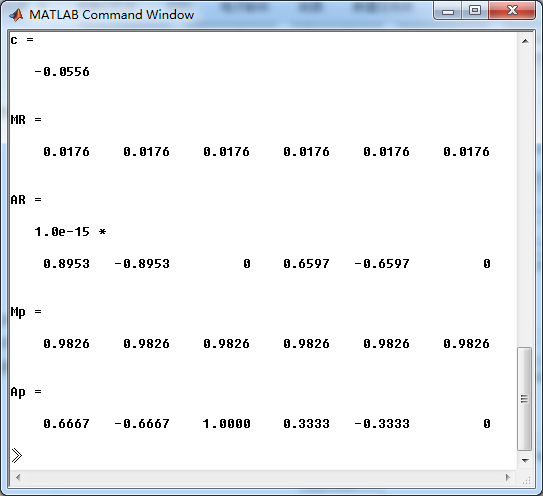
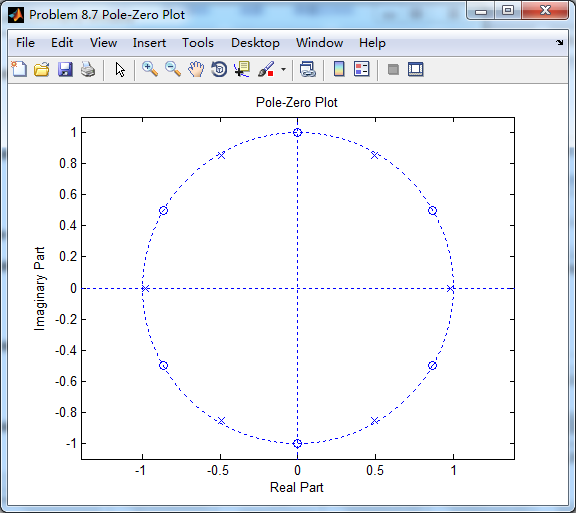
梳状低通滤波器零极点图
幅度谱、相位谱、群延迟
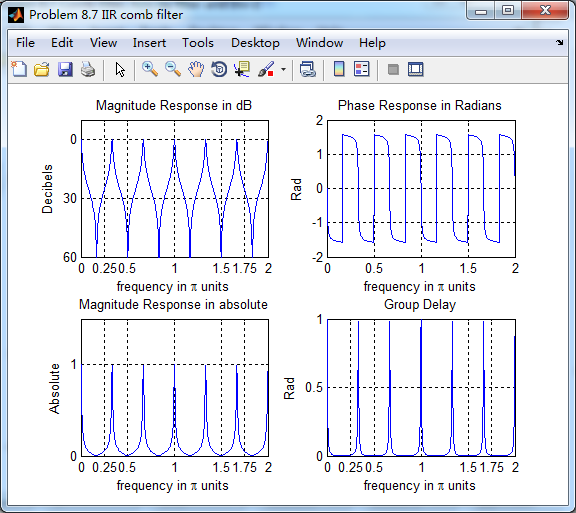
可以看出,在0到2π范围内,单个低通重复出现了6次,原来的谱压缩到六分之一。
《DSP using MATLAB》Problem 8.7的更多相关文章
- 《DSP using MATLAB》Problem 7.27
代码: %% ++++++++++++++++++++++++++++++++++++++++++++++++++++++++++++++++++++++++++++++++ %% Output In ...
- 《DSP using MATLAB》Problem 7.26
注意:高通的线性相位FIR滤波器,不能是第2类,所以其长度必须为奇数.这里取M=31,过渡带里采样值抄书上的. 代码: %% +++++++++++++++++++++++++++++++++++++ ...
- 《DSP using MATLAB》Problem 7.25
代码: %% ++++++++++++++++++++++++++++++++++++++++++++++++++++++++++++++++++++++++++++++++ %% Output In ...
- 《DSP using MATLAB》Problem 7.24
又到清明时节,…… 注意:带阻滤波器不能用第2类线性相位滤波器实现,我们采用第1类,长度为基数,选M=61 代码: %% +++++++++++++++++++++++++++++++++++++++ ...
- 《DSP using MATLAB》Problem 7.23
%% ++++++++++++++++++++++++++++++++++++++++++++++++++++++++++++++++++++++++++++++++ %% Output Info a ...
- 《DSP using MATLAB》Problem 7.16
使用一种固定窗函数法设计带通滤波器. 代码: %% ++++++++++++++++++++++++++++++++++++++++++++++++++++++++++++++++++++++++++ ...
- 《DSP using MATLAB》Problem 7.15
用Kaiser窗方法设计一个台阶状滤波器. 代码: %% +++++++++++++++++++++++++++++++++++++++++++++++++++++++++++++++++++++++ ...
- 《DSP using MATLAB》Problem 7.14
代码: %% ++++++++++++++++++++++++++++++++++++++++++++++++++++++++++++++++++++++++++++++++ %% Output In ...
- 《DSP using MATLAB》Problem 7.13
代码: %% ++++++++++++++++++++++++++++++++++++++++++++++++++++++++++++++++++++++++++++++++ %% Output In ...
- 《DSP using MATLAB》Problem 7.12
阻带衰减50dB,我们选Hamming窗 代码: %% ++++++++++++++++++++++++++++++++++++++++++++++++++++++++++++++++++++++++ ...
随机推荐
- Lunascape:将FireFox、Safari和IE合为一体的浏览器
转自:http://blog.bingo929.com/lunascape-firefox-safari-ie-all-in-one.html 作为前端开发/网页设计师,电脑中总是安装着各种不同内核渲 ...
- SpringCloud学习笔记《---04 Feign---》基础篇
- 新知道一个 端对端加密 Signal protocol
看 socketio Sponsors 列表中的小蓝鸟,发现网站中有使用 x-jquery-tmpl [翻译]WhatsApp 加密概述(技术白皮书) 知道一个叫 Signal 协议 的端对端加密 端 ...
- Python代码中func(*args, **kwargs)
这是Python函数可变参数 args及kwargs *args表示任何多个无名参数,它是一个tuple **kwargs表示关键字参数,它是一个dict 测试代码如下: def foo(*args, ...
- Navicat Premium下载、安装、破解
Navicat Premium 是一套数据库管理工具,让你以单一程序同時连接到 MySQL.MariaDB.SQL Server.SQLite.Oracle 和 PostgreSQL 数据库. 此外, ...
- NPM一Node包管理和分发工具
NPM 全称 Node Package Manager Node包管理和分发工具,可以把NPM理解为前端的Maven 我们通过npm可以很方便地下载js库,管理前端工程 最近版本的node.js已经集 ...
- js 当前时间和对比时间的比较
<!DOCTYPE><html> <head> <meta charset="utf-8" /> <title>功能:当 ...
- C#,判断数字集合是否是连续的
/// <summary> /// 判断数字集合是否是连续的 /// </summary> /// <returns></returns> public ...
- SpringCloud学习笔记(九):SpringCloud Config 分布式配置中心
概述 分布式系统面临的-配置问题 微服务意味着要将单体应用中的业务拆分成一个个子服务,每个服务的粒度相对较小,因此系统中会出现大量的服务.由于每个服务都需要必要的配置信息才能运行,所以一套集中式的.动 ...
- shiro real的理解,密码匹配等
1 .定义实体及关系 即用户-角色之间是多对多关系,角色-权限之间是多对多关系:且用户和权限之间通过角色建立关系:在系统中验证时通过权限验证,角色只是权限集合,即所谓的显示角色:其实权限应该对应到资源 ...