
《DSP using MATLAB》Problem 3.2

1、用x1序列的DTFT来表示x2序列的DTFT

2、代码:
%% ------------------------------------------------------------------------

%%            Output Info about this m-file

fprintf('\n***********************************************************\n');

fprintf('        <DSP using MATLAB> Problem 3.2 \n\n');

banner();

%% ------------------------------------------------------------------------

% ----------------------------------

%            x1(n)

% ----------------------------------

n1_start = 0; n1_end = 3;

n1 = [n1_start : n1_end];

x1 = [1, 2, 2, 1];

figure('NumberTitle', 'off', 'Name', 'Problem 3.2 x1(n)');

set(gcf,'Color','white');

stem(n1, x1);

xlabel('n'); ylabel('x1');

title('x1(n) sequence'); grid on;

M = 500;

k = [-M:M];        % [-pi, pi]

%k = [0:M];        % [0, pi]

w = (pi/M) * k;

[X1] = dtft(x1, n1, w);

magX1 = abs(X1); angX1 = angle(X1); realX1 = real(X1); imagX1 = imag(X1);

figure('NumberTitle', 'off', 'Name', 'Problem 3.2 DTFT of x1(n)');;

set(gcf,'Color','white');

subplot(2,1,1); plot(w/pi, magX1); grid on;

title('Magnitude Part');

xlabel('frequency in \pi units'); ylabel('Magnitude');

subplot(2,1,2); plot(w/pi, angX1); grid on;

title('Angle Part');

xlabel('frequency in \pi units'); ylabel('Radians');

X1_chk = (1+exp(-j*w*4)) .* X1;

magX1_chk = abs(X1_chk); angX1_chk = angle(X1_chk); realX1_chk = real(X1_chk); imagX1_chk = imag(X1_chk);

figure('NumberTitle', 'off', 'Name', 'Problem 3.2 X2(w) obtained by formular with X1(w)');;

set(gcf,'Color','white');

subplot(2,1,1); plot(w/pi, magX1_chk); grid on;

title('Magnitude Part');

xlabel('frequency in \pi units'); ylabel('Magnitude');

subplot(2,1,2); plot(w/pi, angX1_chk); grid on;

title('Angle Part');

xlabel('frequency in \pi units'); ylabel('Radians');

% -------------------------------------

%            x2(n)

% -------------------------------------

[x2, n2] = sigshift(x1, n1, 4);

figure('NumberTitle', 'off', 'Name', 'Problem 3.2 x2(n)');

set(gcf,'Color','white');

stem(n2, x2);

xlabel('n'); ylabel('x2');

title('x2(n) sequence'); grid on;

M = 500;

k = [-M:M];        % [-pi, pi]

%k = [0:M];        % [0, pi]

w = (pi/M) * k;

[X2] = dtft(x2, n2, w);

magX2 = abs(X2); angX2 = angle(X2); realX2 = real(X2); imagX2 = imag(X2);

figure('NumberTitle', 'off', 'Name', 'Problem 3.2 DTFT of x2(n)');;

set(gcf,'Color','white');

subplot(2,1,1); plot(w/pi, magX2); grid on;

title('Magnitude Part');

xlabel('frequency in \pi units'); ylabel('Magnitude');

subplot(2,1,2); plot(w/pi, angX2); grid on;

title('Angle Part');

xlabel('frequency in \pi units'); ylabel('Radians');

% -------------------------------------

%            x3(n)

% -------------------------------------

[x3, n3] = sigadd(x1, n1, x2, n2);

figure('NumberTitle', 'off', 'Name', 'Problem 3.2 x3(n)');

set(gcf,'Color','white');

stem(n3, x3);

xlabel('n'); ylabel('x3');

title('x3(n) sequence'); grid on;

M = 500;

k = [-M:M];        % [-pi, pi]

%k = [0:M];        % [0, pi]

w = (pi/M) * k;

[X3] = dtft(x3, n3, w);

magX3 = abs(X3); angX3 = angle(X3); realX3 = real(X3); imagX3 = imag(X3);

figure('NumberTitle', 'off', 'Name', 'Problem 3.2 DTFT of x3(n)');;

set(gcf,'Color','white');

subplot(2,1,1); plot(w/pi, magX3); grid on;

title('Magnitude Part');

xlabel('frequency in \pi units'); ylabel('Magnitude');

subplot(2,1,2); plot(w/pi, angX3); grid on;

title('Angle Part');

xlabel('frequency in \pi units'); ylabel('Radians');
运行结果:
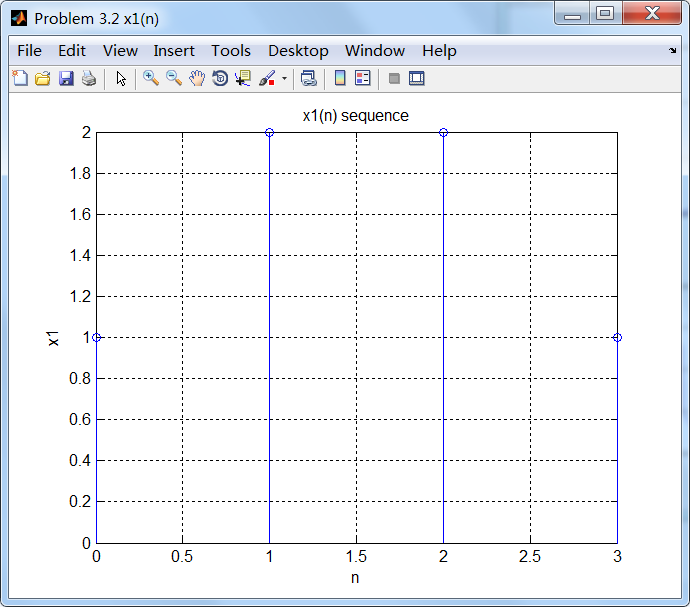

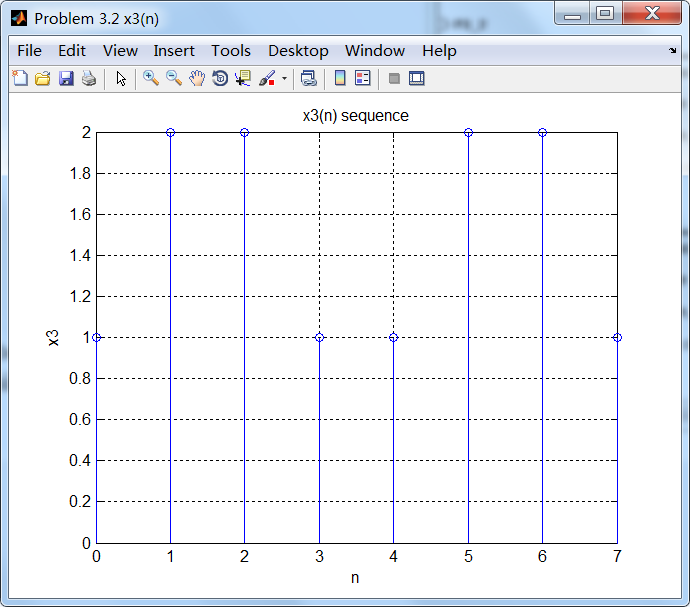

通过第1小题得到的公式计算x2序列的谱,如下:

可看出,第1小题公式计算的结果,和直接将序列通过DTFT定义得到结果是相同的。
《DSP using MATLAB》Problem 3.2的更多相关文章
- 《DSP using MATLAB》Problem 7.27
代码: %% ++++++++++++++++++++++++++++++++++++++++++++++++++++++++++++++++++++++++++++++++ %% Output In ...
- 《DSP using MATLAB》Problem 7.26
注意:高通的线性相位FIR滤波器,不能是第2类,所以其长度必须为奇数.这里取M=31,过渡带里采样值抄书上的. 代码: %% +++++++++++++++++++++++++++++++++++++ ...
- 《DSP using MATLAB》Problem 7.25
代码: %% ++++++++++++++++++++++++++++++++++++++++++++++++++++++++++++++++++++++++++++++++ %% Output In ...
- 《DSP using MATLAB》Problem 7.24
又到清明时节,…… 注意:带阻滤波器不能用第2类线性相位滤波器实现,我们采用第1类,长度为基数,选M=61 代码: %% +++++++++++++++++++++++++++++++++++++++ ...
- 《DSP using MATLAB》Problem 7.23
%% ++++++++++++++++++++++++++++++++++++++++++++++++++++++++++++++++++++++++++++++++ %% Output Info a ...
- 《DSP using MATLAB》Problem 7.16
使用一种固定窗函数法设计带通滤波器. 代码: %% ++++++++++++++++++++++++++++++++++++++++++++++++++++++++++++++++++++++++++ ...
- 《DSP using MATLAB》Problem 7.15
用Kaiser窗方法设计一个台阶状滤波器. 代码: %% +++++++++++++++++++++++++++++++++++++++++++++++++++++++++++++++++++++++ ...
- 《DSP using MATLAB》Problem 7.14
代码: %% ++++++++++++++++++++++++++++++++++++++++++++++++++++++++++++++++++++++++++++++++ %% Output In ...
- 《DSP using MATLAB》Problem 7.13
代码: %% ++++++++++++++++++++++++++++++++++++++++++++++++++++++++++++++++++++++++++++++++ %% Output In ...
- 《DSP using MATLAB》Problem 7.12
阻带衰减50dB,我们选Hamming窗 代码: %% ++++++++++++++++++++++++++++++++++++++++++++++++++++++++++++++++++++++++ ...
随机推荐
- UI自动化测试框架之Selenium关键字驱动
一.原理及特点 1. 关键字驱动测试是数据驱动测试的一种改进类型 2. 主要关键字包括三类:被操作对象(Item).操作(Operation)和值(value),用面向对象形式可将其表现为Item.O ...
- HDU1978How Many Ways 记忆化dfs+dp
/*记忆化dfs+dp dp[i][j]代表达到这个点的所有路的条数,那么所有到达终点的路的总数就是这dp[1][1]加上所有他所能到达的点的 所有路的总数 */ #include<stdio. ...
- presto-cli通过hive查询hdfs
1. 启动hive metastore 2. 启动hive thrift接口 参考:http://www.cnblogs.com/kisf/p/7497261.html 3. 下载presto se ...
- 初识PHP(三)面向对象特性
PHP5开始支持面向对象的编程方式.PHP的面向对象编程方法和别的语言区别不大,下面对PHP面向编程基本语法进行简单记录. 一.声明对象 声明方法: class Say{ public functio ...
- UVa 1635 无关的元素(唯一分解定理+二项式定理)
https://vjudge.net/problem/UVA-1635 题意: 给定n个数a1,a2,...an,依次求出相邻两数之和,将得到一个新数列.重复上述操作,最后结果将变成一个数.问这个数除 ...
- NGS检测ALK融合大起底--转载
导读: ALK融合是非小细胞肺癌的关键驱动机制之一,在NSCLC患者中发生的频率约为3-7%.针对ALK融合的抑制剂克唑替尼.色瑞替尼以及Alectinib在治疗ALK融合阳性的NSCLC患者中都取得 ...
- C++中的动态绑定
C++中基类和派生类遵循类型兼容原则:即可用派生类的对象去初始化基类的对象,可用派生类的对象去初始化基类的引用,可用派生类对象的地址去初始化基类对象指针. C++中动态绑定条件发生需要满足2个条件: ...
- Android 引用资源
比如在 strings.xml 中找到的 Hello world!字符串,我们有两种方式可以引用它: 1. 在代码中通过 R.string.hello_world 可以获得该字符串的引用: 2. 在 ...
- 用 SQL 对关系型数据库进行查询
前面几节中,我们已经掌握了如何向 SQLite 数据库中写入数据.这一节,我们将学习如何根据需求对数据库进行查询,进而从中获取数据.接下来的例子中会使用 data/datasets.sqlite(之前 ...
- CentOS6.4x86EngCustomize120g__20160307.rar
安装的镜像包: CentOS-6.4-i386-bin-DVD1to2(CentOS-6.4-i386-bin-DVD1.iso / CentOS-6.4-i386-bin-DVD2.iso) 1. ...