
《DSP using MATLAB》Problem 3.8
2018年元旦,他乡加班中,外面尽是些放炮的,别人的繁华与我无关。
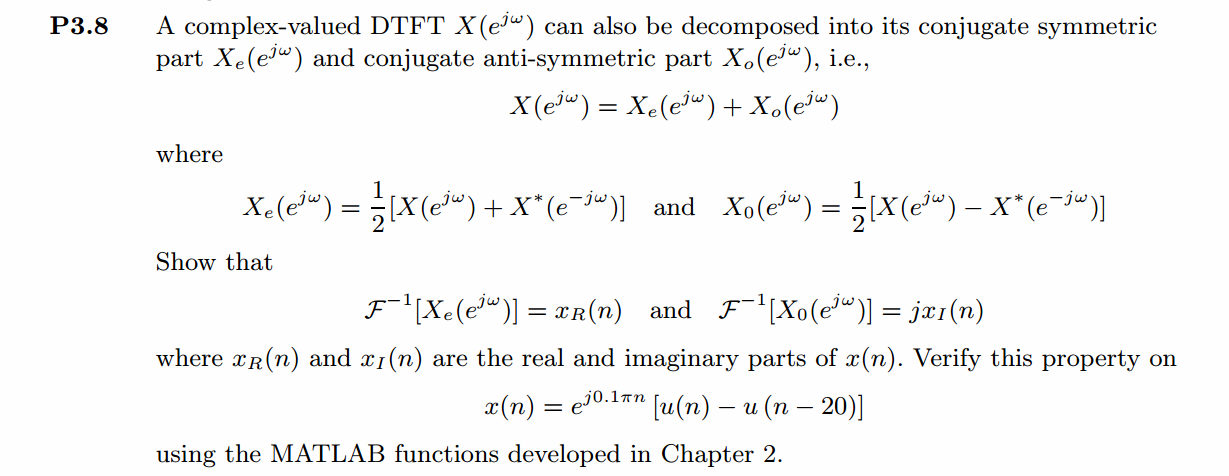
代码:
%% ------------------------------------------------------------------------

%%            Output Info about this m-file

fprintf('\n***********************************************************\n');

fprintf('        <DSP using MATLAB> Problem 3.8 \n\n');

banner();

%% ------------------------------------------------------------------------

n_start = -5; n_end = 30;

n = [n_start:n_end];

x = exp(j*0.1*pi*n) .* (stepseq(0, n_start, n_end)-stepseq(20, n_start, n_end));

figure('NumberTitle', 'off', 'Name', 'Problem 3.8 x(n)')

set(gcf,'Color',[1,1,1])                  % 改变坐标外围背景颜色

subplot(2,1,1); stem(n, real(x)); title('x sequence Real Part');

xlabel('n'); ylabel('Real[x(n)]') ;

% axis([-10,10,0,1.2])

grid on

subplot(2,1,2); stem(n, imag(x)); title('x sequence Imag Part');

xlabel('n'); ylabel('Imag[x(n)]');

grid on;

% ----------------------------------------------------

%                       DTFT of x(n)

% ----------------------------------------------------

MM = 500;

k = [-MM:MM];        % [-pi, pi]

%k = [0:M];          % [0, pi]

w = (pi/MM) * k;

[X] = dtft(x, n, w);

magX = abs(X); angX = angle(X); realX = real(X); imagX = imag(X);

figure('NumberTitle', 'off', 'Name', 'Problem 3.8 X(w)--DTFT of x(n)');

set(gcf,'Color','white');

subplot(2,1,1); plot(w/pi, magX); grid on;

title('Magnitude Part of X(w)');

xlabel('frequency in \pi units'); ylabel('Magnitude');

subplot(2,1,2); plot(w/pi, angX); grid on;

title('Angle Part of X(w)');

xlabel('frequency in \pi units'); ylabel('Radians');

figure('NumberTitle', 'off', 'Name', 'Problem 3.8 Real and Imag of X(w)');

set(gcf,'Color','white');

subplot('2,1,1'); stem(w/pi, realX); grid on;

title('Real Part of X(w)');

xlabel('frequency in \pi units'); ylabel('Real');

subplot('2,1,2'); stem(w/pi, imagX); grid on;

title('Imaginary Part of X(w)');

xlabel('frequency in \pi units'); ylabel('Imaginary');

%% ----------------------------------------------------

%%            Even and Odd part of X(jw)

%% ----------------------------------------------------

[XE, XO, m] = evenodd_cv(X, w/pi*500);

figure('NumberTitle', 'off', 'Name', 'Problem 3.8 XE(m)--Even of X(w)')

set(gcf,'Color',[1,1,1])

subplot(2,1,1); stem(m/500, real(XE)); title('Real Part of Even Sequence');

xlabel('m in \pi units'); ylabel('Real[XE(m)]');

%axis([-10,10,0,1.2])

grid on

subplot(2,1,2); stem(m/500, imag(XE)); title('Imag Part of Even Sequence');

xlabel('m in \pi units'); ylabel('Imag[XE(m)]');

%axis([-10,10,0,1.2])

grid on

figure('NumberTitle', 'off', 'Name', 'Problem 3.8 XO(m)--Odd of X(w)')

set(gcf,'Color','white')

subplot(2,1,1); stem(m/500, real(XO)); title('Real Part of Odd Sequence');

xlabel('m in \pi units'); ylabel('Real[XO(m)]');

%axis([-10,10,0,1.2])

grid on

subplot(2,1,2); stem(m/500, imag(XO)); title('Imag Part of Odd Sequence');

xlabel('m in \pi units'); ylabel('Imag[XO(m)]');

%axis([-10,10,0,1.2])

grid on

% ---------------------------------------------------

%                   DTFT of Realx(n)

% ---------------------------------------------------

MM = 500;

k = [-MM:MM];        % [-pi, pi]

%k = [0:M];        % [0, pi]

w = (pi/MM) * k;

[RX] = dtft(real(x), n, w);

magRX = abs(RX); angRX = angle(RX); realRX = real(RX); imagRX = imag(RX);

figure('NumberTitle', 'off', 'Name', 'Problem 3.8 RX(w)--DTFT of Realx(n)');

set(gcf,'Color','white');

subplot(2,1,1); plot(w/pi, magRX); grid on;

title('Magnitude Part');

xlabel('frequency in \pi units'); ylabel('Magnitude');

subplot(2,1,2); plot(w/pi, angRX); grid on;

title('Angle Part');

xlabel('frequency in \pi units'); ylabel('Radians');

figure('NumberTitle', 'off', 'Name', 'Problem 3.8 Real and Imag of RX(w)');

set(gcf,'Color','white');

subplot('2,1,1'); plot(w/pi, realRX); grid on;

title('Real Part');

xlabel('frequency in \pi units'); ylabel('Real');

subplot('2,1,2'); plot(w/pi, imagRX); grid on;

title('Imaginary Part');

xlabel('frequency in \pi units'); ylabel('Imaginary');

% -------------------------------------------------------

%                      DTFT of Imagx(n)

% -------------------------------------------------------

MM = 500;

k = [-MM:MM];        % [-pi, pi]

%k = [0:M];        % [0, pi]

w = (pi/MM) * k;

[IX] = dtft(j*imag(x), n, w);

magIX = abs(IX); angIX = angle(IX); realIX = real(IX); imagIX = imag(IX);

figure('NumberTitle', 'off', 'Name', 'Problem 3.8 IX(w)--DTFT of Imagx(n)');

set(gcf,'Color','white');

subplot(2,1,1); plot(w/pi, magIX); grid on;

title('Magnitude Part');

xlabel('frequency in \pi units'); ylabel('Magnitude');

subplot(2,1,2); plot(w/pi, angIX); grid on;

title('Angle Part');

xlabel('frequency in \pi units'); ylabel('Radians');

figure('NumberTitle', 'off', 'Name', 'Problem 3.8 Real and Imag of IX(w)');

set(gcf,'Color','white');

subplot('2,1,1'); plot(w/pi, realIX); grid on;

title('Real Part');

xlabel('frequency in \pi units'); ylabel('Real');

subplot('2,1,2'); plot(w/pi, imagIX); grid on;

title('Imaginary Part');

xlabel('frequency in \pi units'); ylabel('Imaginary');

% ------------------------------------------

%             Verify

% ------------------------------------------

figure('NumberTitle', 'off', 'Name', 'Problem 3.8 RX(w) and RealXE');

set(gcf,'Color','white');

subplot('2,1,1'); plot(w/pi, realRX); grid on;

title('Real Part of RX(w)');

xlabel('frequency in \pi units'); ylabel('Real');

subplot('2,1,2'); plot((m/500), real(XE)); grid on;

title('Real Part of XE(w)');

xlabel('frequency in \pi units'); ylabel('Real');

figure('NumberTitle', 'off', 'Name', 'Problem 3.8 IX(w) and ImagXO');

set(gcf,'Color','white');

subplot('2,1,1'); plot(w/pi, imagIX); grid on;

title('Imaginary Part of IX(w)');

xlabel('frequency in \pi units'); ylabel('Imaginary');

subplot('2,1,2'); plot((m/500), imag(XO)); grid on;

title('Imaginary Part of XO(w)');

xlabel('frequency in \pi units'); ylabel('Imaginary');
运行结果:
1、原始序列及其DTFT
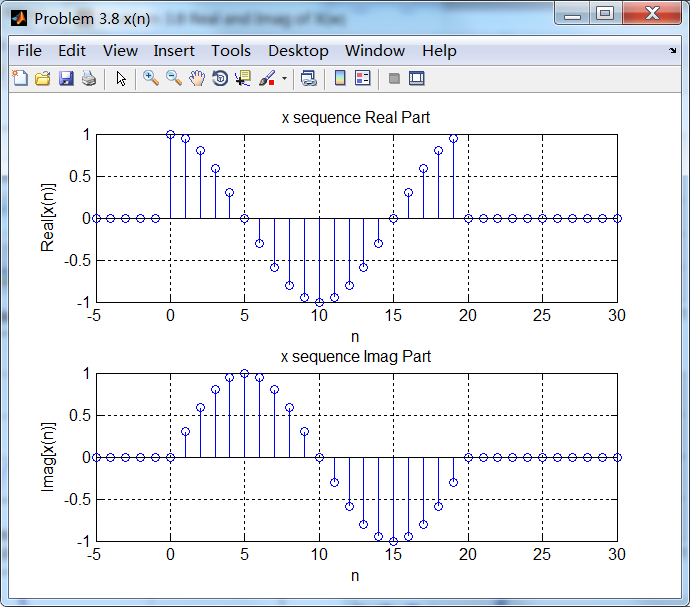
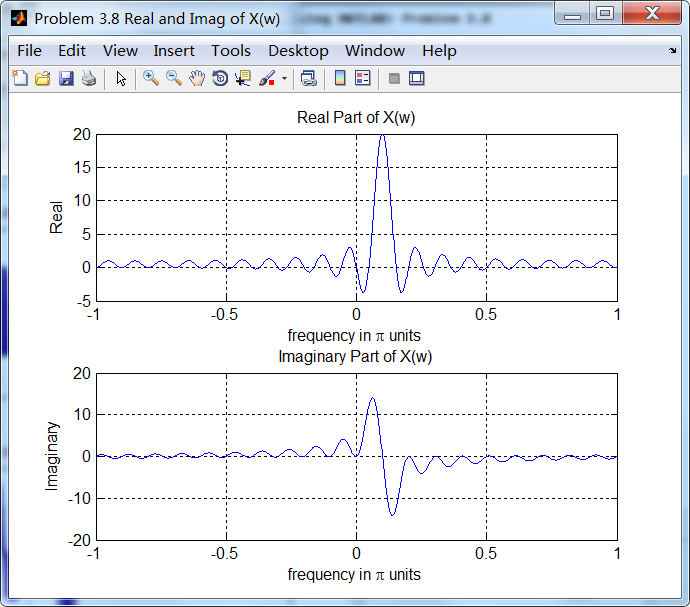
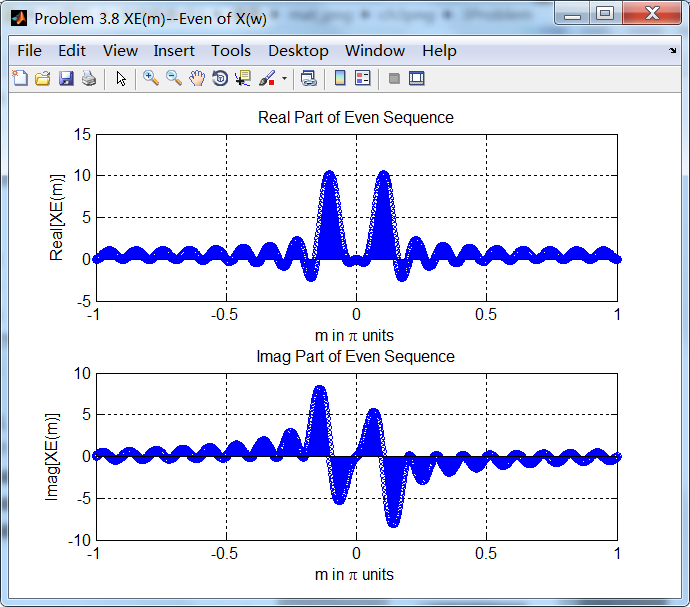
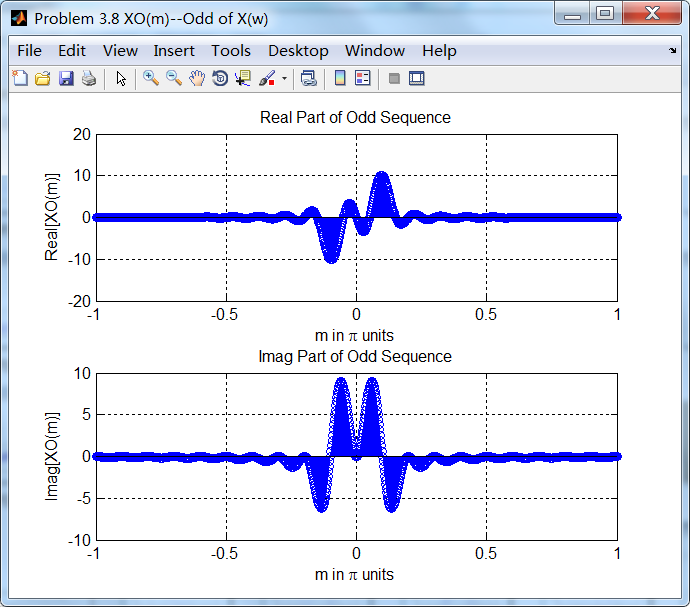
2、序列DTFT进行共轭奇偶对称分解

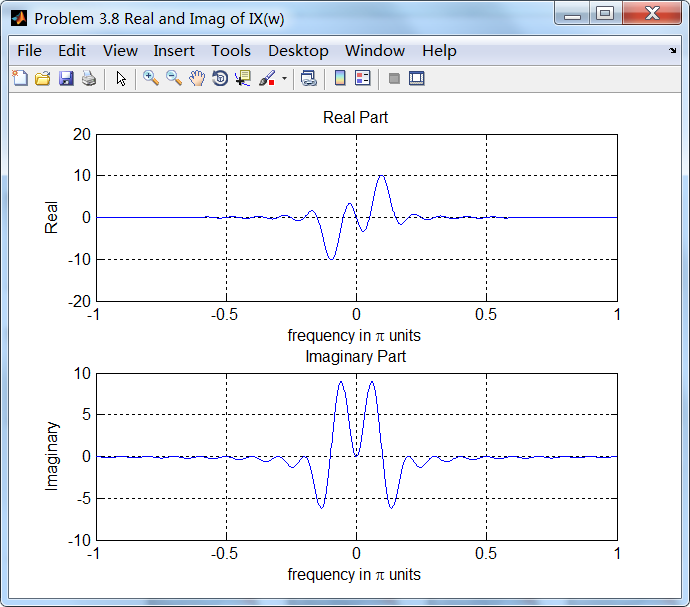
3、原始序列实部和虚部的DTFT

4、对比结果
序列DTFT的共轭偶对称分量和序列实部的DTFT结果相同;
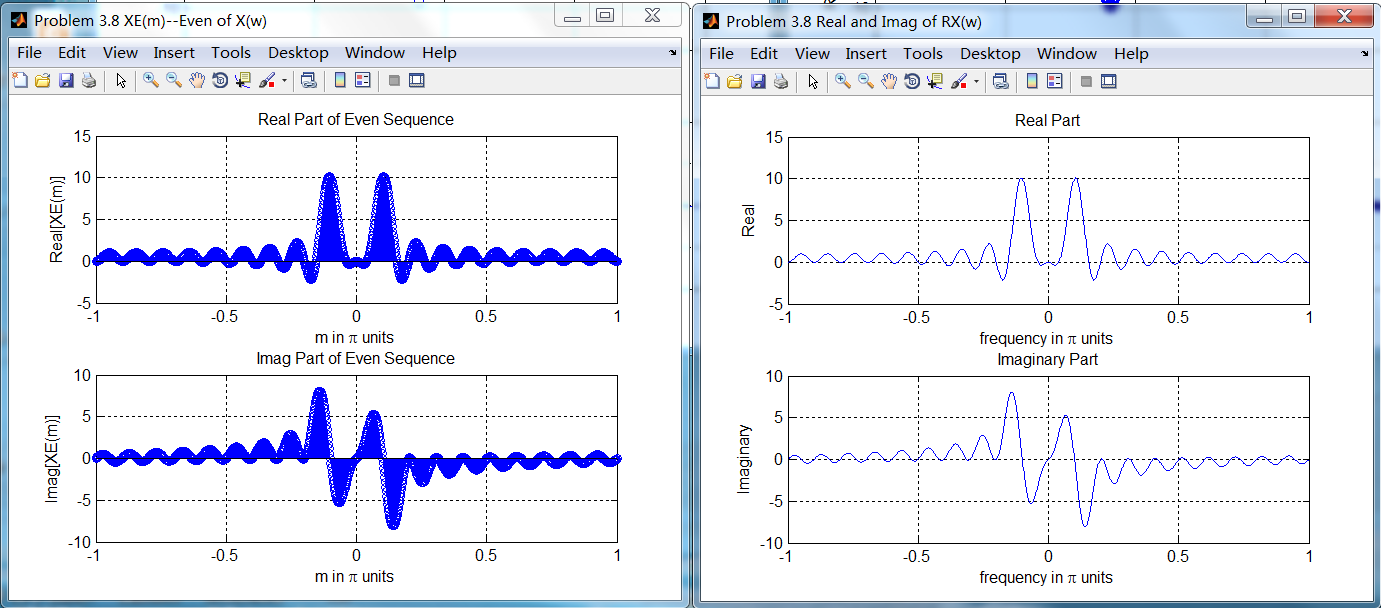
序列DTFT的共轭奇对称分量和序列虚部的DTFT结果相同;

《DSP using MATLAB》Problem 3.8的更多相关文章
- 《DSP using MATLAB》Problem 7.27
代码: %% ++++++++++++++++++++++++++++++++++++++++++++++++++++++++++++++++++++++++++++++++ %% Output In ...
- 《DSP using MATLAB》Problem 7.26
注意:高通的线性相位FIR滤波器,不能是第2类,所以其长度必须为奇数.这里取M=31,过渡带里采样值抄书上的. 代码: %% +++++++++++++++++++++++++++++++++++++ ...
- 《DSP using MATLAB》Problem 7.25
代码: %% ++++++++++++++++++++++++++++++++++++++++++++++++++++++++++++++++++++++++++++++++ %% Output In ...
- 《DSP using MATLAB》Problem 7.24
又到清明时节,…… 注意:带阻滤波器不能用第2类线性相位滤波器实现,我们采用第1类,长度为基数,选M=61 代码: %% +++++++++++++++++++++++++++++++++++++++ ...
- 《DSP using MATLAB》Problem 7.23
%% ++++++++++++++++++++++++++++++++++++++++++++++++++++++++++++++++++++++++++++++++ %% Output Info a ...
- 《DSP using MATLAB》Problem 7.16
使用一种固定窗函数法设计带通滤波器. 代码: %% ++++++++++++++++++++++++++++++++++++++++++++++++++++++++++++++++++++++++++ ...
- 《DSP using MATLAB》Problem 7.15
用Kaiser窗方法设计一个台阶状滤波器. 代码: %% +++++++++++++++++++++++++++++++++++++++++++++++++++++++++++++++++++++++ ...
- 《DSP using MATLAB》Problem 7.14
代码: %% ++++++++++++++++++++++++++++++++++++++++++++++++++++++++++++++++++++++++++++++++ %% Output In ...
- 《DSP using MATLAB》Problem 7.13
代码: %% ++++++++++++++++++++++++++++++++++++++++++++++++++++++++++++++++++++++++++++++++ %% Output In ...
- 《DSP using MATLAB》Problem 7.12
阻带衰减50dB,我们选Hamming窗 代码: %% ++++++++++++++++++++++++++++++++++++++++++++++++++++++++++++++++++++++++ ...
随机推荐
- Chrome与之驱动对应的版本
看到网上基本没有最新的chromedriver与chrome的对应关系表,便兴起整理了一份如下,希望对大家有用: chromedriver版本 支持的Chrome版本 v2.46 v71-73 v2. ...
- shell中引号的妙用
#!/bin/bashfile=('leon 01.cap' leon-02.cap nicky-01.cap whoareu-01.cap 8dbb-01.cap)dict=(simple.txt ...
- 『PyTorch』第十一弹_torch.optim优化器
一.简化前馈网络LeNet import torch as t class LeNet(t.nn.Module): def __init__(self): super(LeNet, self).__i ...
- JS冒泡排序的6种写法(武当雄风)
天下英雄出我辈,一入江湖岁月催.鸿图霸业谈笑间,不胜人生一场醉. 武当山上,一年一度的试道大会又开始了... 众武当弟子摩拳擦掌都想在此次试道大会上一展风采... 张三丰临终前曾留下一句话:试道大会采 ...
- 一篇关于oracle psu的文章(转)
Oracle Database PSU/CPU Posted on 2011-07-28 16:27 dbblog 阅读(2569) 评论(0) 编辑 收藏 1. 什么是PSU/CPU?CPU: Cr ...
- redis中的"HashMap"
redis是一个存储键值对的内存数据库,其存储键值的方式和java中的HashMap相似. 表征redis数据库的结构体是redisDb (在server.h文件中),redis服务器默认有16个数据 ...
- jsonp 遍历文档
遍历文档 将html解析成一个Document后,就可以使用类似Dom的方法进行操作 File input = new File("/tmp/input.html"); Docum ...
- httpclient 使用代理
httpclient_使用代理 当爬取网页的时候,有的目标站点有反爬虫机制,对于频繁访问站点以及规则性访问站点的行为,会采用屏蔽IP的措施. 这时候代理IP就派上用场了. 代理的分类 透明代理 匿名代 ...
- javascript开发HTML5游戏--斗地主(单机模式part1)
最近学习使用了一款HTML5游戏引擎(青瓷引擎),并用它尝试做了一个斗地主的游戏,简单实现了单机对战和网络对战,代码可已放到github上,在此谈谈自己如何通过引擎来开发这款游戏的. 客户端代码 ...
- (C#基础)Linq学习理解
一遍学习基础,一遍练习打字,很多乐趣. 代码 using System; using System.Collections.Generic; using System.Linq; using Syst ...