
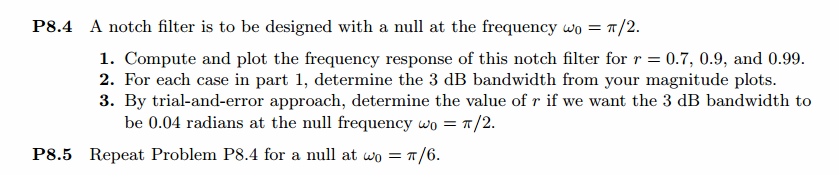
《DSP using MATLAB》Problem 8.4
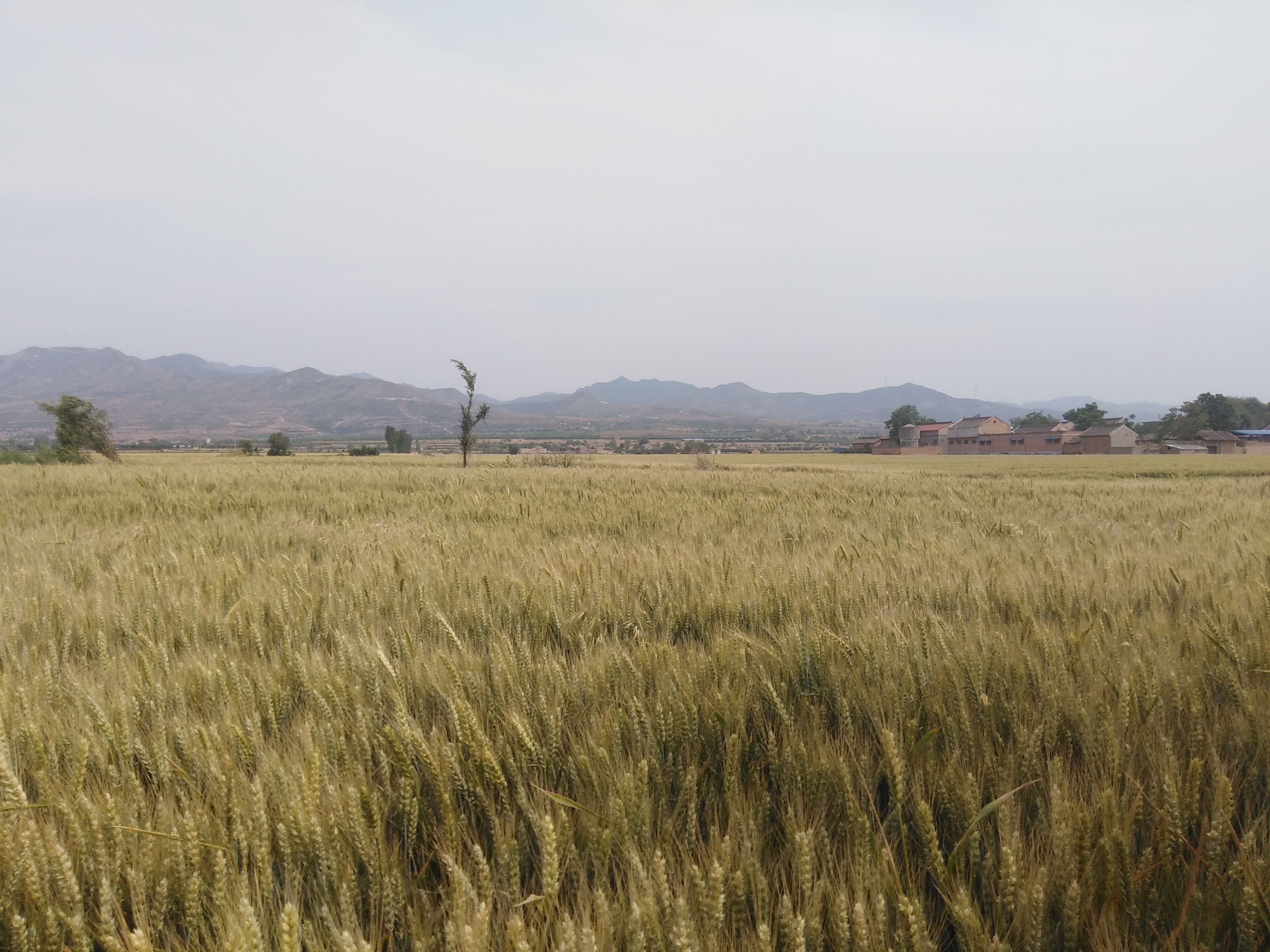
今天是六一儿童节,陪伴不了家人,心里思念着他们,看着地里金黄的麦子,远处的山,高高的天
代码:
%% ------------------------------------------------------------------------

%%            Output Info about this m-file

fprintf('\n***********************************************************\n');

fprintf('        <DSP using MATLAB> Problem 8.4 \n\n');

banner();

%% ------------------------------------------------------------------------

% digital Notch filter

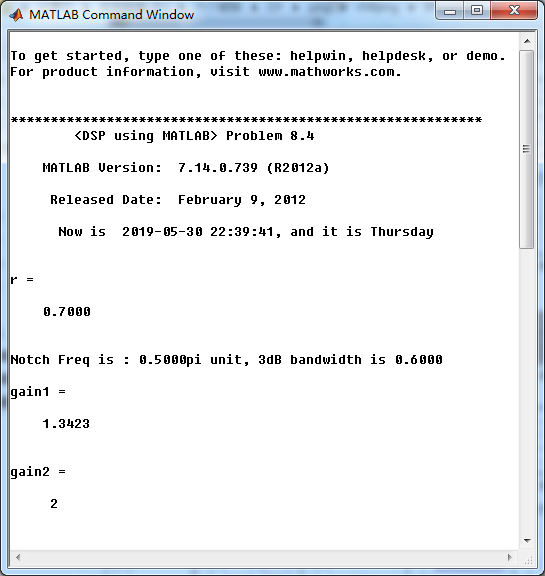
r = 0.7

%r = 0.9

%r = 0.99

omega0 = pi/2;

% corresponding system function  Direct form

b0 = 1.0;                                                                 % gain parameter

b   = b0*[1  -2*cos(omega0)  1];                                        % numerator with poles

a   = [1  -2*r*cos(omega0)   r*r];                                      % denominator

% precise resonant frequency and 3dB bandwidth

omega_r = acos((1+r*r)*cos(omega0)/(2*r));

delta_omega = 2*(1-r);

fprintf('\nNotch Freq is : %.4fpi unit, 3dB bandwidth is %.4f \n', omega_r/pi,delta_omega);

%

[db, mag, pha, grd, w] = freqz_m(b, a);

[db_b, mag_b, pha_b, grd_b, w] = freqz_m(b, 1);

% ---------------------------------------------------------------------

%  Choose the gain parameter of the filter, maximum gain is equal to 1

% ---------------------------------------------------------------------

gain1=max(mag)                    % with poles

gain2=max(mag_b)                  % without poles

[db, mag, pha, grd, w] = freqz_m(b/gain1, a);

[db_b, mag_b, pha_b, grd_b, w] = freqz_m(b/gain2, 1);

figure('NumberTitle', 'off', 'Name', 'Problem 8.4 Notch filter with poles')

set(gcf,'Color','white');

subplot(2,2,1); plot(w/pi, db); grid on; axis([0 2 -60 10]);

set(gca,'YTickMode','manual','YTick',[-60,-30,0])

set(gca,'YTickLabelMode','manual','YTickLabel',['60';'30';' 0']);

set(gca,'XTickMode','manual','XTick',[0,0.5,1,1.5,2]);

xlabel('frequency in \pi units'); ylabel('Decibels'); title('Magnitude Response in dB');

subplot(2,2,3); plot(w/pi, mag); grid on; %axis([0 1 -100 10]);

xlabel('frequency in \pi units'); ylabel('Absolute'); title('Magnitude Response in absolute');

set(gca,'XTickMode','manual','XTick',[0,0.5,1,1.5,2]);

set(gca,'YTickMode','manual','YTick',[0,1.0]);

subplot(2,2,2); plot(w/pi, pha); grid on; %axis([0 1 -100 10]);

xlabel('frequency in \pi units'); ylabel('Rad'); title('Phase Response in Radians');

subplot(2,2,4); plot(w/pi, grd*pi/180);  grid on; %axis([0 1 -100 10]);

xlabel('frequency in \pi units'); ylabel('Rad'); title('Group Delay');

set(gca,'XTickMode','manual','XTick',[0,0.5,1,1.5,2]);

%set(gca,'YTickMode','manual','YTick',[0,1.0]);

figure('NumberTitle', 'off', 'Name', 'Problem 8.4 Notch filter without poles')

set(gcf,'Color','white');

subplot(2,2,1); plot(w/pi, db_b); grid on; axis([0 2 -60 10]);

set(gca,'YTickMode','manual','YTick',[-60,-30,0])

set(gca,'YTickLabelMode','manual','YTickLabel',['60';'30';' 0']);

set(gca,'XTickMode','manual','XTick',[0,0.25,0.5,1,1.5,1.75]);

xlabel('frequency in \pi units'); ylabel('Decibels'); title('Magnitude Response in dB');

subplot(2,2,3); plot(w/pi, mag_b); grid on; %axis([0 1 -100 10]);

xlabel('frequency in \pi units'); ylabel('Absolute'); title('Magnitude Response in absolute');

set(gca,'XTickMode','manual','XTick',[0,0.5,1,1.5,2]);

set(gca,'YTickMode','manual','YTick',[0,1.0]);

subplot(2,2,2); plot(w/pi, pha_b); grid on; %axis([0 1 -100 10]);

xlabel('frequency in \pi units'); ylabel('Rad'); title('Phase Response in Radians');

subplot(2,2,4); plot(w/pi, grd_b*pi/180);  grid on; %axis([0 1 -100 10]);

xlabel('frequency in \pi units'); ylabel('Rad'); title('Group Delay');

set(gca,'XTickMode','manual','XTick',[0,0.5,1,1.5,2]);

%set(gca,'YTickMode','manual','YTick',[0,1.0]);

figure('NumberTitle', 'off', 'Name', 'Problem 8.4 Notch filter with & without poles')

set(gcf,'Color','white');

subplot(2,1,1); plot(w/pi, db, 'r--'); grid on; axis([0 2 -60 10]); hold on;

plot(w/pi, db_b); grid on; axis([0 2 -60 10]); hold off;

set(gca,'YTickMode','manual','YTick',[-60,-30,0])

set(gca,'YTickLabelMode','manual','YTickLabel',['60';'30';' 0']);

set(gca,'XTickMode','manual','XTick',[0,0.5,1,1.5,2]);

xlabel('frequency in \pi units'); ylabel('Decibels'); title('Magnitude Response in dB');

subplot(2,1,2); plot(w/pi, pha, 'r--'); grid on; hold on;%axis([0 1 -100 10]);

plot(w/pi, pha_b); hold off;

xlabel('frequency in \pi units'); ylabel('Rad'); title('Phase Response in Radians');

figure('NumberTitle', 'off', 'Name', 'Problem 8.4 Pole-Zero Plot')

set(gcf,'Color','white');

zplane(b,a);

title(sprintf('Pole-Zero Plot, r=%.2f  \\omega=%.2f\\pi',r,omega0/pi));

%pzplotz(b,a);

figure('NumberTitle', 'off', 'Name', 'Problem 8.4 Pole-Zero Plot')

set(gcf,'Color','white');

zplane(b,1);

title(sprintf('Pole-Zero Plot, r=%.2f  \\omega=%.2f\\pi',r,omega0/pi));

%pzplotz(b,a);

% Impulse Response

fprintf('\n----------------------------------');

fprintf('\nPartial fraction expansion method: \n');

b = b/gain1;

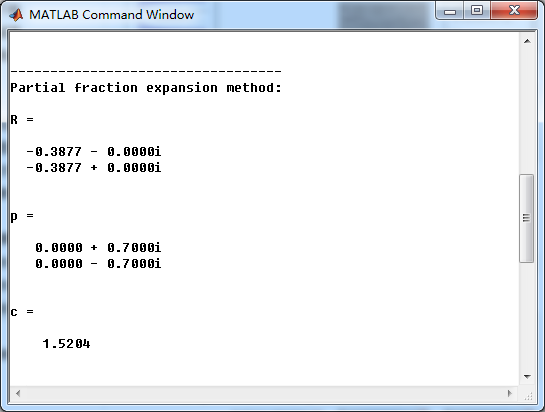
[R, p, c] = residuez(b , a)

MR = (abs(R))'              % Residue  Magnitude

AR = (angle(R))'/pi         % Residue  angles in pi units

Mp = (abs(p))'              % pole  Magnitude

Ap = (angle(p))'/pi         % pole  angles in pi units

[delta, n] = impseq(0,0,50);

h_chk = filter(b , a , delta);      % check sequences

% ------------------------------------------------------------------------

%              gain parameter b0=1

% ------------------------------------------------------------------------

h =  -0.5204*( 0.7.^n ) .* (2*cos(pi*n/2) ) + 2.0408 * delta;  % r=0.7

%h =   -0.1173*( 0.9.^n ) .* (2*cos(pi*n/2) ) + 1.2346 * delta;  % r=0.9

%h =  -0.0102*( 0.99.^n ) .* (2*cos(pi*n/2) ) + 1.0203 * delta;  % r=0.99

% ------------------------------------------------------------------------

% ------------------------------------------------------------------------

%              gain parameter b0 = equation

% ------------------------------------------------------------------------

%h =  -0.3877*( 0.7.^n ) .* (2*cos(pi*n/2) ) + 1.5204 * delta;  % r=0.7

%h =   -0.1173*( 0.9.^n ) .* (2*cos(pi*n/2) ) + 1.2346 * delta;  % r=0.9

%h =  -0.0102*( 0.99.^n ) .* (2*cos(pi*n/2) ) + 1.0203 * delta;  % r=0.99

% ------------------------------------------------------------------------

figure('NumberTitle', 'off', 'Name', 'Problem 8.4 Notch filter, h(n) by filter and Inv-Z ')

set(gcf,'Color','white');

subplot(2,1,1); stem(n, h_chk); grid on; %axis([0 2 -60 10]);

xlabel('n'); ylabel('h\_chk'); title('Impulse Response sequences by filter');

subplot(2,1,2); stem(n, h/gain1); grid on; %axis([0 1 -100 10]);

xlabel('n'); ylabel('h'); title('Impulse Response sequences by Inv-Z');

[db, mag, pha, grd, w] = freqz_m(h/gain1, [1]);

figure('NumberTitle', 'off', 'Name', 'Problem 8.4 Notch filter, h(n) by Inv-Z ')

set(gcf,'Color','white');

subplot(2,2,1); plot(w/pi, db); grid on; axis([0 2 -60 10]);

set(gca,'YTickMode','manual','YTick',[-60,-30,0])

set(gca,'YTickLabelMode','manual','YTickLabel',['60';'30';' 0']);

set(gca,'XTickMode','manual','XTick',[0,0.5,1,1.5,2]);

xlabel('frequency in \pi units'); ylabel('Decibels'); title('Magnitude Response in dB');

subplot(2,2,3); plot(w/pi, mag); grid on; %axis([0 1 -100 10]);

xlabel('frequency in \pi units'); ylabel('Absolute'); title('Magnitude Response in absolute');

set(gca,'XTickMode','manual','XTick',[0,0.5,1,1.5,2]);

set(gca,'YTickMode','manual','YTick',[0,1.0]);

subplot(2,2,2); plot(w/pi, pha); grid on; %axis([0 1 -100 10]);

xlabel('frequency in \pi units'); ylabel('Rad'); title('Phase Response in Radians');

subplot(2,2,4); plot(w/pi, grd*pi/180);  grid on; %axis([0 1 -100 10]);

xlabel('frequency in \pi units'); ylabel('Rad'); title('Group Delay');

set(gca,'XTickMode','manual','XTick',[0,0.5,1,1.5,2]);

%set(gca,'YTickMode','manual','YTick',[0,1.0]);

% Given resonat frequency and 3dB bandwidth

delta_omega = 0.04;

omega_r = pi*0.5;

r = 1 - delta_omega / 2
运行结果:
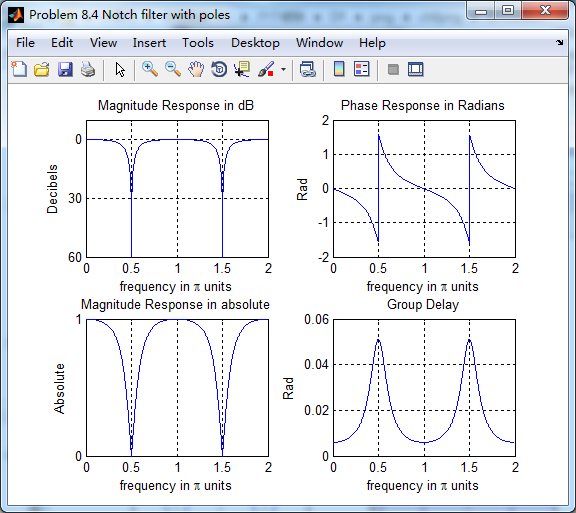
陷波滤波器,ω0=0.5π,引入极点r=0.7
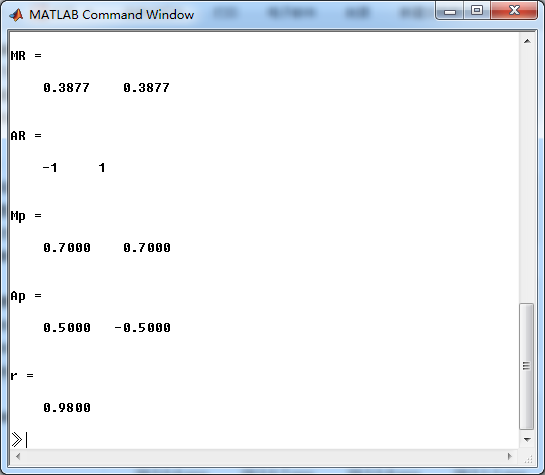
系统函数部分分式展开
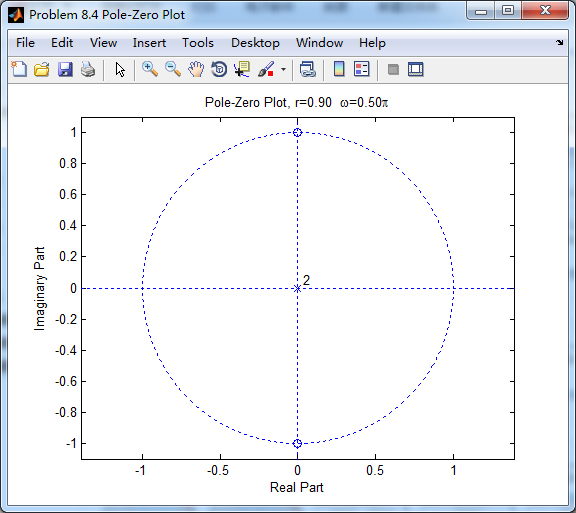
系统零极点如下图

幅度谱、相位谱、群延迟
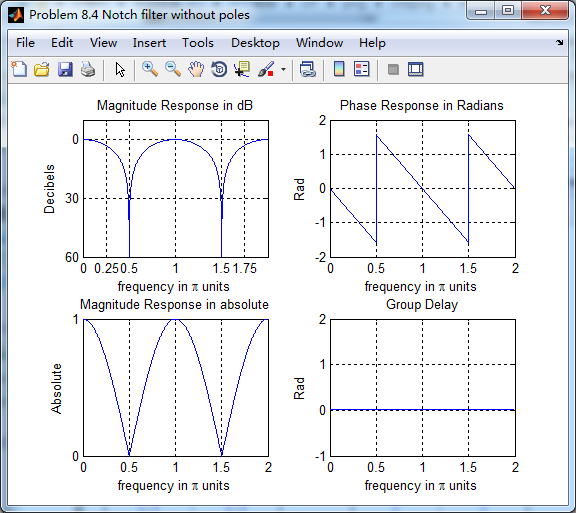
零点位于原点位置,相当于去掉零点,如下
去掉零点后,陷波滤波器的幅度谱、相位谱和群延迟
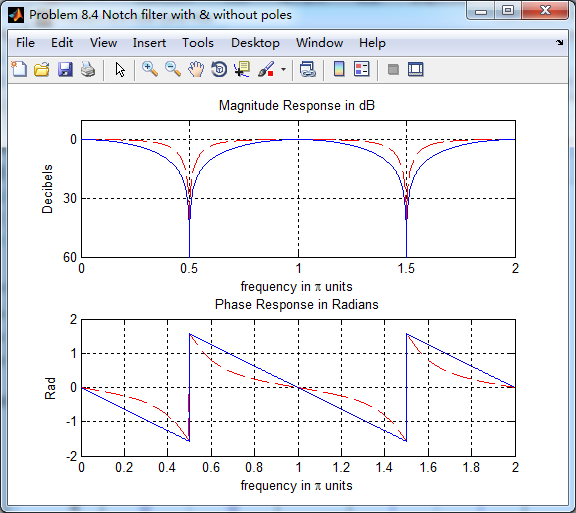
引入零点的情况下,陷波频率附近频带更窄(红色),蓝色是无零点的情况。如同书上所言,陷波频率ω0
二者相差不大。
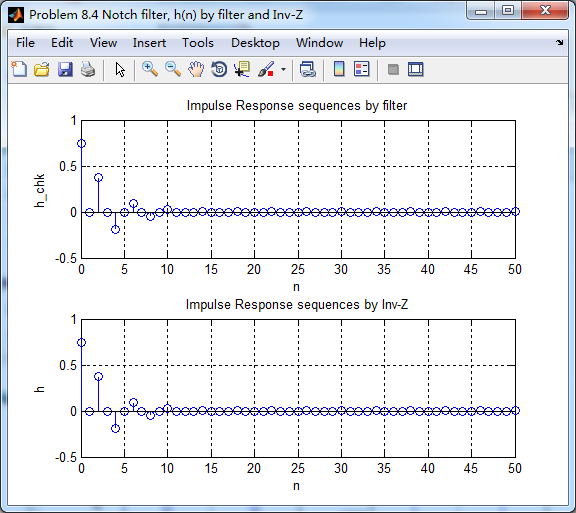
系统函数部分分式展开后,查表,求逆z变换得到脉冲响应序列h(n)
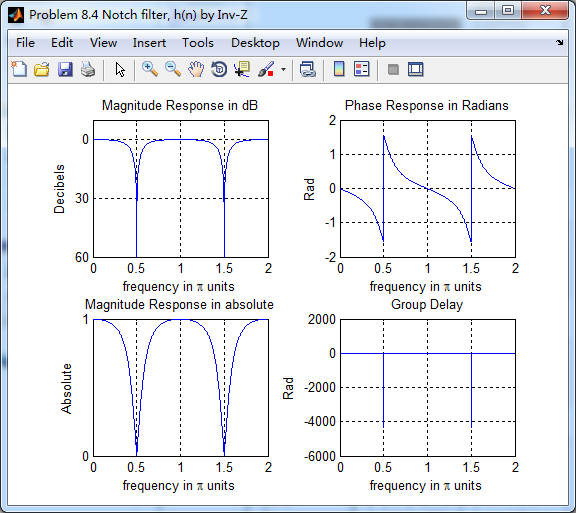
极点模r=0.9和0.99的结果,这里就不放了。
《DSP using MATLAB》Problem 8.4的更多相关文章
- 《DSP using MATLAB》Problem 7.27
代码: %% ++++++++++++++++++++++++++++++++++++++++++++++++++++++++++++++++++++++++++++++++ %% Output In ...
- 《DSP using MATLAB》Problem 7.26
注意:高通的线性相位FIR滤波器,不能是第2类,所以其长度必须为奇数.这里取M=31,过渡带里采样值抄书上的. 代码: %% +++++++++++++++++++++++++++++++++++++ ...
- 《DSP using MATLAB》Problem 7.25
代码: %% ++++++++++++++++++++++++++++++++++++++++++++++++++++++++++++++++++++++++++++++++ %% Output In ...
- 《DSP using MATLAB》Problem 7.24
又到清明时节,…… 注意:带阻滤波器不能用第2类线性相位滤波器实现,我们采用第1类,长度为基数,选M=61 代码: %% +++++++++++++++++++++++++++++++++++++++ ...
- 《DSP using MATLAB》Problem 7.23
%% ++++++++++++++++++++++++++++++++++++++++++++++++++++++++++++++++++++++++++++++++ %% Output Info a ...
- 《DSP using MATLAB》Problem 7.16
使用一种固定窗函数法设计带通滤波器. 代码: %% ++++++++++++++++++++++++++++++++++++++++++++++++++++++++++++++++++++++++++ ...
- 《DSP using MATLAB》Problem 7.15
用Kaiser窗方法设计一个台阶状滤波器. 代码: %% +++++++++++++++++++++++++++++++++++++++++++++++++++++++++++++++++++++++ ...
- 《DSP using MATLAB》Problem 7.14
代码: %% ++++++++++++++++++++++++++++++++++++++++++++++++++++++++++++++++++++++++++++++++ %% Output In ...
- 《DSP using MATLAB》Problem 7.13
代码: %% ++++++++++++++++++++++++++++++++++++++++++++++++++++++++++++++++++++++++++++++++ %% Output In ...
- 《DSP using MATLAB》Problem 7.12
阻带衰减50dB,我们选Hamming窗 代码: %% ++++++++++++++++++++++++++++++++++++++++++++++++++++++++++++++++++++++++ ...
随机推荐
- 2019-3-20-win10-uwp-如何自定义-RichTextBlock-右键菜单
title author date CreateTime categories win10 uwp 如何自定义 RichTextBlock 右键菜单 lindexi 2019-3-20 9:54:9 ...
- 第一个Vus.js
<!DOCTYPE html> <html> <head> <meta charset="utf-8"> <title> ...
- 数据库MySQL--修改数据表
创建数据库::create database 数据库名: 如果数据不存在则创建,存在不创建:Create database if not exists 数据库名 ; 删除数据库::drop datab ...
- Postgraduate
https://account.chsi.com.cn/passport/login?entrytype=yzgr&service=https%3A%2F%2Fyz.chsi.com.cn%2 ...
- jQuery FormData使用方法
FormData的主要用途 将form表单元素的name与value进行组合,实现表单数据的序列化,从而减少表单元素的拼接,提高工作效率. 异步上传文件 注:FormData 对象的字段类型可以是 B ...
- 织梦怎么调用栏目SEO标题
点击[模板][默认模板管理]找到模板文件名[list_article.htm],点击模板后面的修改,弹出修改模板代码页面.更改模板文件中<title>{dede:field.title/} ...
- 基于V8引擎的C++和JS的相互交互
基于什么原因略! 1. 脚本引擎的基本功能 V8只是一个JS引擎.去除它的特点功能出处,它必须要实现JS引擎的几个基础功能: 脚本执行:脚本可能是一个表达式:一段js代码:或者一个文件执行表达式返回j ...
- 第二十篇:记下第一个mysql触发器
项目背景:给一个服务限制访问次数,当用户访问这个服务的次数达到这个值的时候,关闭他的访问权限首先访问信息存在一张表中,记录用户的ip:visitor_ip,服务的id:service_id,访问次数: ...
- Git 比较两个分支之间的差异
1.查看 dev 有,而 master 中没有的: git log dev ^master 2.查看 dev 中比 master 中多提交了哪些内容: git log master..dev 注意,列 ...
- layui之input里格式验证
form.verify({ title: function(value){ if(value.length < 5){ retu ...