
《DSP using MATLAB》Problem 3.1
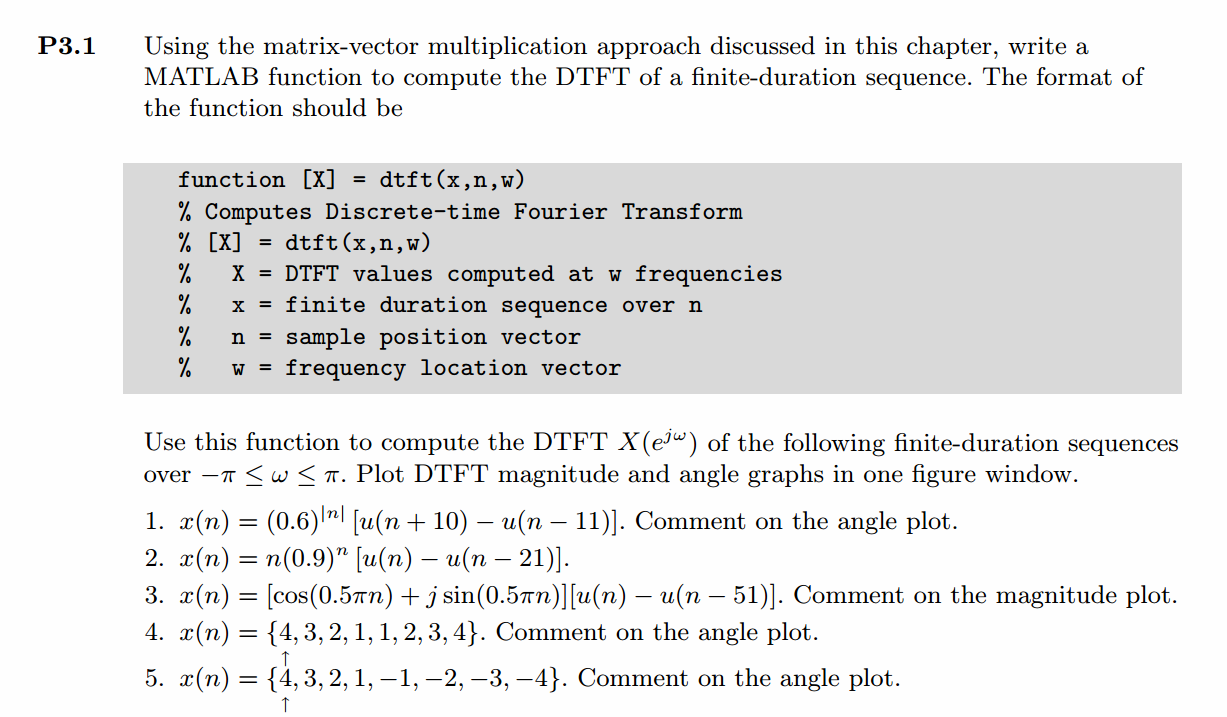
先写DTFT子函数:
function [X] = dtft(x, n, w)

%% ------------------------------------------------------------------------

%%     Computes DTFT (Discrete-Time Fourier Transform)

%%                         of Finite-Duration Sequence

%%   Note: NOT the most elegant way

%   [X] = dtft(x, n, w)

%    X  = DTFT values computed at w frequencies

%    x  = finite duration sequence over n

%    n  = sample position vector

%    w  = frequency location vector

M = 500;

k = [-M:M];                    % [-pi, pi]

%k = [0:M];                    % [0, pi]

w = (pi/M) * k;

X = x * (exp(-j*pi/M)) .^ (n'*k);

% X = x * exp(-j*n'*pi*k/M) ;
下面开始利用上函数开始画图。结构都一样,先显示序列x(n),在进行DTFT,画出幅度响应和相位响应。
代码:
%% ------------------------------------------------------------------------

%%            Output Info about this m-file

fprintf('\n***********************************************************\n');

fprintf('        <DSP using MATLAB> Problem 3.1 \n\n');

banner();

%% ------------------------------------------------------------------------

% ----------------------------------

%            x1(n)

% ----------------------------------

n1_start = -11; n1_end = 13;

n1 = [n1_start : n1_end];

x1 = 0.6 .^ (abs(n1)) .* (stepseq(-10, n1_start, n1_end)-stepseq(11, n1_start, n1_end));

figure('NumberTitle', 'off', 'Name', 'Problem 3.1 x1(n)');

set(gcf,'Color','white');

stem(n1, x1);

xlabel('n'); ylabel('x1');

title('x1(n) sequence'); grid on;

M = 500;

k = [-M:M];        % [-pi, pi]

%k = [0:M];        % [0, pi]

w = (pi/M) * k;

[X1] = dtft(x1, n1, w);

magX1 = abs(X1); angX1 = angle(X1); realX1 = real(X1); imagX1 = imag(X1);

figure('NumberTitle', 'off', 'Name', 'Problem 3.1 DTFT');

set(gcf,'Color','white');

subplot(2,2,1); plot(w/pi, magX1); grid on;

title('Magnitude Part');

xlabel('frequency in \pi units'); ylabel('Magnitude');

subplot(2,2,3); plot(w/pi, angX1/pi); grid on;

title('Angle Part');

xlabel('frequency in \pi units'); ylabel('Radians/\pi');

subplot('2,2,2'); plot(w/pi, realX1); grid on;

title('Real Part');

xlabel('frequency in \pi units'); ylabel('Real');

subplot('2,2,4'); plot(w/pi, imagX1); grid on;

title('Imaginary Part');

xlabel('frequency in \pi units'); ylabel('Imaginary');

figure('NumberTitle', 'off', 'Name', 'Problem 3.1 DTFT of x1(n)');;

set(gcf,'Color','white');

subplot(2,1,1); plot(w/pi, magX1); grid on;

title('Magnitude Part');

xlabel('frequency in \pi units'); ylabel('Magnitude');

subplot(2,1,2); plot(w/pi, angX1); grid on;

title('Angle Part');

xlabel('frequency in \pi units'); ylabel('Radians');

% -------------------------------------

%            x2(n)

% -------------------------------------

n2_start = -1; n2_end = 22;

n2 = [n2_start : n2_end];

x2 = (n2 .* (0.9 .^ n2)) .* (stepseq(0, n2_start, n2_end) - stepseq(21, n2_start, n2_end));

figure('NumberTitle', 'off', 'Name', 'Problem 3.1 x2(n)');

set(gcf,'Color','white');

stem(n2, x2);

xlabel('n'); ylabel('x2');

title('x2(n) sequence'); grid on;

M = 500;

k = [-M:M];        % [-pi, pi]

%k = [0:M];        % [0, pi]

w = (pi/M) * k;

[X2] = dtft(x2, n2, w);

magX2 = abs(X2); angX2 = angle(X2); realX2 = real(X2); imagX2 = imag(X2);

figure('NumberTitle', 'off', 'Name', 'Problem 3.1 DTFT of x2(n)');;

set(gcf,'Color','white');

subplot(2,1,1); plot(w/pi, magX2); grid on;

title('Magnitude Part');

xlabel('frequency in \pi units'); ylabel('Magnitude');

subplot(2,1,2); plot(w/pi, angX2); grid on;

title('Angle Part');

xlabel('frequency in \pi units'); ylabel('Radians');

% -------------------------------------

%            x3(n)

% -------------------------------------

n3_start = -1; n3_end = 52;

n3 = [n3_start : n3_end];

x3 = (cos(0.5*pi*n3) + j * sin(0.5*pi*n3)) .* (stepseq(0, n3_start, n3_end) - stepseq(51, n3_start, n3_end));

figure('NumberTitle', 'off', 'Name', 'Problem 3.1 x3(n)');

set(gcf,'Color','white');

stem(n3, x3);

xlabel('n'); ylabel('x3');

title('x3(n) sequence'); grid on;

M = 500;

k = [-M:M];        % [-pi, pi]

%k = [0:M];        % [0, pi]

w = (pi/M) * k;

[X3] = dtft(x3, n3, w);

magX3 = abs(X3); angX3 = angle(X3); realX3= real(X3); imagX3 = imag(X3);

figure('NumberTitle', 'off', 'Name', 'Problem 3.1 DTFT of x3(n)');;

set(gcf,'Color','white');

subplot(2,1,1); plot(w/pi, magX3); grid on;

title('Magnitude Part');

xlabel('frequency in \pi units'); ylabel('Magnitude');

subplot(2,1,2); plot(w/pi, angX3); grid on;

title('Angle Part');

xlabel('frequency in \pi units'); ylabel('Radians');

% -------------------------------------

%            x4(n)

% -------------------------------------

n4_start = 0; n4_end = 7;

n4 = [n4_start : n4_end];

x4 = [4:-1:1, 1:4];

figure('NumberTitle', 'off', 'Name', 'Problem 3.1 x4(n)');

set(gcf,'Color','white');

stem(n4, x4, 'r', 'filled');

xlabel('n'); ylabel('x4');

title('x4(n) sequence'); grid on;

M = 500;

k = [-M:M];        % [-pi, pi]

%k = [0:M];        % [0, pi]

w = (pi/M) * k;

[X4] = dtft(x4, n4, w);

magX4 = abs(X4); angX4 = angle(X4); realX4= real(X4); imagX4 = imag(X4);

figure('NumberTitle', 'off', 'Name', 'Problem 3.1 DTFT of x3(n)');;

set(gcf,'Color','white');

subplot(2,1,1); plot(w/pi, magX4); grid on;

title('Magnitude Part');

xlabel('frequency in \pi units'); ylabel('Magnitude');

subplot(2,1,2); plot(w/pi, angX4); grid on;

title('Angle Part');

xlabel('frequency in \pi units'); ylabel('Radians');

% -------------------------------------

%            x5(n)

% -------------------------------------

n5_start = 0; n5_end = 7;

n5 = [n5_start : n5_end];

x5 = [4:-1:1, -1:-1:-4];

figure('NumberTitle', 'off', 'Name', 'Problem 3.1 x5(n)');

set(gcf,'Color','white');

stem(n5, x5, 'r', 'filled');

xlabel('n'); ylabel('x5');

title('x5(n) sequence'); grid on;

M = 500;

k = [-M:M];        % [-pi, pi]

%k = [0:M];        % [0, pi]

w = (pi/M) * k;

[X5] = dtft(x5, n5, w);

magX5 = abs(X5); angX5 = angle(X5); realX5= real(X5); imagX5 = imag(X5);

figure('NumberTitle', 'off', 'Name', 'Problem 3.1 DTFT of x5(n)');

set(gcf,'Color','white');

subplot(2,1,1); plot(w/pi, magX5); grid on;

title('Magnitude Part');

xlabel('frequency in \pi units'); ylabel('Magnitude');

subplot(2,1,2); plot(w/pi, angX5); grid on;

title('Angle Part');

xlabel('frequency in \pi units'); ylabel('Radians');
运行结果:
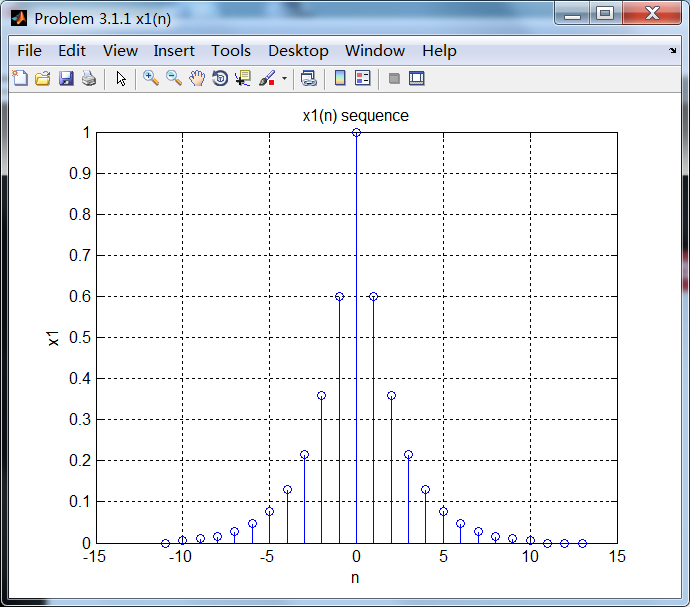

相位响应是关于ω=0偶对称的。
序列2:

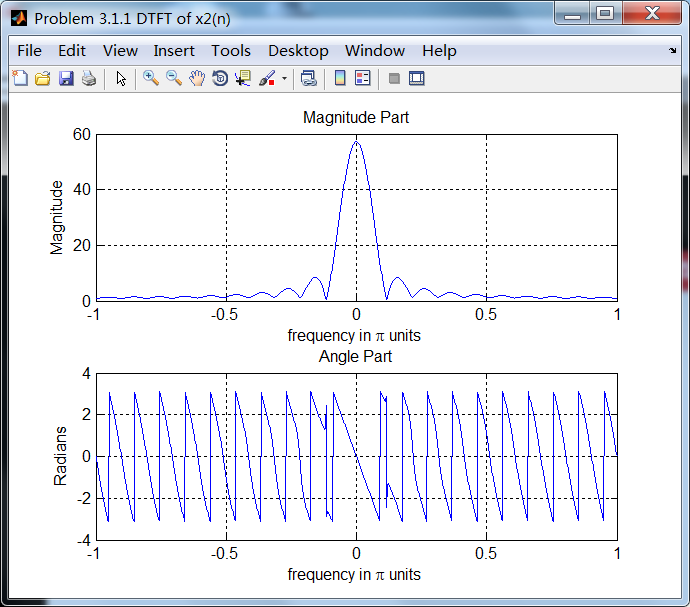
序列3:
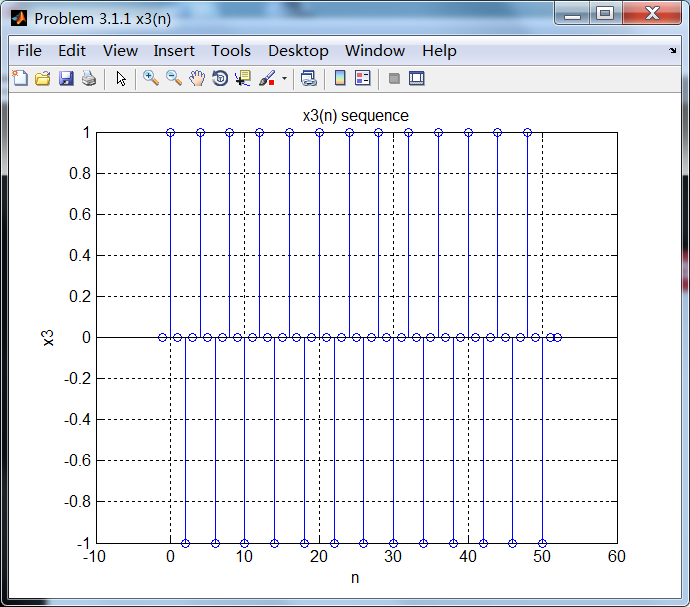
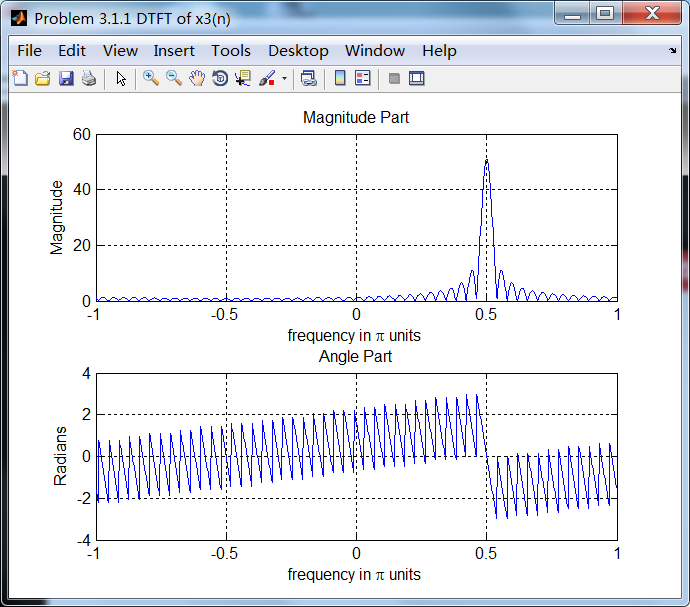
序列3的主要频率分量位于ω=0.5π。
序列4:
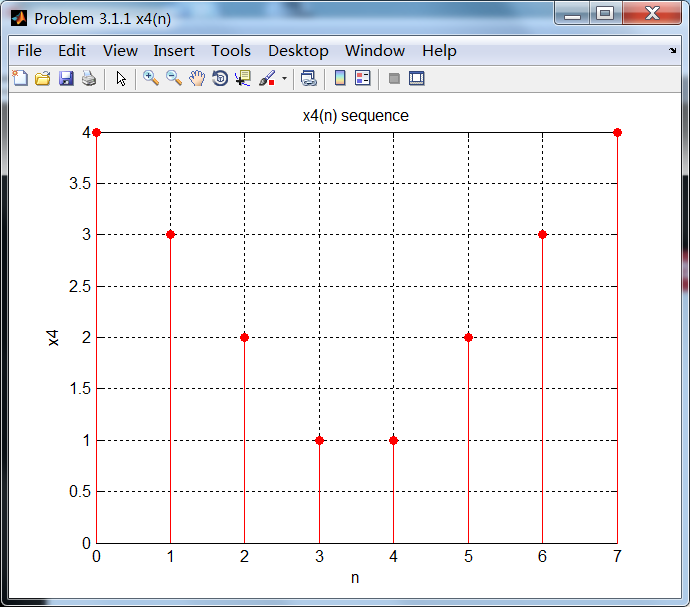
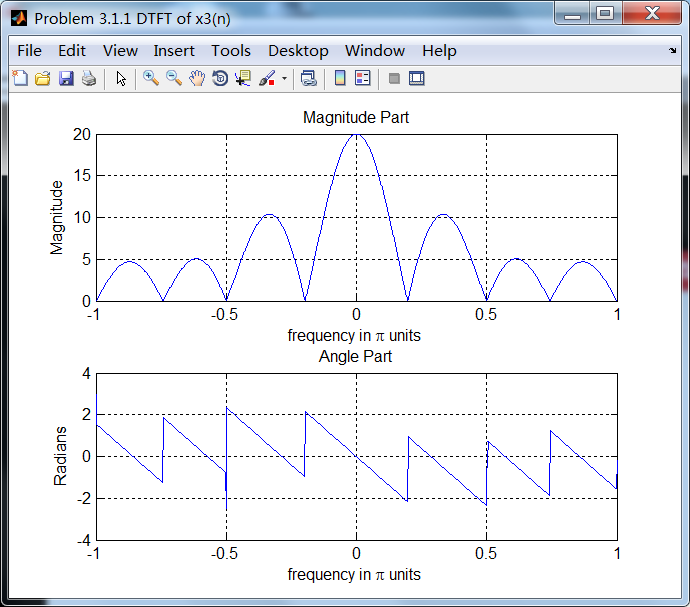
序列4的相位谱关于ω= 0奇对称。
序列5:

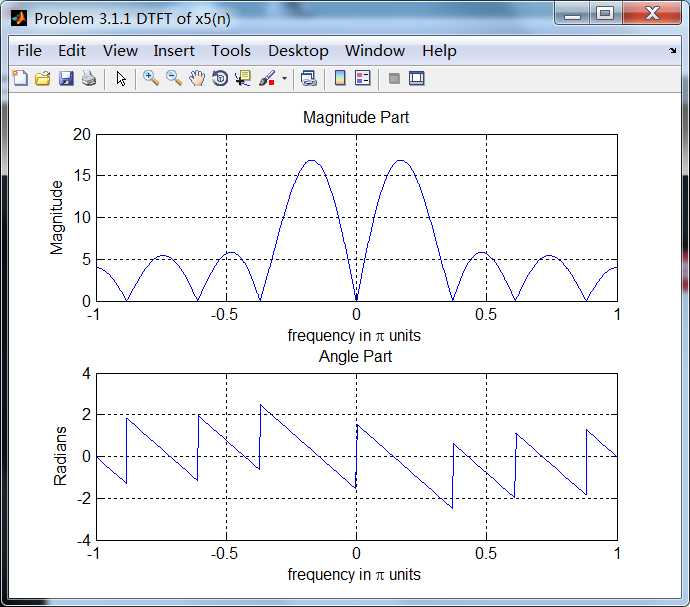
序列5的相位谱关于ω=0奇对称。
《DSP using MATLAB》Problem 3.1的更多相关文章
- 《DSP using MATLAB》Problem 7.27
代码: %% ++++++++++++++++++++++++++++++++++++++++++++++++++++++++++++++++++++++++++++++++ %% Output In ...
- 《DSP using MATLAB》Problem 7.26
注意:高通的线性相位FIR滤波器,不能是第2类,所以其长度必须为奇数.这里取M=31,过渡带里采样值抄书上的. 代码: %% +++++++++++++++++++++++++++++++++++++ ...
- 《DSP using MATLAB》Problem 7.25
代码: %% ++++++++++++++++++++++++++++++++++++++++++++++++++++++++++++++++++++++++++++++++ %% Output In ...
- 《DSP using MATLAB》Problem 7.24
又到清明时节,…… 注意:带阻滤波器不能用第2类线性相位滤波器实现,我们采用第1类,长度为基数,选M=61 代码: %% +++++++++++++++++++++++++++++++++++++++ ...
- 《DSP using MATLAB》Problem 7.23
%% ++++++++++++++++++++++++++++++++++++++++++++++++++++++++++++++++++++++++++++++++ %% Output Info a ...
- 《DSP using MATLAB》Problem 7.16
使用一种固定窗函数法设计带通滤波器. 代码: %% ++++++++++++++++++++++++++++++++++++++++++++++++++++++++++++++++++++++++++ ...
- 《DSP using MATLAB》Problem 7.15
用Kaiser窗方法设计一个台阶状滤波器. 代码: %% +++++++++++++++++++++++++++++++++++++++++++++++++++++++++++++++++++++++ ...
- 《DSP using MATLAB》Problem 7.14
代码: %% ++++++++++++++++++++++++++++++++++++++++++++++++++++++++++++++++++++++++++++++++ %% Output In ...
- 《DSP using MATLAB》Problem 7.13
代码: %% ++++++++++++++++++++++++++++++++++++++++++++++++++++++++++++++++++++++++++++++++ %% Output In ...
- 《DSP using MATLAB》Problem 7.12
阻带衰减50dB,我们选Hamming窗 代码: %% ++++++++++++++++++++++++++++++++++++++++++++++++++++++++++++++++++++++++ ...
随机推荐
- 26QTimer定时器的使用
前面介绍过定时器事件(QTimerEvent),有个弊端,就是每启动一个定时器都要对应的ID.本次介绍在设计器中使用Qtimer. 首先在设计器中添加一个LCD Number,和两个按钮. 头文件 # ...
- CCPC2018-湖南全国邀请赛 Solution
A - Easy $h$-index 后缀扫一下 #include <bits/stdc++.h> using namespace std; #define ll long long #d ...
- uva1366 dp
这题说的是给了 一个矩阵在每个单元内有BLOHHLUM 种的资源 Bi,j, 有YEYENUM 种的 资源Ai,j , 资 源 从 该 单 位 出 发 不能 转 弯 直 接 运 送 到 像 B 类 资 ...
- python webdriver 测试框架-数据驱动DDT的例子
先在cmd环境 运行 pip install ddt 安装数据驱动ddt模块 脚本: #encoding=utf-8 from selenium import webdriver import un ...
- gstreamer调试命令
gplay播放命令 gplay 文件全路径 (eg:gplay 123.mp3) gstreamer播放命令 gst-launch playbin2 uri=file:///文件全路径 (eg gs ...
- 抓包工具Charles简单使用介绍
一是拦截别人软件的发送的请求和后端接口,练习开发. 二是自己后端返回的response拦截修改后再接收以达到测试临界数据的作用. 三写脚本重复拦截抓取别人的数据. 四支持流量控制,可以模拟慢速网络以及 ...
- TED #01#
Laura Vanderkam: How to gain control of your free time 1.我们总是不缺乏时间去做重要的事情,即便我们再忙; “我没时间” 的同义词是“我不想做” ...
- javascript-高级用法
22.1 安全的类型检测 为什么:typeof 不靠谱, 无法将数组从对象中区分出来, instanceof 有特殊情况,在iframe存在的情况下无法判断另一个iframe内的数组 如何做:Obje ...
- Linux内核分析08
进程的切换和系统的一般执行过程 一,进程切换的关键代码switch_to分析 进程调度的时机 中断处理过程(包括时钟中断.I/O中断.系统调用和异常)中,直接调用schedule(),或者返回用户态时 ...
- 线程访问ui,托管
1.在类中声明 delegate void setDebugDelegate(string info);//线程访问textbox委托函数 private void setDebug(string i ...