
《DSP using MATLAB》Problem 8.45


代码:
%% ------------------------------------------------------------------------

%%            Output Info about this m-file

fprintf('\n***********************************************************\n');

fprintf('        <DSP using MATLAB> Problem 8.45.4 \n\n');

banner();

%% ------------------------------------------------------------------------

%%

%%          Chebyshev-1 bandpass and lowpass, parallel form,

%%          by toolbox function in MATLAB,

%%

%% ------------------------------------------------------------------------

%--------------------------------------------------------

%           PART1 bandpass

% Digital Filter Specifications:   Chebyshev-1 bandpass

% -------------------------------------------------------

wsbp = [0.40*pi 0.90*pi];             % digital stopband freq in rad

wpbp = [0.60*pi 0.80*pi];             % digital passband freq in rad

delta1 = 0.05;

delta2 = 0.01;

Ripple = 0.5-delta1;                     % passband ripple in absolute

Attn = delta2;                           % stopband attenuation in absolute

  Rp = -20*log10(Ripple/0.5);             % passband ripple in dB

  As = -20*log10(Attn/0.5);               % stopband attenuation in dB

% Calculation of Chebyshev-1 filter parameters:

[N, wn] = cheb1ord(wpbp/pi, wsbp/pi, Rp, As);

fprintf('\n  ********* Chebyshev-1 Digital Bandpass Filter Order is = %3.0f \n', 2*N)

% Digital Chebyshev-1 Bandpass Filter Design:

[bbp, abp] = cheby1(N, Rp, wn);

[C, B, A] = dir2cas(0.5*bbp, abp)

% Calculation of Frequency Response:

[dbbp, magbp, phabp, grdbp, wwbp] = freqz_m(0.5*bbp, abp);

% -----------------------------------------------------

%    PART2  lowpass

% Digital Highpass Filter Specifications:

% -----------------------------------------------------

wslp = 0.40*pi;             % digital stopband freq in rad

wplp = 0.30*pi;             % digital passband freq in rad

delta1 = 0.10;

delta2 = 0.01;

Ripple = 1.0-delta1;                     % passband ripple in absolute

Attn = delta2;                           % stopband attenuation in absolute

  Rp = -20*log10(Ripple/1.0);             % passband ripple in dB

  As = -20*log10(Attn/1.0);               % stopband attenuation in dB

% Calculation of Chebyshev-1 filter parameters:

[N, wn] = cheb1ord(wplp/pi, wslp/pi, Rp, As);

fprintf('\n  ********* Chebyshev-1 Digital Lowpass Filter Order is = %3.0f \n', N)

% Digital Chebyshev-1 lowpass Filter Design:

[blp, alp] = cheby1(N, Rp, wn);

[C, B, A] = dir2cas(blp, alp)

% Calculation of Frequency Response:

[dblp, maglp, phalp, grdlp, wwlp] = freqz_m(blp, alp);

% ---------------------------------------------

%      PART3   parallel form of bp and lp

% ---------------------------------------------

abp;

bbp;

alp;

blp;

fprintf('\n  ********* Chebyshev-1 Digital Lowpass parrell with Bandpass Filter *******\n');

fprintf('\n  ********* Coefficients of Direct-Form: *******\n');

a = conv(2*abp, alp)

b = conv(bbp, alp) + conv(blp, 2*abp)

[C, B, A] = dir2cas(b, a)

% Calculation of Frequency Response:

[db, mag, pha, grd, ww] = freqz_m(b, a);

%% -----------------------------------------------------------------

%%                             Plot

%% -----------------------------------------------------------------

figure('NumberTitle', 'off', 'Name', 'Problem 8.45.4 combination of Chebyshev-1 bp and lp, by cheby1 function in MATLAB')

set(gcf,'Color','white');

M = 1;                          % Omega max

subplot(2,2,1); plot(ww/pi, mag); axis([0, M, 0, 1.2]); grid on;

xlabel('Digital frequency in \pi units'); ylabel('|H|'); title('Magnitude Response');

set(gca, 'XTickMode', 'manual', 'XTick', [0, wplp/pi, wsbp(1)/pi, wpbp/pi, wsbp(2)/pi, M]);

set(gca, 'YTickMode', 'manual', 'YTick', [0, 0.01, 0.45, 0.5, 0.9, 1]);

subplot(2,2,2); plot(ww/pi, db); axis([0, M, -100, 2]); grid on;

xlabel('Digital frequency in \pi units'); ylabel('Decibels'); title('Magnitude in dB');

set(gca, 'XTickMode', 'manual', 'XTick', [0, wplp/pi, wsbp(1)/pi, wpbp/pi, wsbp(2)/pi, M]);

set(gca, 'YTickMode', 'manual', 'YTick', [-76, -46, -41, -1, 0]);

set(gca,'YTickLabelMode','manual','YTickLabel',['76'; '46'; '41';'1 ';' 0']);

subplot(2,2,3); plot(ww/pi, pha/pi); axis([0, M, -1.1, 1.1]); grid on;

xlabel('Digital frequency in \pi nuits'); ylabel('radians in \pi units'); title('Phase Response');

set(gca, 'XTickMode', 'manual', 'XTick', [0, wplp/pi, wsbp(1)/pi, wpbp/pi, wsbp(2)/pi, M]);

set(gca, 'YTickMode', 'manual', 'YTick', [-1:0.5:1]);

subplot(2,2,4); plot(ww/pi, grd); axis([0, M, 0, 80]); grid on;

xlabel('Digital frequency in \pi units'); ylabel('Samples'); title('Group Delay');

set(gca, 'XTickMode', 'manual', 'XTick', [0, wplp/pi, wsbp(1)/pi, wpbp/pi, wsbp(2)/pi, M]);

set(gca, 'YTickMode', 'manual', 'YTick', [0:20:80]);

figure('NumberTitle', 'off', 'Name', 'Problem 8.45.4 combination of Chebyshev-1 bp and lp, by cheby1')

set(gcf,'Color','white');

M = 1;                          % Omega max

%subplot(2,2,1);

plot(ww/pi, mag); axis([0, M, 0, 1.2]); grid on;

xlabel('Digital frequency in \pi units'); ylabel('|H|'); title('Magnitude Response');

set(gca, 'XTickMode', 'manual', 'XTick', [0, wplp/pi, wsbp(1)/pi, wpbp/pi, wsbp(2)/pi, M]);

set(gca, 'YTickMode', 'manual', 'YTick', [0, 0.01, 0.45, 0.5, 0.9, 1]);

figure('NumberTitle', 'off', 'Name', 'Problem 8.45.4 Pole-Zero Plot')

set(gcf,'Color','white');

zplane(b, a);

title(sprintf('Pole-Zero Plot'));

%pzplotz(b,a);
运行结果:
看题目设计要求,是Chebyshev-1型低通和带通的组合。
我们先设计带通,系统函数串联形式的系数如下:

其次,Chebyshev-1型数字低通,阶数为7,系统函数串联形式的系数如下:

再次,低通和带通进行组合,等效滤波器的系统函数,直接形式和串联形式,系数分别如下:


等效滤波器,幅度谱如下,频带边界频率和指标画出直线,
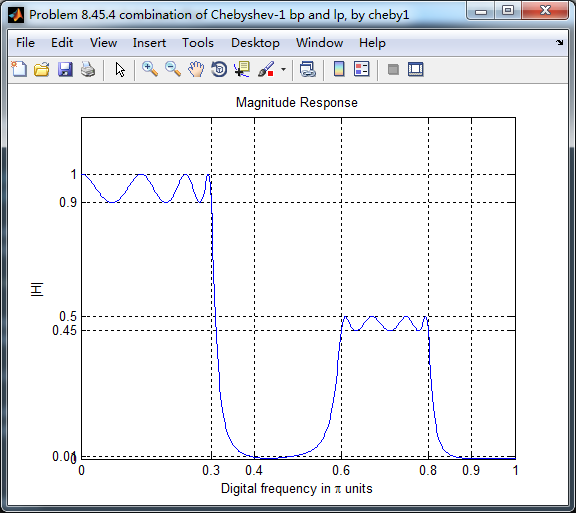
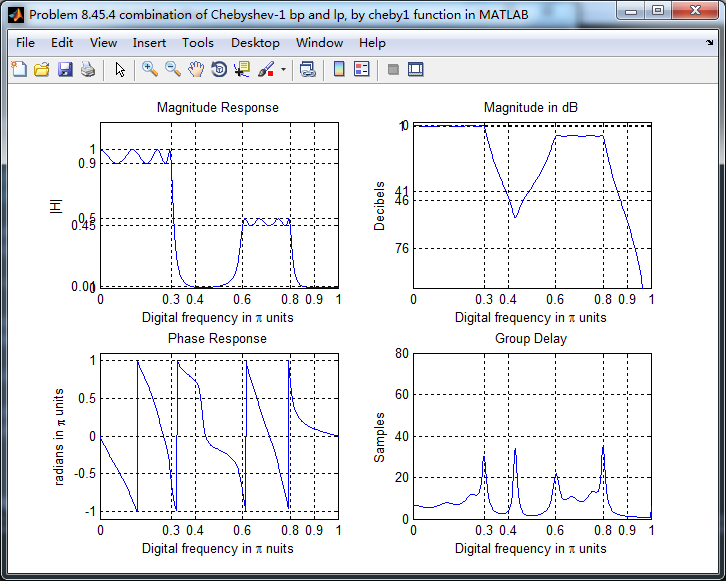
幅度谱、相位谱和群延迟响应
零极点图

《DSP using MATLAB》Problem 8.45的更多相关文章
- 《DSP using MATLAB》Problem 7.27
代码: %% ++++++++++++++++++++++++++++++++++++++++++++++++++++++++++++++++++++++++++++++++ %% Output In ...
- 《DSP using MATLAB》Problem 7.26
注意:高通的线性相位FIR滤波器,不能是第2类,所以其长度必须为奇数.这里取M=31,过渡带里采样值抄书上的. 代码: %% +++++++++++++++++++++++++++++++++++++ ...
- 《DSP using MATLAB》Problem 7.25
代码: %% ++++++++++++++++++++++++++++++++++++++++++++++++++++++++++++++++++++++++++++++++ %% Output In ...
- 《DSP using MATLAB》Problem 7.24
又到清明时节,…… 注意:带阻滤波器不能用第2类线性相位滤波器实现,我们采用第1类,长度为基数,选M=61 代码: %% +++++++++++++++++++++++++++++++++++++++ ...
- 《DSP using MATLAB》Problem 7.23
%% ++++++++++++++++++++++++++++++++++++++++++++++++++++++++++++++++++++++++++++++++ %% Output Info a ...
- 《DSP using MATLAB》Problem 7.15
用Kaiser窗方法设计一个台阶状滤波器. 代码: %% +++++++++++++++++++++++++++++++++++++++++++++++++++++++++++++++++++++++ ...
- 《DSP using MATLAB》Problem 7.14
代码: %% ++++++++++++++++++++++++++++++++++++++++++++++++++++++++++++++++++++++++++++++++ %% Output In ...
- 《DSP using MATLAB》Problem 7.13
代码: %% ++++++++++++++++++++++++++++++++++++++++++++++++++++++++++++++++++++++++++++++++ %% Output In ...
- 《DSP using MATLAB》Problem 7.12
阻带衰减50dB,我们选Hamming窗 代码: %% ++++++++++++++++++++++++++++++++++++++++++++++++++++++++++++++++++++++++ ...
随机推荐
- 使用PaxScript为Delphi应用增加对脚本的支持
通过使用PaxScript可以为Delphi应用增加对脚本的支持. PaxScript支持paxC,paxBasic,paxPascle,paxJavaScript(对ECMA-262做了扩展) 四种 ...
- DELPHI中枚举类型数据的介绍和使用方法
在看delphi程序的时候看到aa=(a,b,c,d);这样的东西,还以为是数组,同事说是函数,呵呵,当然这两个都不屑一击,原来这样式子是在声明并付值一个枚举类型的数据.下边写下来DELPHI中枚举类 ...
- 理解CommonJS ,AMD ,CMD, 模块规范
参考 : https://blog.csdn.net/xcymorningsun/article/details/52709608 1.CommonJS 模块规范 (同步加载模块): var math ...
- Go语言基础:make,new, len, cap, append, delete方法
前面提到不少Go的内建函数,这篇文章学习下如何使用.. make 先拿 make 开刀,可是一开始我就进入了误区,因为我想先找到他的源码,先是发现 src/builtin/builtin.go 中 ...
- 根据已知值,选中selec中的选项
$("#modal").find("select[name=materialType]").find("option").each(func ...
- (转) C#中使用throw和throw ex抛出异常的区别
通常,我们使用try/catch/finally语句块来捕获异常,就像在这里说的.在抛出异常的时候,使用throw和throw ex有什么区别呢? 假设,按如下的方式调用几个方法: →在Main方法中 ...
- 剑指offer——51丑数
题目描述 把只包含质因子2.3和5的数称作丑数(Ugly Number).例如6.8都是丑数,但14不是,因为它包含质因子7. 习惯上我们把1当做是第一个丑数.求按从小到大的顺序的第N个丑数. / ...
- spring Aop设计原理
转载至:https://blog.csdn.net/luanlouis/article/details/51095702 0.前言 Spring 提供了AOP(Aspect Oriented Prog ...
- 软工-五月心得体会 PB16110698
伴随着愈发红润的骄阳,火热而紧张刺激的五月悄然而至.这一个月以来,曾经让同学们“废寝忘食”的软工课大作业终于告一段落,每周一篇的读书笔记也缓到半月一篇,着实令人长吐一口气.但这一份表面的余裕当然没有看 ...
- 笔记33 Spring MVC的高级技术——Spring MVC配置的替代方案
一.自定义DispatcherServlet配置 AbstractAnnotationConfigDispatcherServletInitializer所完成 的事情其实比看上去要多.在Spitt ...